 Donezo Inbox
An AI email assistant that never sends without you
Donezo Inbox's assistant labels incoming Gmail, spots the messages that need a reply, applies rules you write in plain English and pre-writes drafts in your tone. It is off until you switch it on, it only acts on mail that arrives afterwards, and it never sends anything on its own: drafts wait for you.
What is an AI email assistant?
An AI email assistant reads your incoming mail and does the repetitive part of email for you: sorting it, working out what needs an answer and writing a first draft. A good one leaves the decision to send with you, and lets you see and change what it did. Donezo Inbox's lives inside the email client rather than sitting on top of it.
How does Donezo Inbox's assistant work?
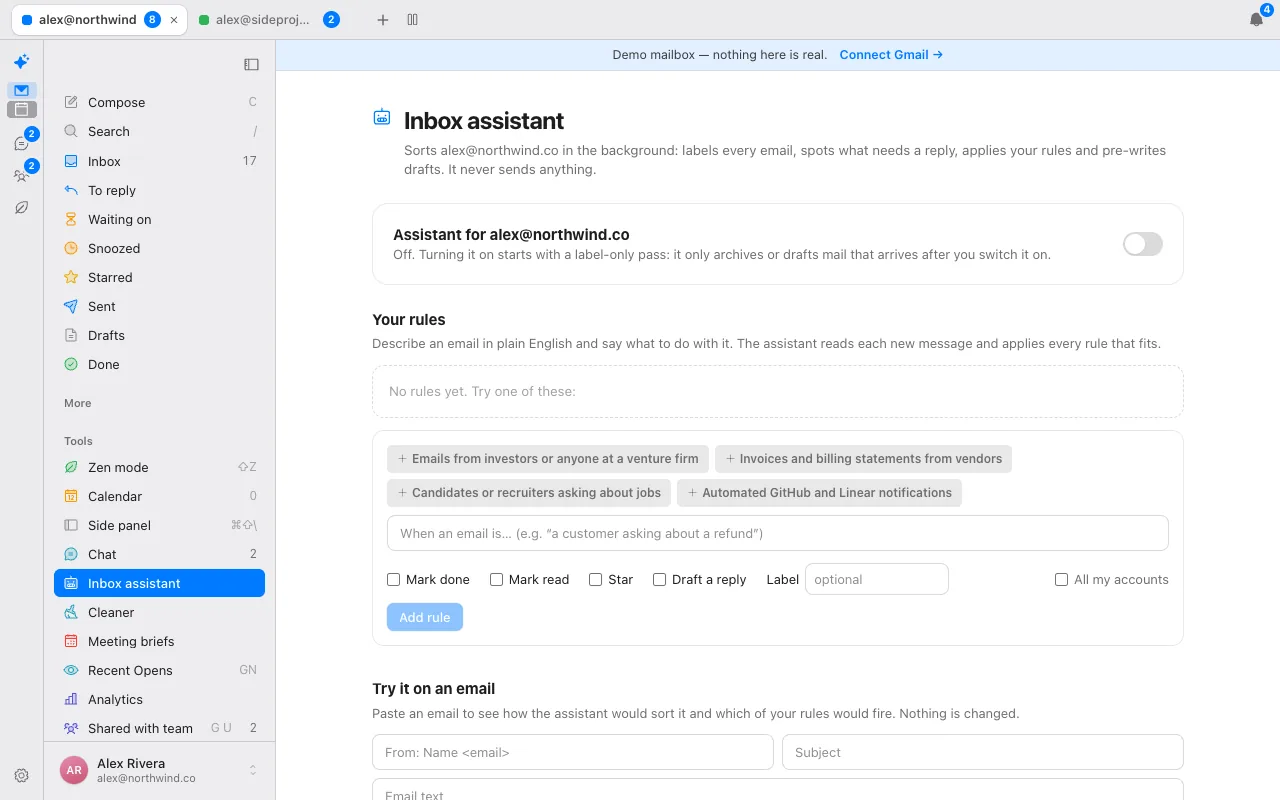
- Switch it on for an account. It starts with a label-only pass, and it only archives or drafts mail that arrives after you switch it on. Existing mail is not touched.
- It labels each new message as one of To reply, FYI, Notification, Marketing, Meeting, Receipt or Cold email, as real Gmail labels under a single Donezo label.
- It tracks who owes whom. To reply shows who needs you. Waiting on shows threads where you sent the last message and nobody answered for two days or more.
- It applies your rules. Write one sentence, such as “emails from investors or anyone at a venture firm”, and choose what happens: mark done, mark read, star, draft a reply or apply a label.
- It pre-writes drafts in your tone, learned from your recent sent mail plus any style notes you add. The draft appears in the conversation and in Gmail drafts, and waits for you.
Remind me if no reply is separate from the assistant. It brings a thread back only when nobody answered by the time you chose, and it works without the assistant switched on. It does not send follow-up emails for you.
What control do you have over it?
- Off by default, per account. Nothing is labelled or drafted until you switch it on.
- It never sends. Drafts and labels only. You press send.
- Test a rule first. Paste an email into the test box to see how the assistant would sort it and which rules would fire. Nothing is changed.
- See what it did. The assistant keeps an activity log of recent labels, archives and drafts (subject and sender, kept for 14 days), and your connected AI agent can read the same log.
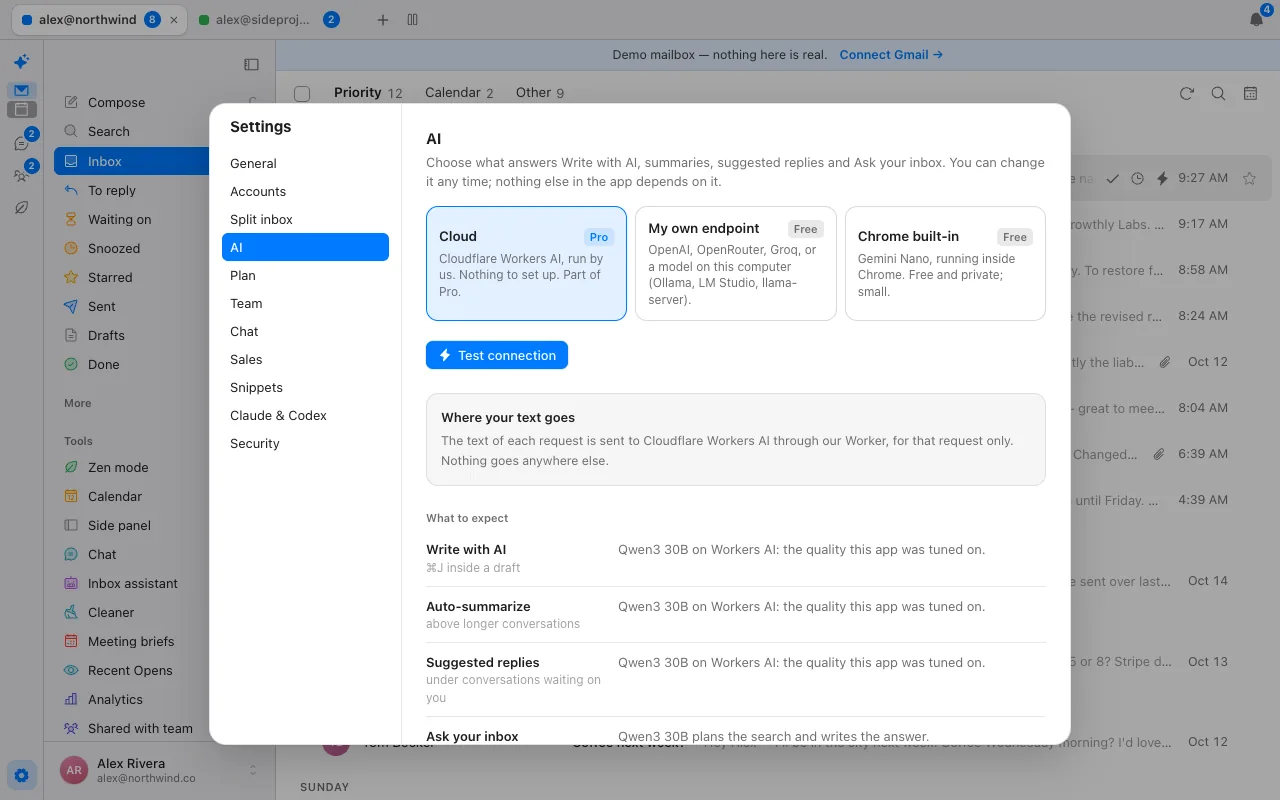
- You choose the model. Your own key, a model on your computer or Chrome's built-in model for the on-screen features, or hosted AI on Cloudflare Workers AI as part of Pro. The always-on background assistant runs on our servers, so it needs Pro or a server-side key of your own.
What does it look like in an open conversation?
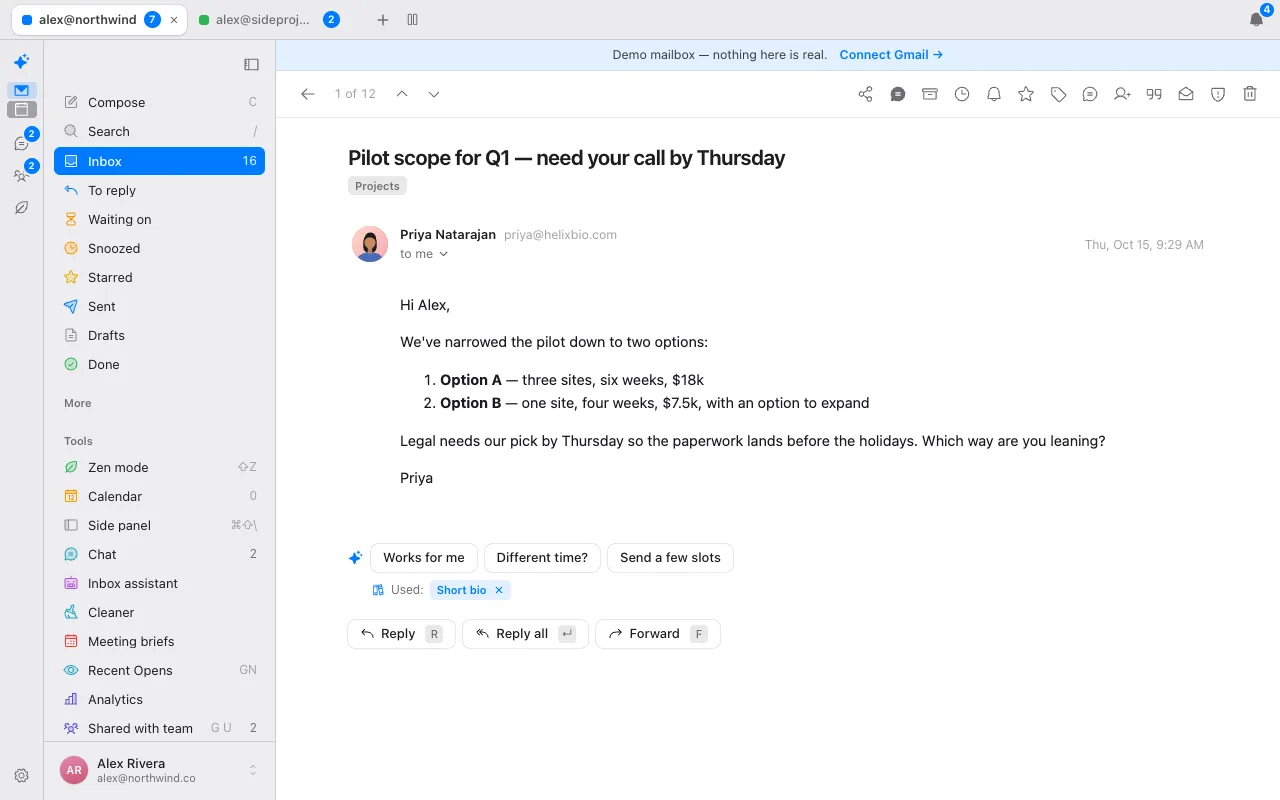
Suggested replies and the one-line summary above longer conversations are separate settings that you can switch off. They use whichever AI provider you picked under Settings, then AI.
What does it not do?
Donezo works with Gmail and Google Workspace only. It has no Outlook or IMAP support, no shared inbox or assignment, no meeting notes and no scheduling links. It does not take meeting notes, and it does not send email on your behalf. Its priority sort is rule-based (mail from real people first), not a ranking model.
How does it compare with Fyxer and Superhuman?
Fyxer is an assistant for the inbox you already use, metered in credits and covering Gmail and Outlook. Superhuman Mail is a fast client with AI included. Donezo Inbox is a client with an optional assistant and no credit meter. See Donezo vs Fyxer, Donezo vs Superhuman and the plain-English cost of each in the value index.
What do the labels and rules mean?
| Label | Used for |
|---|---|
| To reply | A real person asks you something, needs a decision or is waiting for your response. Feeds the To reply view. |
| FYI | Informational email from a person or team that needs no response from you. |
| Notification | Automated messages from an app or service: alerts, comments, status changes, security notices. |
| Marketing | Newsletters, promotions, announcements and sales campaigns sent to many people. |
| Meeting | Calendar invites, scheduling and meeting updates. |
| Receipt | Receipts, invoices, order and shipping confirmations, billing statements. |
| Cold email | Unsolicited outreach from someone you do not know, trying to sell or pitch you something. |
Rules sit on top of the labels. The page suggests starting points such as emails from investors or anyone at a venture firm, invoices and billing statements from vendors, candidates or recruiters asking about jobs, and automated GitHub and Linear notifications. Each rule can mark done, mark read, star, draft a reply or apply a label, for one account or all of them.
How accurate is it?
We measured it on a small labelled set, and the set is small, so treat the numbers as a sanity check rather than a benchmark. The test set holds 32 labelled emails: 18 the assistant's prompt was tuned on and 14 it was not. Each email has a correct category, whether it needs a reply, and which rule should fire.
| Model | Category | Needs a reply | Rule match | Set |
|---|---|---|---|---|
| Workers AI (Qwen3 30B), the hosted default | 18 of 18 | 18 of 18 | 18 of 18 | The 18 it was tuned on |
| Workers AI (Qwen3 30B), the hosted default | 13 of 14 | 13 of 14 | 14 of 14 | The 14 held out |
| Qwen3.5-4B (Q4) on a Mac, local test | 27 of 32 | 28 of 32 | 31 of 32 | All 32, median 2.7 seconds per email |
The numbers come from the repository's own evaluation script and test file, which anyone running the project can re-run against their own model. Real mail is messier than 32 labelled examples, which is why the assistant starts with labels only, keeps an activity log and never sends.
What do the first ten minutes look like?
- Open the live demo and look at the Inbox assistant page. It runs with sample mail and nothing is real, so you can read the rules and use the test box first.
- Sign in with Google and open Inbox assistant. Choose the AI under Settings, then AI: your own key, a model on your computer, Chrome's built-in model, or hosted AI if you are on Pro.
- Switch the assistant on for one account. Expect a label-only pass: new mail gets To reply, FYI, Notification and the other labels, and nothing is archived or drafted from older mail.
- Add one rule in a sentence. Paste a real email into the test box to see how it would be sorted and which rule would fire, before relying on it.
- Open To reply and Waiting on over the next day and see whether the labels match your judgement. If a label is wrong, change the rule or switch the assistant off for that account.
- When you are happy, turn on drafts. They appear in the conversation and in Gmail drafts, and nothing sends without you.
What should you check before giving any AI access to your mail?
Four questions are worth asking of any assistant, and here is how Donezo Inbox answers them.
| Question | Donezo Inbox's answer |
|---|---|
| Where does my mail live? | In Gmail. The browser reads it directly; the server keeps your encrypted sign-in token, settings and the assistant's short activity log. |
| Where does the text of an email go when AI runs? | To the model you chose: your own endpoint, a model on your computer or Chrome's, or Cloudflare Workers AI on Pro. Nothing goes to an advertising network. |
| Can it send or delete without me? | It never sends. Auto-archive is a separate opt-in that starts as a preview and never touches mail you starred or labelled yourself. |
| Can I see and undo what it did? | Yes: an activity log of labels, archives and drafts, a rule tester, and Undo (Z) on actions. |
The full account of what is stored, and the gaps, is on the security page.
Questions
Can the AI assistant send email?
No. It labels mail and pre-writes drafts. Nothing is sent until you send it.
Does it touch my old email?
No. It only acts on mail that arrives after you switch it on for an account.
Which AI does it use?
Your choice: your own key, a model on your computer, Chrome's built-in model, or our hosted AI on Pro.
Does it work with Outlook?
No. Gmail and Google Workspace only.
What does it cost?
The email client is free for one inbox and AI is free with your own key. Pro is $29/year.
Can I see what it did?
Yes. It keeps a short activity log of labels, archives and drafts, and you can test a rule on any email before relying on it.
Is there a free AI email assistant that works with Gmail?
Donezo Inbox's client is free for one inbox, and Write with AI, summaries and suggested replies are free with your own AI key, a model on your computer or Chrome's built-in model. The always-on background assistant runs on our servers, so it needs Pro or a server-side key of your own.
Should I give an AI assistant access to my email?
Check where your mail lives, where its text is sent, whether it can send without you and whether you can see what it did. Donezo Inbox answers each on this page and on the security page, and keeps the assistant off until you switch it on.
Can an AI assistant send emails for me?
Donezo's assistant cannot: it labels and drafts only. A connected agent such as Claude can send only if you switch on Let agents send email, which needs Pro beyond a free trial allowance.
Can ChatGPT organise my email?
Donezo's assistant works with any OpenAI-compatible endpoint you provide for the on-screen features, and its background assistant can use a hosted server-side key of your own. It does not require ChatGPT.
Is there an AI assistant in Gmail itself?
Gmail has its own features. Donezo Inbox is a separate client that works alongside Gmail and keeps your mail in it.
See it for yourself
The live demo runs with sample mail, no sign-in.
Try the live demoContinue with Google