 Donezo Inbox
Home / Alternatives
Superhuman alternatives for Gmail, compared
Superhuman Mail starts at $25 per member per month billed annually, which is $300 a year. The cheaper options are Donezo Inbox ($29/year, Gmail only), Inbox Zero ($18 a month annually), Missive ($14 a month yearly, built around a shared inbox) and SaneBox ($4.54 a month on its two-year term, a filter rather than a client). Below: what each plan includes, what you give up by switching, the shortcuts that carry over and a step-by-step switch.
Which Superhuman alternatives cost less?
| Product | Starting price | Built for | Worth knowing |
|---|---|---|---|
| Donezo Inbox | Free for one inbox. Pro $29/year, one yearly plan. | A fast, keyboard-first Gmail client with an opt-in AI assistant and a Claude and Codex connector. | Gmail and Google Workspace only. No shared inbox, meeting notes or Outlook. |
| Superhuman Mail | Starter $25 per member per month billed annually. Business $33. | Fast email with AI, for individuals and teams. | Starter is capped at 25 seats. Check its page for supported providers. |
| Missive | Starter $14 per user per month billed yearly. | Teams that share mail and want chat and assignment next to it. | Starter is up to 5 users. Works with Gmail, Outlook and IMAP. |
| Inbox Zero | Starter $18 per month billed annually, $20 monthly. | AI sorting, drafting and cold-email blocking. | Gmail and Outlook. 7-day trial. |
| Shortwave | Business $30 per seat per month. Premier $45. Max $120. | A Gmail-first client with AI built in. See the Shortwave page. | 14-day trial. No free plan listed. |
| Fyxer | Free, 400 credits a month. Pro $37 per month billed annually, $49 monthly. | An AI assistant that works inside your existing inbox. | Credit-metered. Gmail and Outlook. |
| SaneBox | $9.49 a month for one account, $4.54 on the two-year term. | Filtering mail in the client you already use. | It is not an email client. |
Prices were read from each vendor's own pricing page on October 15, 2026. Vendors change them, so check the linked page before you buy. Spark is also a Superhuman alternative; its prices are in euros and vary by region, so they are in the value index rather than here.
What does each Superhuman plan include?
Superhuman's plans page lists what each Mail plan includes. Starter lists email productivity, Superhuman AI, team collaboration, calendar and scheduling, unified admin and billing, and group productivity coaching. Business adds its most advanced AI, Auto Drafts, Ask AI, a Superhuman Mail MCP, custom Auto Labels with AI, HubSpot and Salesforce, and Recent Opens. Enterprise adds advanced security and controls, single sign-on, a customer success manager, team analytics, priority support and VIP coaching.
That shape matters for the comparison. Several things Superhuman keeps for the $33 Business plan (a connector for AI agents, read statuses) are part of Donezo Inbox's free tier or its $29 yearly Pro plan. What Superhuman has and Donezo does not is the team and calendar side: team collaboration, scheduling and an admin console.
| Feature | Superhuman Mail | Donezo Inbox |
|---|---|---|
| Agent connector (MCP) | Listed on Business ($33) | On every plan: read, search and draft free; send, archive and snooze on Pro or within a free trial allowance |
| Read statuses (Recent Opens) | Listed on Business ($33) | Pro, with a plain note that opens are hints, not proof |
| AI drafting | Superhuman AI on Starter; Auto Drafts on Business | Write with AI, suggested replies and assistant drafts. Free with your own key, a local model or Chrome's model; hosted AI on Pro |
| Calendar and scheduling | Listed on Starter | A read-only calendar view and meeting briefs. No scheduling links, no creating events |
| Team collaboration and admin | Listed on Starter | Not on sale |
| CRM (HubSpot, Salesforce) | Listed on Business | HubSpot, Salesforce and Pipedrive in the side panel on Pro |
| Providers | See Superhuman's page | Gmail and Google Workspace only |
Prices were read from each vendor's own pricing page on October 15, 2026. Vendors change them, so check the linked page before you buy. Donezo Inbox publishes this page, so read the Superhuman column against the vendor's own list.
How much does Superhuman cost at 1, 5 and 10 seats?
| Plan | 1 seat per year | 5 seats per year | 10 seats per year | Basis |
|---|---|---|---|---|
| Superhuman Mail Starter | $300 | $1,500 | $3,000 | $25 billed annually |
| Superhuman Mail Business | $396 | $1,980 | $3,960 | $33 billed annually |
| Inbox Zero Starter | $216 | $1,080 | $2,160 | $18 billed annually |
| Missive Starter | $168 | $840 | Over the plan's seat limit | $14 billed yearly |
| Donezo Inbox Pro | $29 | $145 if each person buys their own | $290 if each person buys their own | $29/year, per person |
Donezo Pro is sold per person today. Ten people buying their own is $290 a year, but there is no shared billing, no team admin and no shared inbox, so this is a comparison for individuals and very small groups, not a team purchase. The full dataset, with features and sources, is in the Email software value index.
Why do people look for a Superhuman alternative?
Four reasons come up most: the price, because Superhuman Mail's cheapest plan is $300 a year; wanting a different set of providers; wanting team features such as a shared inbox; and wanting a different kind of AI, such as one that drafts but never sends.
Each alternative above answers a different one of those. Donezo answers the first and the last. It does not answer the second or third.
What does Donezo Inbox look like next to Superhuman?
Donezo Inbox is a good fit if you live in Gmail or Google Workspace, want Superhuman-style speed and shortcuts, and would rather pay $29/year than $300. Donezo works with Gmail and Google Workspace only. It has no Outlook or IMAP support, no shared inbox or assignment, no meeting notes and no scheduling links.
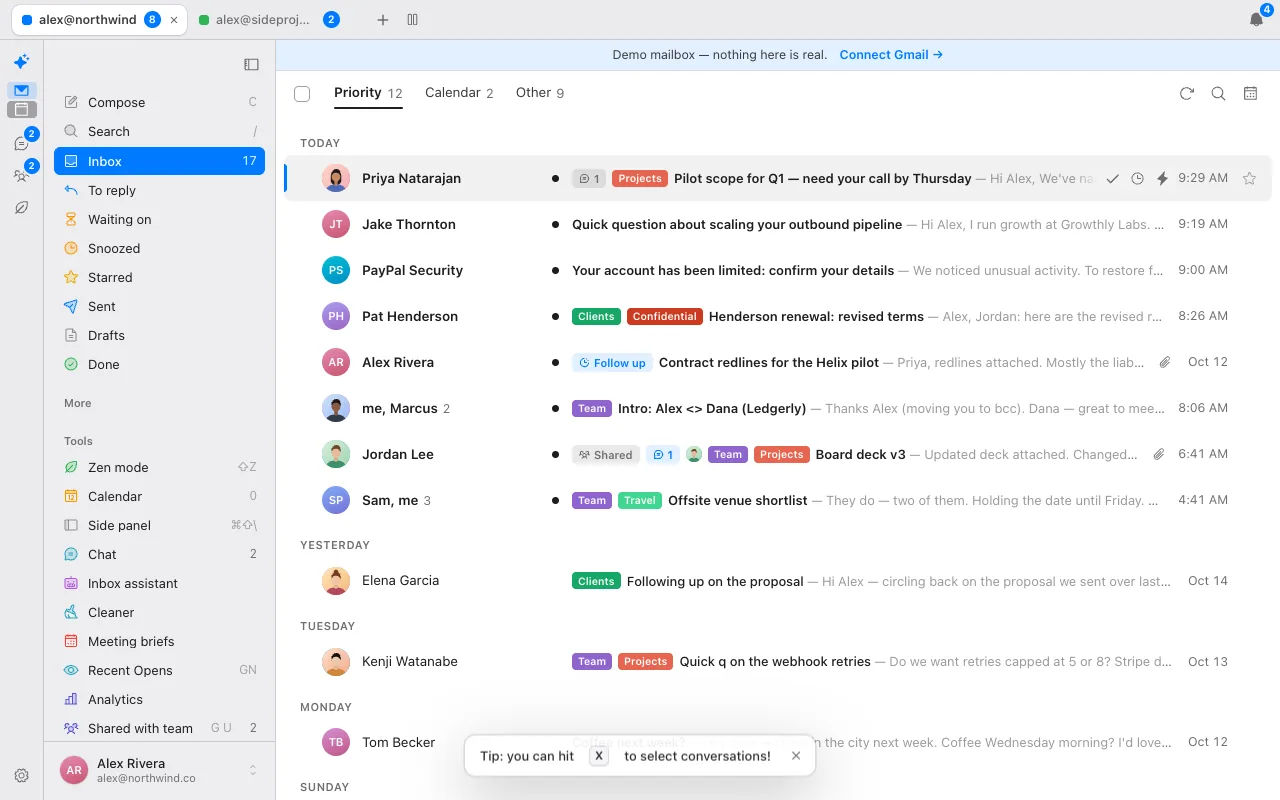
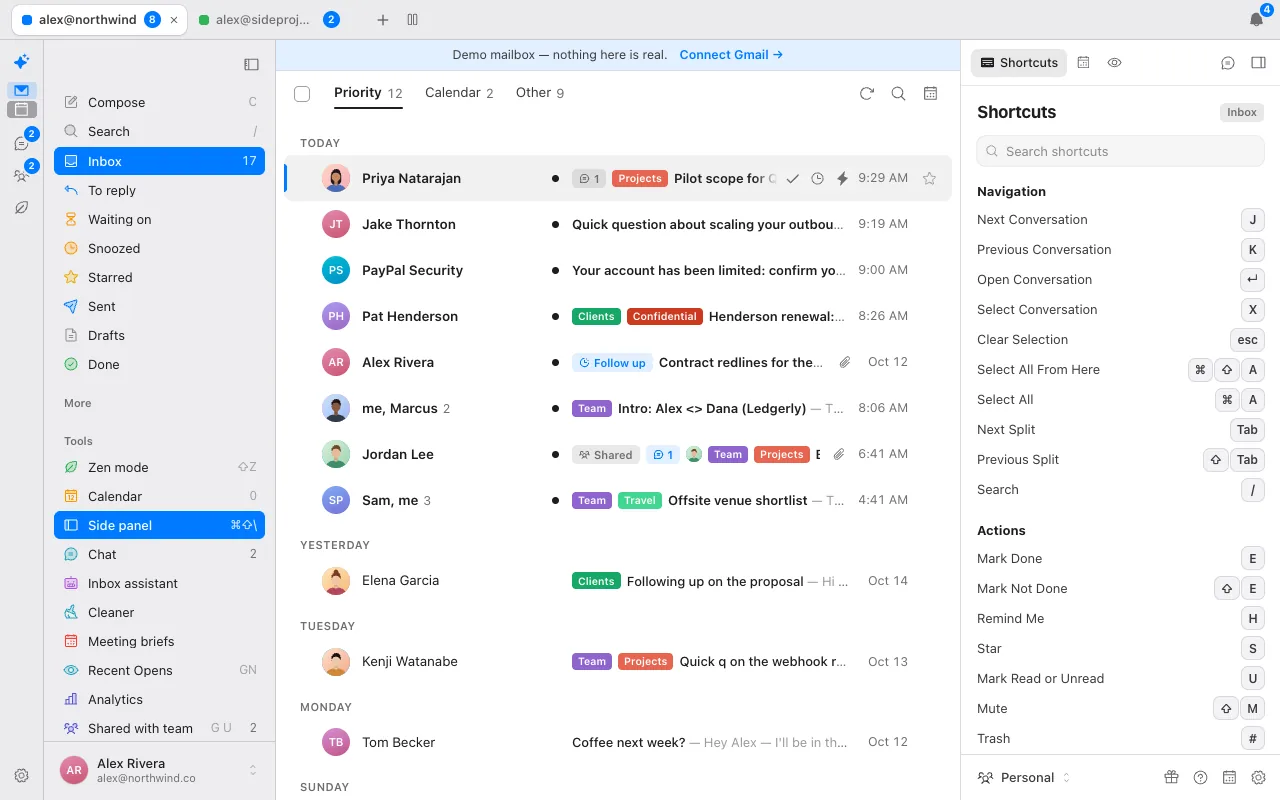
Mail from real people goes to Priority. Newsletters, notifications and receipts are detected from their headers (List-Unsubscribe, bulk-mail headers, no-reply senders and Gmail's own categories) and move to Other. You can add your own splits with Gmail search, such as a VIP list or a Calendar split for invitations.
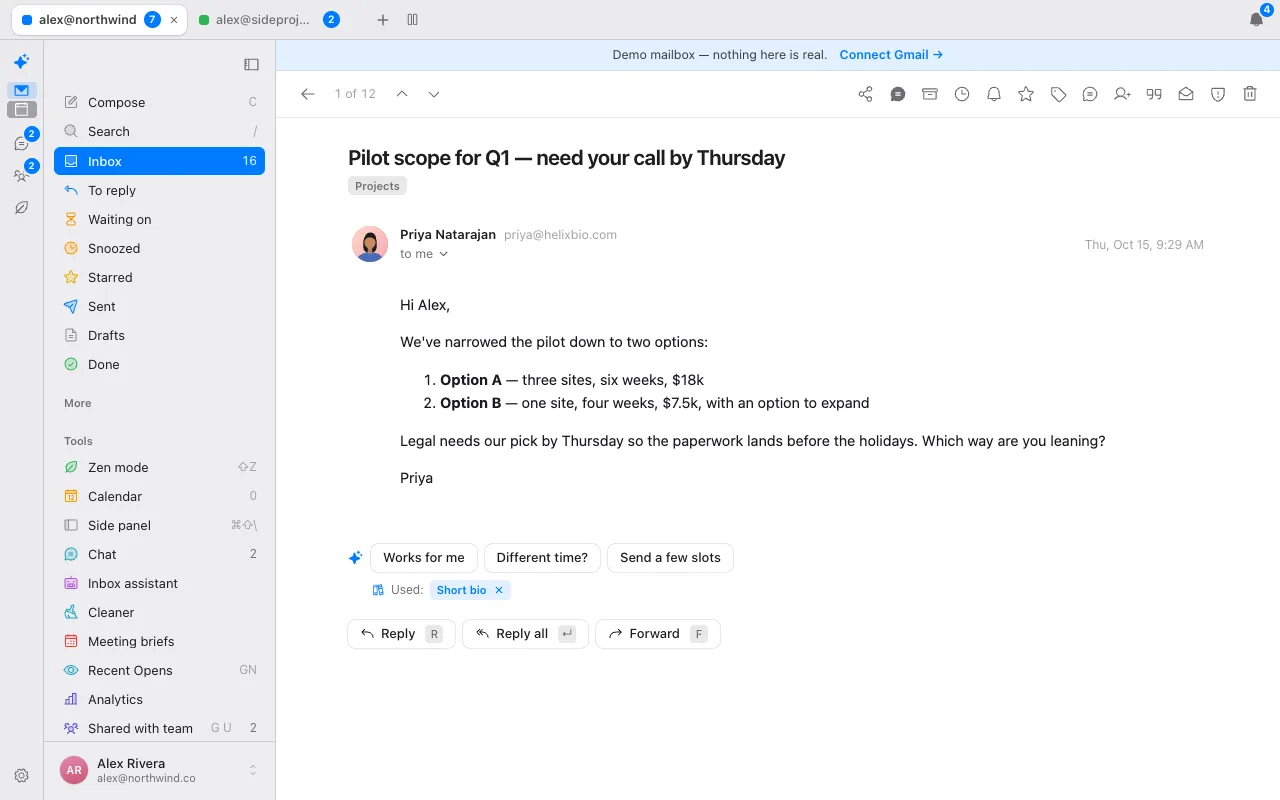
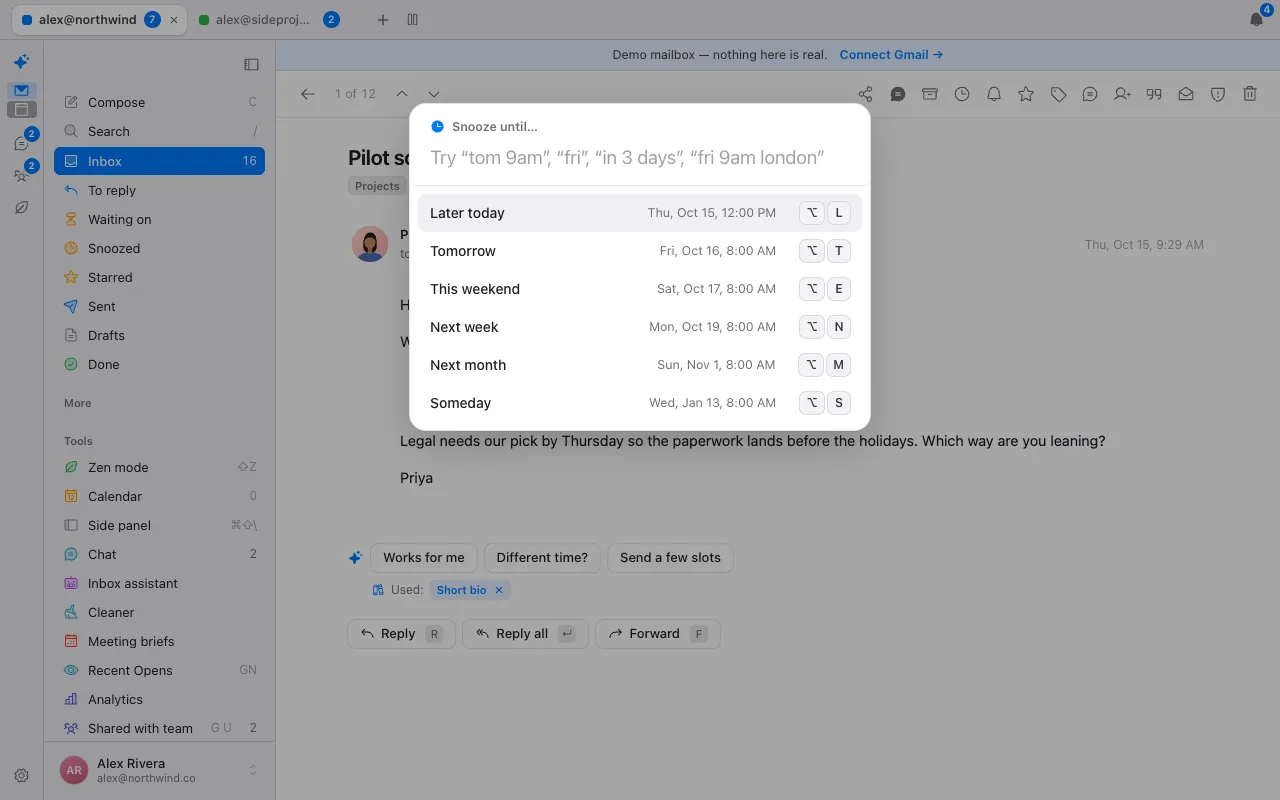
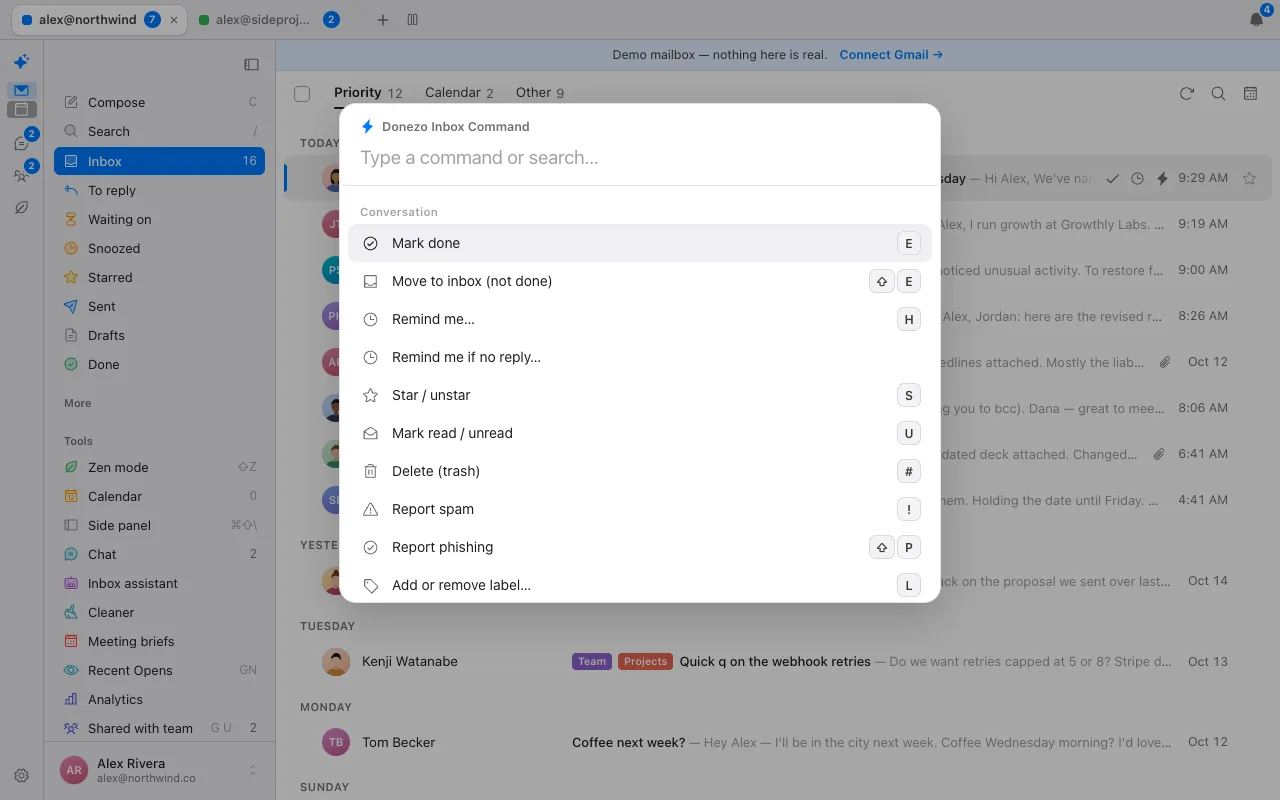
Which Superhuman shortcuts work in Donezo Inbox?
Almost all of the common ones do, and the keys are the same. Press ? in the app for the full list; the table below is the part most people reach for in their first hour.
| Action | Key | Action | Key |
|---|---|---|---|
| Command palette | ⌘K | Mark done | E |
| Search | / | Mark not done | ⇧E |
| Next / previous conversation | J / K | Remind me (snooze) | H |
| Compose | C | Star | S |
| Reply / reply all / forward | R / ↵ / F | Mark read or unread | U |
| Undo | Z or ⌘Z | Trash / spam | # / ! |
| Go to inbox / other | G then I / O | Go to drafts / sent / done | G then D / T / E |
| Select conversation | X | Mute | ⇧M |
Donezo adds go-to keys for its own views: G then Z for To reply, G W for Waiting on, G R for Follow-ups, G Q for Scheduled and G N for Recent Opens. Parity is not complete. A few Superhuman keys are deliberately not built, and the repository's shortcut audit says why for each one.
How do you switch from Superhuman to Donezo Inbox?
Your mail, labels and folders live in Gmail, and Donezo reads them from there, so there is nothing to export or import.
- Try the live demo first. It runs with sample mail and needs no sign-in, so you can check your keys before you commit.
- Sign in with Google. Donezo asks for Gmail access and read-only calendar access, and keeps its sign-in token encrypted.
- Open the shortcut list with ? and carry on with the keys you already know.
- Re-create anything that lives only inside Superhuman. Its snoozes, reminders and scheduled sends are not something Donezo reads, so list them before you cancel and set the ones you still need again with H, or Schedule in the composer.
- Optional: switch on the assistant for an account when you want labelling and drafts. It is off until you do, and it only acts on mail that arrives after that.
- Cancel Superhuman when you are satisfied, not before.
Who should stay on Superhuman?
Stay if you use Outlook or IMAP and Superhuman covers your provider, if your team relies on its collaboration, calendar and scheduling features or an admin console, or if you want a vendor with a larger team behind it. Donezo Inbox is the right switch if your question is price, Gmail-only is fine and you want an assistant that never sends on its own.
Is a faster email client worth paying for?
The honest way to decide is arithmetic: how much time a tool has to save to pay for itself. The table uses 250 working days a year and three hourly values for your time. It is a break-even calculation, not a claim that any product saves that time; the way to find out is a trial or the demo.
| Plan | Per year | Hours a year to break even at $25 an hour | at $50 an hour | at $100 an hour | Minutes a working day at $50 an hour |
|---|---|---|---|---|---|
| Superhuman Mail Starter | $300 | 12 | 6.0 | 3.0 | 1.4 |
| Superhuman Mail Business | $396 | 16 | 7.9 | 4.0 | 1.9 |
| Shortwave Business (billed monthly) | $360 | 14 | 7.2 | 3.6 | 1.7 |
| Fyxer Pro (billed annually) | $444 | 18 | 8.9 | 4.4 | 2.1 |
| Inbox Zero Starter (billed annually) | $216 | 8.6 | 4.3 | 2.2 | 1.0 |
| Donezo Inbox Pro | $29 | 1.2 | 0.6 | 0.3 | 0.1 |
At $50 an hour, Superhuman Starter pays for itself if it saves about 1.4 minutes of every working day. Donezo Inbox Pro does at about 8 seconds. Both bars are low; the real question is whether the features you would use, such as team collaboration or scheduling, exist in the cheaper tool at all.
What else does Donezo Inbox have that Superhuman users rely on?
Beyond split inbox, snooze and shortcuts, these are the features people moving from Superhuman usually look for. Names follow Donezo's app; check Superhuman's help centre for how it names its own.
| Feature | How it works in Donezo Inbox |
|---|---|
| Instant intro | Press I to open a reply addressed to the person who asked and the person to meet, optionally moving the asker to Bcc, with a short introduction written by AI or from a template. |
| Quote only part of a message | Select text in a message and press Q (or ⇧Q) to reply quoting only that text. |
| Remind me if no reply | Pick 1 day, 2, 3, a week or a custom number from the caret next to Send (or ⌘⇧U), or set a default for every send. The thread returns to the top of the inbox only if nobody but you has written; out-of-office replies and bounces do not count. |
| Send and mark done | ⌘⇧↵ sends a reply and archives the conversation in one step. |
| Undo send | A window you set from 0 to 30 seconds. Instant send (⌘⇧Z) skips it. |
| Snippets with merge fields | ⌘; inserts a snippet with {first_name}, {name} and {my_name} filled in; one set works across all your accounts and exports as JSON. |
| One-click unsubscribe | ⌘U unsubscribes using the sender's one-click method, a mailto or its link, then marks the conversation done. |
| Get me to zero | Command palette actions that mark everything older than a week or a month, or all of it, as done. |
| Inbox-zero streaks | The All-done screen shows your streak, what you cleared today and your median reply time, over a picture that is a new one each day. |
| Insert availability | Three free 30-minute slots over the next three working days, read from Google Calendar free and busy, inserted into a draft. |
| Calendar beside the inbox | A read-only day view on the 0 key with events from every linked account, colour-coded, with a Join link for meetings. No scheduling links and no creating events. |
| Several accounts | Unlimited on Pro, as tabs or up to six side-by-side panes, with Ctrl and a number to switch. |
How was this page made?
Every competitor price and plan detail on this page was read from the vendor's own page on October 15, 2026, and links to that page sit beside the figure. Where a page did not show a number, the page says so rather than guessing. Screenshots are of Donezo Inbox's own demo mailbox, which uses sample data. Donezo Inbox publishes this page and competes with the products on it, so read it with that in mind. It has not benchmarked speed or AI accuracy on other products and makes no such claims about them.
Questions
Is Superhuman worth $25 a month?
That depends on how much of your day is email and whether you use its team features or its AI. If speed and keyboard shortcuts are the main reason, a cheaper client can cover most of it. The tables above show what each option costs and what it leaves out.
Is there a free Superhuman alternative?
Donezo Inbox's email client is free for one inbox, and its AI is free if you bring your own key, a local model or Chrome's built-in model. Fyxer also has a free plan with 400 credits a month, and SaneBox and Spark have their own plans listed in the value index.
Does Donezo Inbox work with Outlook?
No. It works with Gmail and Google Workspace only. Outlook and IMAP are not supported.
Can I use my Superhuman shortcuts in Donezo?
Almost all of them. Press ? in the app for the full list. Parity is not complete, so check the keys you rely on in the live demo.
Does Donezo send email by itself?
No. The assistant labels mail and pre-writes drafts that wait for you. It is off until you switch it on for an account, and it only acts on mail that arrives after that.
Does Superhuman have a connector for Claude or Codex?
Its plans page lists a Superhuman Mail MCP on the Business plan. Donezo Inbox's connector works on every plan, with read, search and draft free.
Will I lose my mail if I switch?
No. Mail stays in Gmail. Only things stored inside Superhuman itself, such as its snoozes and reminders, need to be set up again.
How much does Superhuman Mail cost per month?
Its plans page shows Starter at $25 per member per month billed annually and Business at $33, with an annual option marked 17% off. It also has a monthly option; this page quotes the annual figures because those are the ones read from the vendor page.
What is the best free Superhuman alternative?
For Gmail, Donezo Inbox's client is free for one inbox with almost all of Superhuman's shortcuts. For other providers, check Spark and Mailbird, which have free plans listed in the value index.
Does Donezo Inbox have a split inbox, snippets and snooze like Superhuman?
Yes to all three: a split inbox with editable splits, snippets with merge fields and snooze with plain-word times.
Is Donezo Inbox only for Gmail?
Yes. Gmail and Google Workspace only. Outlook and IMAP are not supported.
See it for yourself
The live demo runs with sample mail, no sign-in.
Try the live demoContinue with Google