 Donezo Inbox
The best email clients for Gmail, compared
The email clients people most often pair with Gmail are Superhuman Mail ($25 per month billed annually), Shortwave ($30), Mimestream ($49.99 a year, Mac), Spark, Mailbird, Missive ($14 per user per month) and Donezo Inbox (free for one inbox, Pro $29/year). Which one fits depends on your computer, your budget and whether you want AI, a team inbox or just speed. Donezo Inbox publishes this page, so it is on the list; the other prices come from each vendor's own page.
Which email clients work well with Gmail?
| Client | Price | Best for | Worth knowing |
|---|---|---|---|
| Donezo Inbox | Free for one inbox. Pro $29/year. | Fast, keyboard-first Gmail with an opt-in AI assistant and a Claude and Codex connector. | Gmail and Google Workspace only. Runs in the browser. No shared inbox. |
| Superhuman Mail | Starter $25 per member per month billed annually. Business $33. | Fast email with AI, for individuals and teams. | Starter is capped at 25 seats. |
| Shortwave | Business $30 per seat per month. Premier $45. Max $120. | A Gmail-first client with AI built in. | No free plan listed. |
| Mimestream | $49.99 a year. 14-day free trial, no card. | A native Mac client for Gmail. | Covers all your Google accounts on up to 5 devices; Group plan is per seat. |
| Spark | Free. Plus €10 a month (€8.25 billed annually). Pro €22 (€19.08). | A multi-provider client with a free tier. | Prices are in euros and vary by region. |
| Mailbird | Free for one account. Premium €2.46 a month billed yearly (list €4.92). | A desktop client for Windows and Mac that handles several providers. | Promotional pricing; a lifetime option exists. |
| Missive | Starter $14 per user per month billed yearly. | Teams that share Gmail and want chat and assignment beside it. | Works with Gmail, Outlook and IMAP. Starter is up to 5 users. |
Prices were read from each vendor's own pricing page on October 15, 2026. Vendors change them, so check the linked page before you buy. Gmail itself, in the browser or Google's mobile apps, is the default to beat and is not in the table.
How do you choose a Gmail client?
- Your computer. Mimestream is a Mac app. Mailbird is for Windows and Mac. Donezo Inbox, Superhuman and Shortwave need a browser or their own apps; check each page for the platforms you need.
- Your budget. From free (Donezo for one inbox, Spark, Mailbird) to $25 to $33 a month (Superhuman). Over a year, $300 against $29 is a real gap.
- Your provider. If you also use Outlook or IMAP, Missive, Spark, Mailbird and Superhuman (check its page) cover more than Gmail-only clients such as Donezo.
- Your team. Only Missive in this table is built around sharing mail. The others are personal clients.
- AI. Superhuman and Shortwave include it in the plan. Donezo's AI is free with your own key, a local model or Chrome's built-in model, and its hosted AI is part of Pro.
- Keyboard shortcuts. If you are coming from Superhuman, check that the keys you rely on exist. Donezo supports almost all of them.
What does Donezo Inbox do for Gmail?
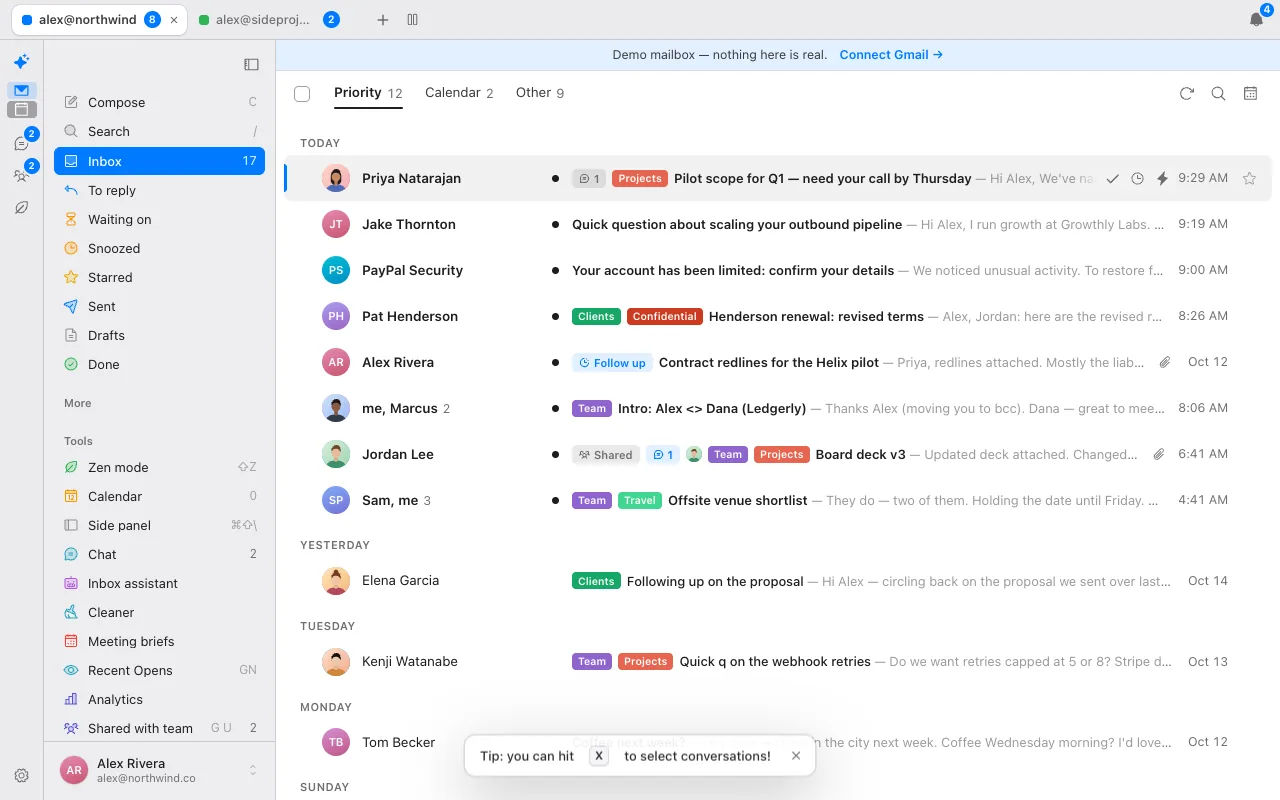
- A split inbox with mail from real people first, and newsletters and notifications out of the way. You can add splits of your own with Gmail search.
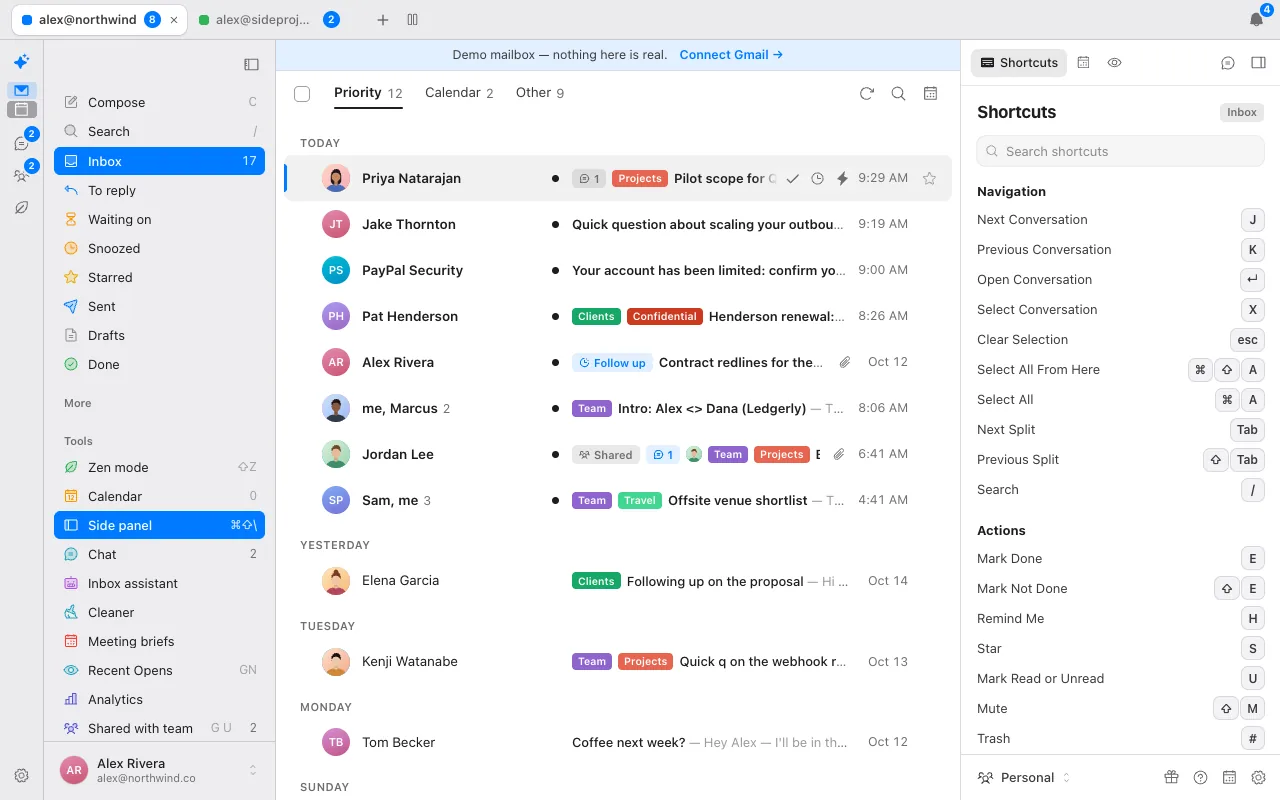
- Almost all of Superhuman's shortcuts: J and K, E for done, H to snooze, R to reply, G then a letter to jump and ⌘K for every command.
- Snooze in plain words, send later and undo send. Snoozes, scheduled sends and reminders run on the server, so they fire with the app closed.
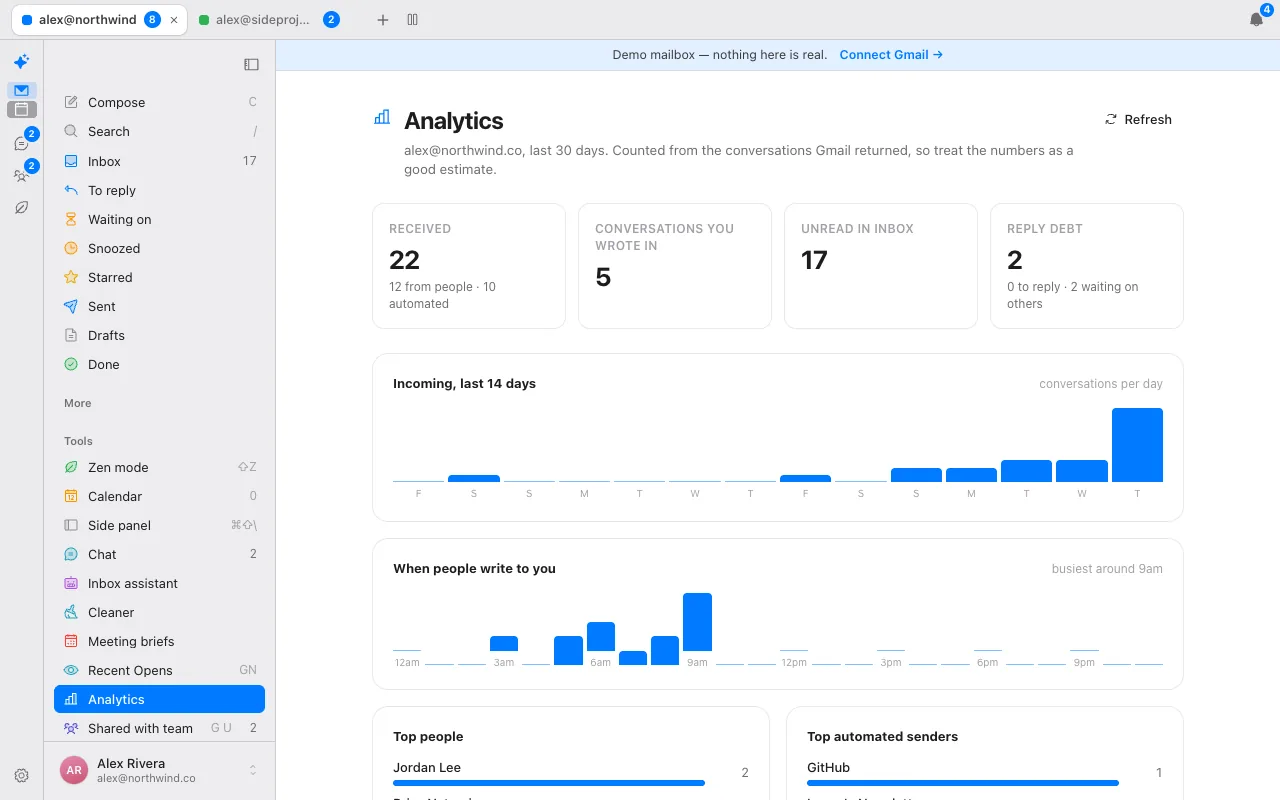
- Bulk unsubscribe and clean-up, snippets, a read-only calendar view and analytics.
- Your mail stays in Gmail. The browser reads it straight from Google, and the server keeps the encrypted sign-in token and the settings you set.
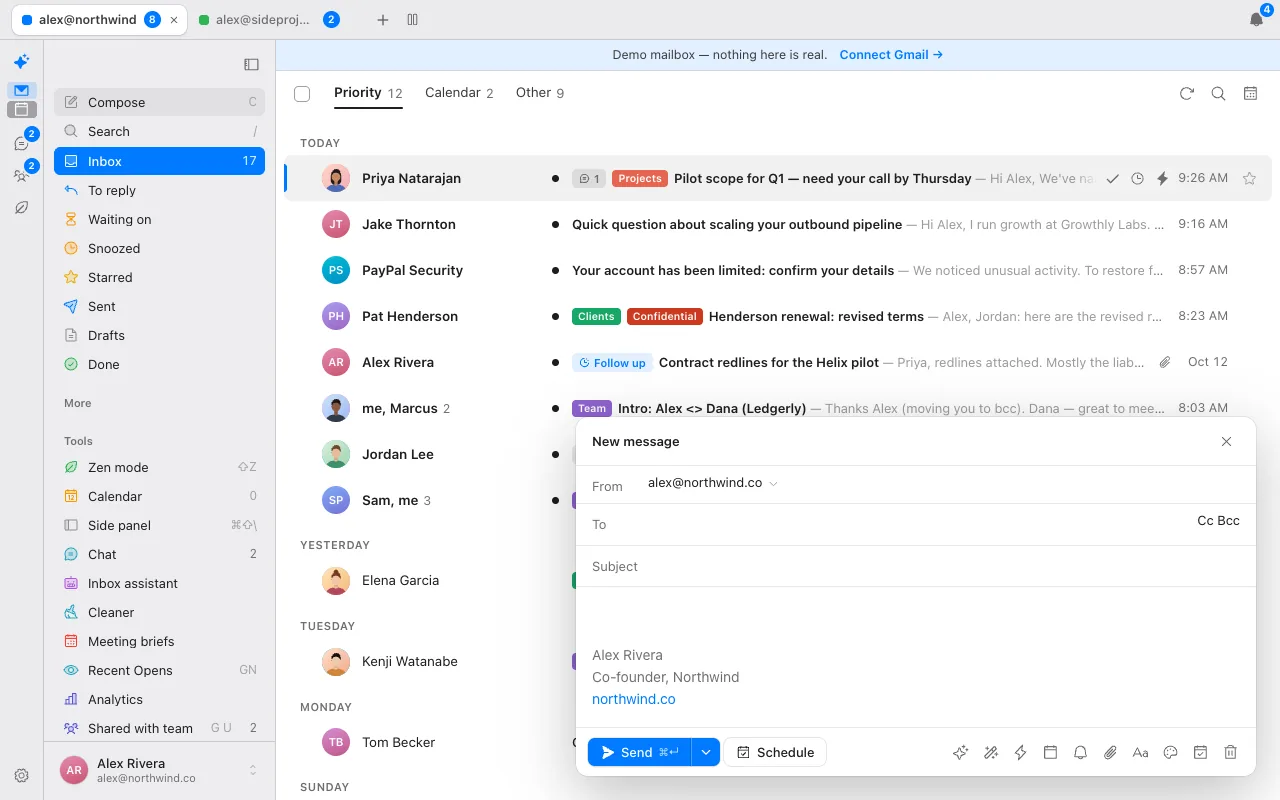
Donezo works with Gmail and Google Workspace only. It has no Outlook or IMAP support, no shared inbox or assignment, no meeting notes and no scheduling links.
How do you try a Gmail client without committing?
Most of the clients above have a trial or free plan: Superhuman has none listed on its plans page, Shortwave and Mimestream offer trials, Spark and Mailbird have free plans. Donezo Inbox has a live demo that runs with sample mail and needs no sign-in, so you can test the keys first, then sign in with Google when you are ready. Your mail never leaves Gmail either way, so trying a second client costs you nothing but time.
How does it handle several Gmail accounts?
A free account covers one Gmail or Workspace inbox; Pro is unlimited. With two or more, a tab bar sits above the app with each account's name and unread count, a plus button adds another, and you can drag to reorder or hide an account without signing out. Ctrl and a number jumps to that account. A Panes layout puts several inboxes side by side. Composing from a different account is a keystroke: ⌘⇧F steps through the account's Gmail send-as addresses.
Is Gmail an email client?
Gmail is Google's email service, and Google's own web and mobile apps are its clients. A third-party email client is another app that connects to your Gmail account and shows the same mail in a different interface. Your mail, labels and folders stay in Gmail either way, which is why trying another client costs you nothing but time and why you can use two clients side by side.
Clients differ in how they connect. Donezo Inbox signs in with Google OAuth, so there is no password, and its browser talks to Gmail directly with a short-lived token.
What is in Donezo Inbox, in full?
A reference of what the client does today, from the product's own documentation.
| Area | What it does |
|---|---|
| Reading and speed | Split inbox, auto-advance after Mark done, multi-select with X and Shift keys, instant search with Gmail operators such as from:, is:unread, has:attachment and newer_than:, and prefetching of the conversations below the cursor. |
| Sending | Schedule send in plain words and any time zone, undo send from 0 to 30 seconds, send and mark done, send-as addresses with Gmail signatures, snippets with merge fields. |
| Follow-up | Snooze, remind-me-if-no-reply from 1 day to custom, and To reply and Waiting on views. |
| AI | Write with AI, suggested replies, inline autocomplete, fix grammar and tone, a one-line summary above longer threads, Ask your inbox and an opt-in assistant. All on your choice of model. |
| Clean-up | Bulk unsubscribe, clear out old mail by age and category, and an optional auto-archive that starts as a preview. |
| Several accounts | Unlimited on Pro, as tabs or up to six side-by-side panes. |
| Calendar | A read-only day view beside the inbox, free-slot insertion into drafts and meeting briefs. |
| Offline and local | The last 60 days of thread summaries (up to 5,000 per account) and the bodies of the top 100 inbox threads and every thread you open are kept in your browser, bounded to about 150 MB. Archive, star and read actions queue offline and replay when you reconnect. It installs as a web app. |
| Agents | A connector so Claude and Codex can search, read, triage and draft across every inbox. |
| Insight | Analytics (volume by day and hour, top senders, reply debt) and inbox-zero streaks. |
The client is gentle on Gmail's quota: filling the local mailbox is paced and runs only while you are not using the app.
Questions
What is the best email client for Gmail?
It depends on what you need. For speed with AI, Superhuman Mail and Shortwave are the paid options and Donezo Inbox is the low-cost one. For a Mac app, Mimestream. For Windows, Mailbird. For a shared team inbox, Missive.
Is there a free Gmail client?
Donezo Inbox is free for one inbox, Spark and Mailbird have free plans, and Gmail itself is free. Check each vendor for what the free plan includes.
Does Donezo Inbox have Superhuman-style shortcuts?
Almost all of them. Press ? in the app for the full list.
Does Donezo Inbox work with Outlook?
No. It works with Gmail and Google Workspace only.
Is my mail copied when I use a third-party Gmail client?
With Donezo Inbox, no: the browser reads mail straight from Gmail and the server stores only your sign-in token and settings. Other clients differ, so check each one's privacy page.
Is Gmail an email client?
Gmail is Google's email service; its web and mobile apps are Google's own clients. A third-party client connects to your Gmail account and shows the same mail in another interface.
Can I use Gmail as an email client?
Yes. Gmail's own web and mobile apps are a client for your Gmail account. Third-party clients are an alternative for the same Gmail mail.
Is there a free email client?
Donezo Inbox is free for one inbox. Spark and Mailbird list free plans on their pricing pages. Check each for what the free plan includes.
Does Donezo Inbox work offline?
Archive, star and read actions queue offline and replay when you reconnect, and recent mail is kept in your browser. Sending needs a connection.
See it for yourself
The live demo runs with sample mail, no sign-in.
Try the live demoContinue with Google