 Donezo Inbox
Home / Alternatives
SaneBox alternatives
SaneBox is a filter, not a client: it sorts mail in whichever email app you already use. Its Snack plan is $9.49 a month billed monthly, $5.42 billed annually or $4.54 on the two-year term. An alternative that includes the client is Donezo Inbox, which is free for one inbox and sorts mail with a split inbox and an opt-in assistant. Inbox Zero and Fyxer are AI assistants for the client you already have. Below: what SaneBox's features do and the closest thing in each alternative.
What does SaneBox cost?
| Plan | Billed monthly | Billed annually | Billed every 2 years | Accounts |
|---|---|---|---|---|
| Snack | $9.49 | $5.42 | $4.54 | 1 account, 2 features |
| Lunch | $15.99 | $9.08 | $7.46 | 2 accounts, 6 features per account |
| Dinner | $42.99 | $26.58 | $22.04 | 4 accounts, all features |
All plans work with any email client and start with a 7-day free trial that includes every feature for up to 4 accounts. The cheaper plans let you pick a limited number of its power features per account; Dinner includes all of them.
Prices were read from each vendor's own pricing page on October 15, 2026. Vendors change them, so check the linked page before you buy.
What do SaneBox's features do, and what covers the same ground elsewhere?
SaneBox's pricing page lists its power tools by name. The middle column pairs each with the nearest feature in Donezo Inbox. It is the closest equivalent, not a claim of identical behaviour, so try the demo before you rely on it.
| SaneBox feature | Nearest in Donezo Inbox | Difference |
|---|---|---|
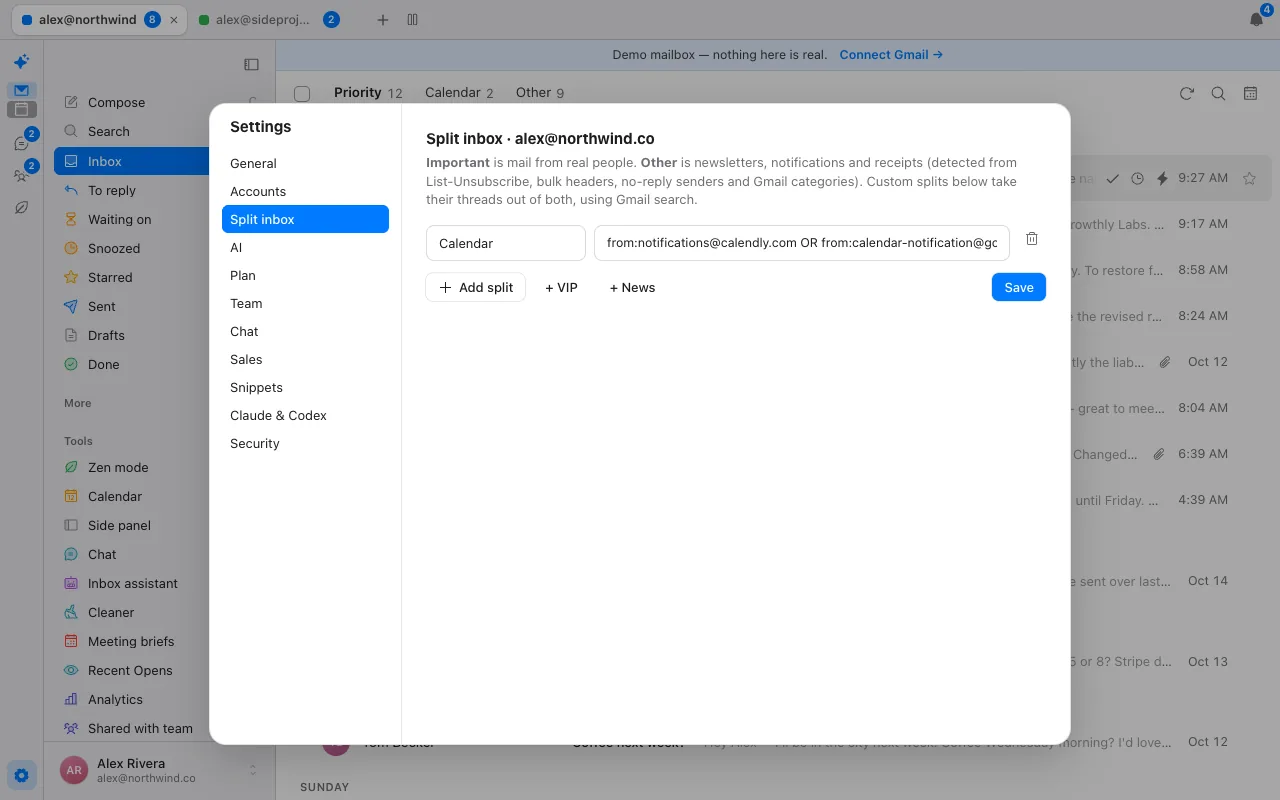
| SaneLater | The split inbox: Priority for real people, Other for newsletters, notifications and receipts | Donezo splits by headers and Gmail categories, and the splits are rules you can edit |
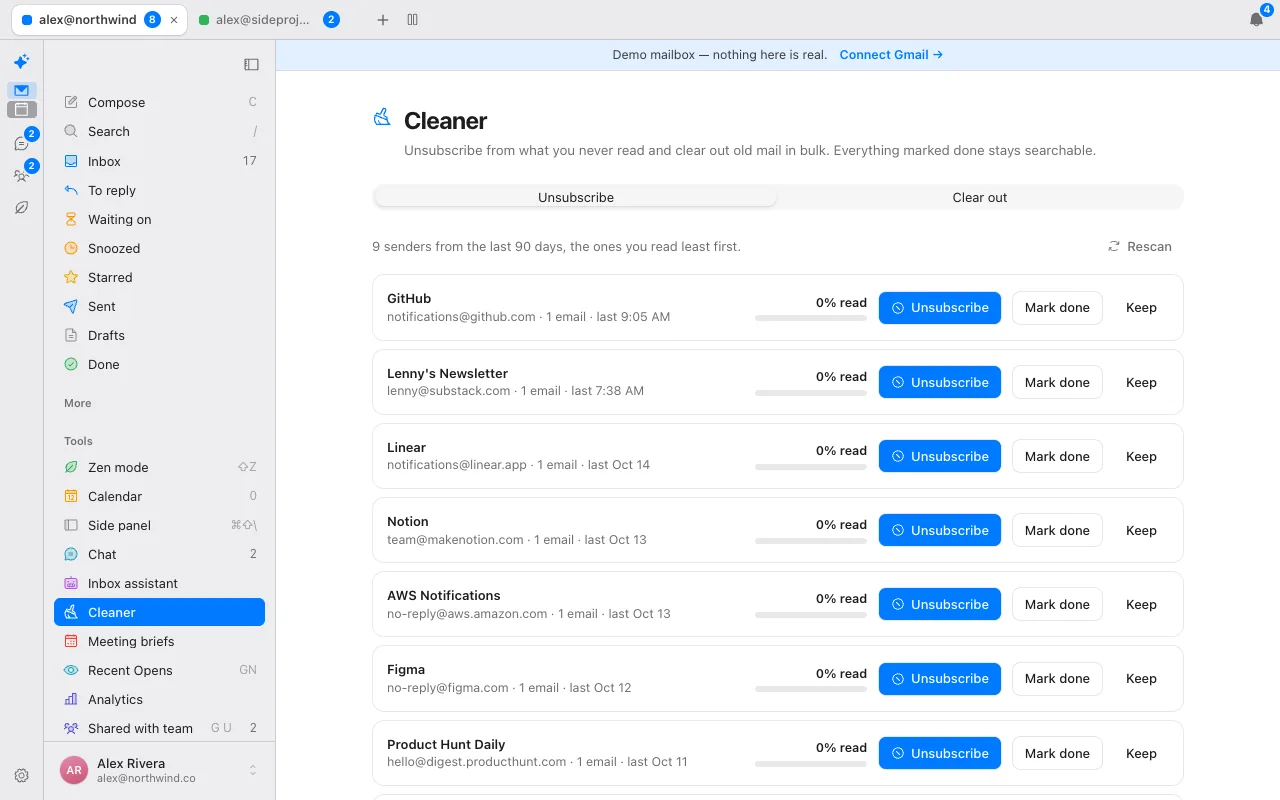
| SaneNews | The Other split, and the Cleaner for senders you never read | Compare the Cleaner screenshot below |
| SaneBlackHole | Mute (⇧M), Report spam and Unsubscribe (⌘U), each on one key | Donezo acts when you press the key |
| SaneNoReplies | Remind me if no reply, and the Waiting on view | Donezo also has a To reply view |
| Reminders and custom snooze | Snooze (H) with plain-word times, send later and undo send | Runs on the server so it fires with the app closed |
| Email Deep Clean | The Cleaner: unsubscribe in one click, clear out old mail in bulk | The Cleaner lists the senders you read least over the last 90 days |
Filter, assistant or client: which do you need?
| Product | What it is | Price | Worth knowing |
|---|---|---|---|
| SaneBox | A filter for any email client | $9.49 a month ($4.54 on the 2-year term) | Does not replace your client. |
| Donezo Inbox | A Gmail client with a split inbox and an opt-in assistant | Free for one inbox. Pro $29/year. | Gmail and Google Workspace only. |
| Inbox Zero | An AI assistant for Gmail and Outlook | Starter $18 a month billed annually, $20 monthly | 7-day trial. |
| Fyxer | An AI assistant on your existing inbox | Free (400 credits a month). Pro $37 billed annually. | Credit-metered. |
| Superhuman Mail | A fast client with AI | Starter $25 per member per month billed annually. | Up to 25 seats on Starter. |
If you like your current email app and only want it quieter, a filter such as SaneBox keeps it. If you would rather move to a client built for speed, Donezo Inbox splits the inbox so mail from real people comes first, and its optional assistant labels mail and drafts replies you review.
Donezo works with Gmail and Google Workspace only. It has no Outlook or IMAP support, no shared inbox or assignment, no meeting notes and no scheduling links. SaneBox works with any email client, so if you are on Outlook it is a better fit than Donezo.
What does SaneBox cost per year on each billing term?
SaneBox's monthly-looking prices hide a prepayment: the lowest prices are on a two-year term billed up front. The table turns each monthly price into what you actually pay.
| Plan | Monthly billing, per year | Annual billing, per year | Two-year term, paid up front | Two-year term, per year |
|---|---|---|---|---|
| Snack | $113.88 | $65.04 | $108.96 | $54.48 |
| Lunch | $191.88 | $108.96 | $179.04 | $89.52 |
| Dinner | $515.88 | $318.96 | $528.96 | $264.48 |
So the headline $4.54 a month for Snack is $108.96 paid every two years. Donezo Inbox's client is free for one inbox, and its Pro plan is $29 a year.
How do you try Donezo Inbox without dropping SaneBox?
- Open the live demo and try the split inbox, the Cleaner and snooze with sample mail.
- Sign in with Google. Donezo reads your Gmail directly, so the mail SaneBox has already sorted is simply there.
- Leave SaneBox running while you compare. Nothing in Donezo conflicts with it.
- Switch on the assistant for an account only if you want labelling and drafts, and use the Cleaner to unsubscribe from senders you never read.
- Cancel SaneBox once Donezo's split inbox and Cleaner do what you need.
How was this page made?
Every competitor price and plan detail on this page was read from the vendor's own page on October 15, 2026, and links to that page sit beside the figure. Where a page did not show a number, the page says so rather than guessing. Screenshots are of Donezo Inbox's own demo mailbox, which uses sample data. Donezo Inbox publishes this page and competes with the products on it, so read it with that in mind. It has not benchmarked speed or AI accuracy on other products and makes no such claims about them.
Questions
How much does SaneBox cost?
$9.49 a month on monthly billing for the Snack plan, $5.42 on annual billing and $4.54 on the two-year term. Lunch and Dinner cost more and cover more accounts.
Is Donezo Inbox a SaneBox replacement?
For Gmail users who want to change client as well as quiet their inbox, yes. For anyone on another provider, no.
Does Donezo Inbox have a free plan?
Yes. The email client is free for one inbox.
Does SaneBox replace my email client?
No. It works with any email client and sorts mail inside the one you already use.
Does SaneBox have a free trial?
Yes: 7 days, with every feature for up to 4 email accounts.
Can I use Donezo Inbox and SaneBox together?
Yes. SaneBox works inside any email client, and Donezo Inbox is a Gmail client, so you can run both while you decide.
How much is SaneBox per year?
Snack is about $114 a year on monthly billing, $65 on annual billing and $109 paid every two years, from its listed prices. See the table above.
See it for yourself
The live demo runs with sample mail, no sign-in.
Try the live demoContinue with Google