 Donezo Inbox
Home / Compare
Donezo Inbox vs Superhuman Mail
Superhuman Mail starts at $25 per member per month billed annually ($300 a year). Donezo Inbox is free for one inbox and Pro is $29/year. Superhuman has the larger feature set, including team features, calendar and scheduling; Donezo covers the keyboard-first Gmail workflow for a fraction of the price and works with Gmail and Google Workspace only. This page compares them one area at a time.
How do Donezo Inbox and Superhuman Mail compare at a glance?
| Donezo Inbox | Superhuman Mail | |
|---|---|---|
| Starting price | Free for one inbox. Pro $29/year. | Starter $25 per member per month billed annually. Business $33. |
| Providers | Gmail and Google Workspace | See Superhuman's plans page for supported providers |
| Keyboard shortcuts | Almost all of Superhuman's (J and K, E, H, R, G then a letter, ⌘K) | Yes |
| Split inbox, snooze, send later, undo send, reminders | Yes. Snooze, send later and reminders run on the server. | Yes |
| AI drafting | Write with AI (⌘J), suggested replies and assistant drafts in your tone. Free with your own key, a local model or Chrome's model. | Superhuman AI on Starter; Auto Drafts on Business |
| Assistant sends on its own | Never. Drafts wait for you, and it is off until you enable it. | See Superhuman's page |
| Connector for AI agents (MCP) | Yes, on every plan, with an optional draft-only mode | Listed on Business ($33) |
| Read statuses (Recent Opens) | Pro | Listed on Business ($33) |
| Team features | Not on sale. No shared inbox or assignment. | Team collaboration listed on Starter, up to 25 seats |
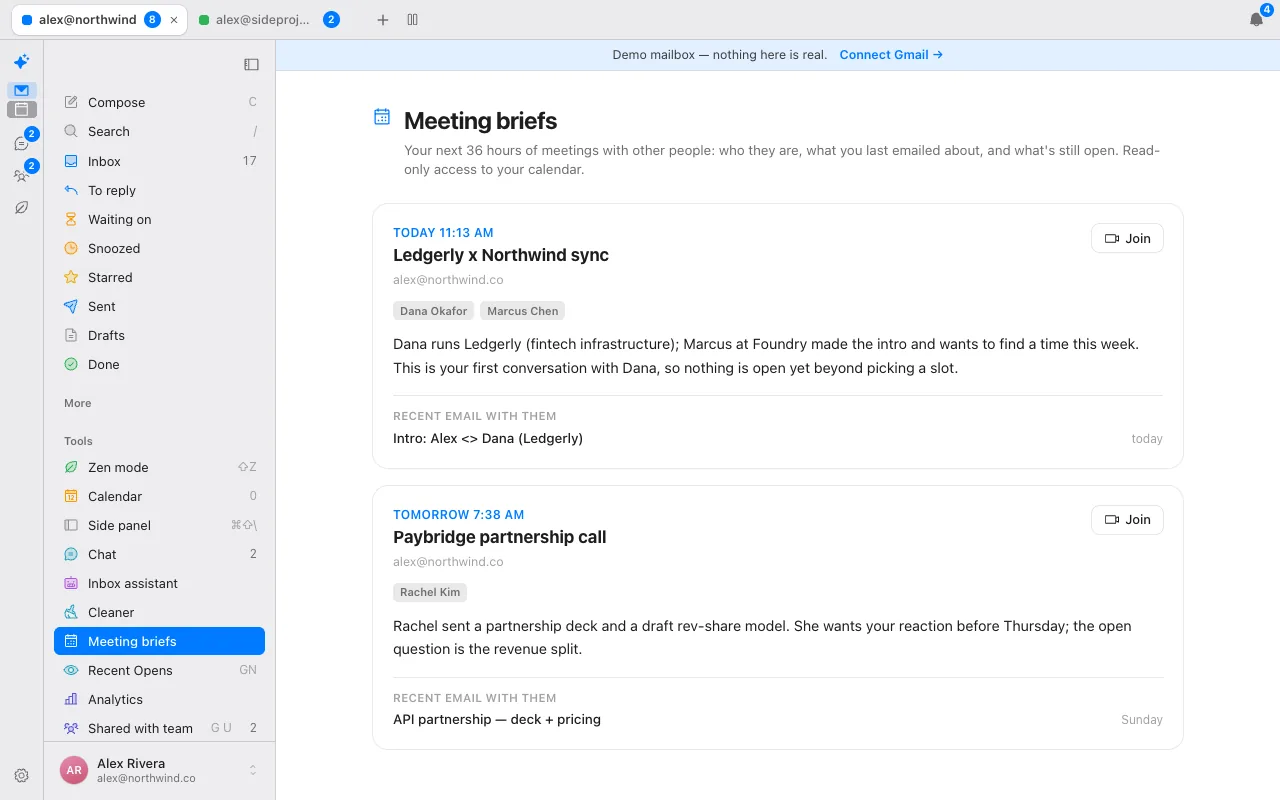
| Calendar and scheduling | Read-only calendar view and meeting briefs. No scheduling links. | Listed on Starter |
Prices were read from each vendor's own pricing page on October 15, 2026. Vendors change them, so check the linked page before you buy. The Superhuman column is read from its plans page. Donezo Inbox publishes this page, so check that column against the vendor's own list.
Which is faster to use?
Both are built around the keyboard. Donezo supports almost all of Superhuman's shortcuts with the same keys: ⌘K for commands, E for done, H to remind, R to reply, G then a letter to jump, / to search and Z to undo. The press-the-key speed is a design goal of both; this page does not publish a speed benchmark, because it has not run one.
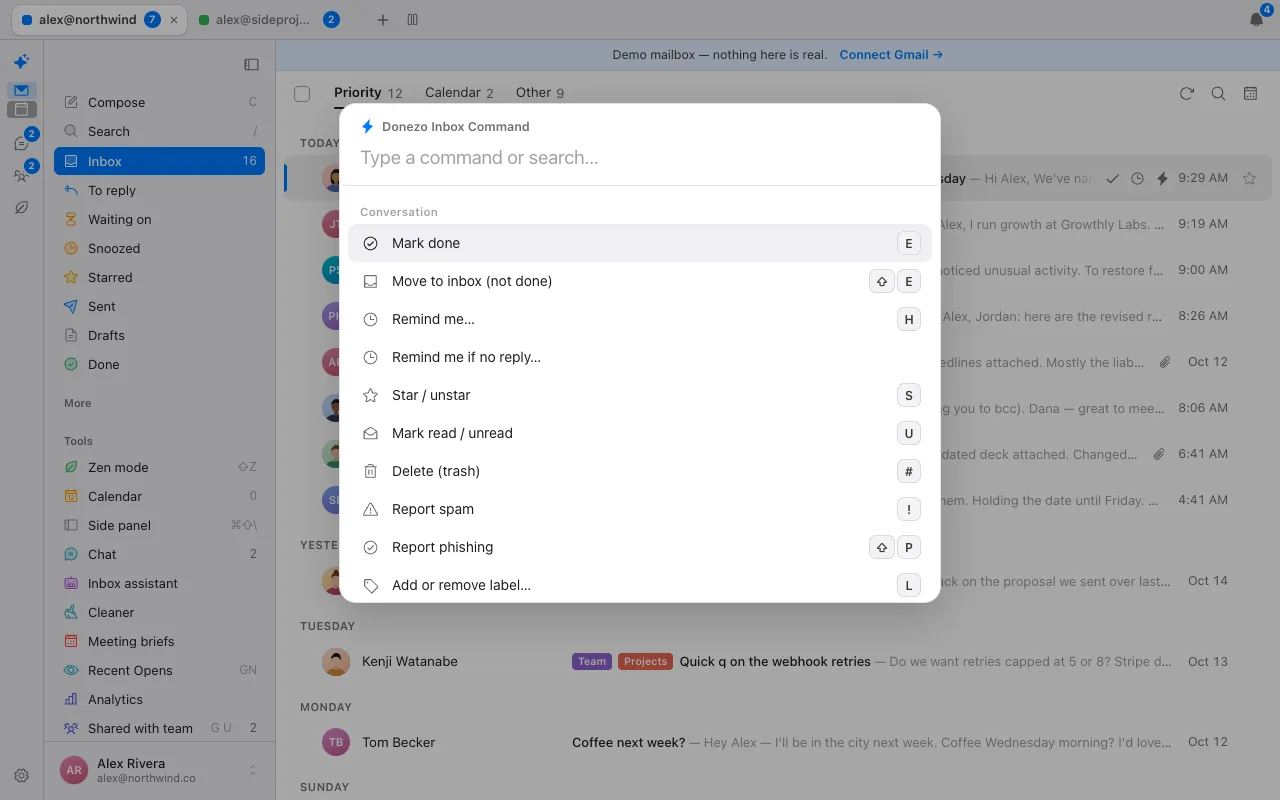
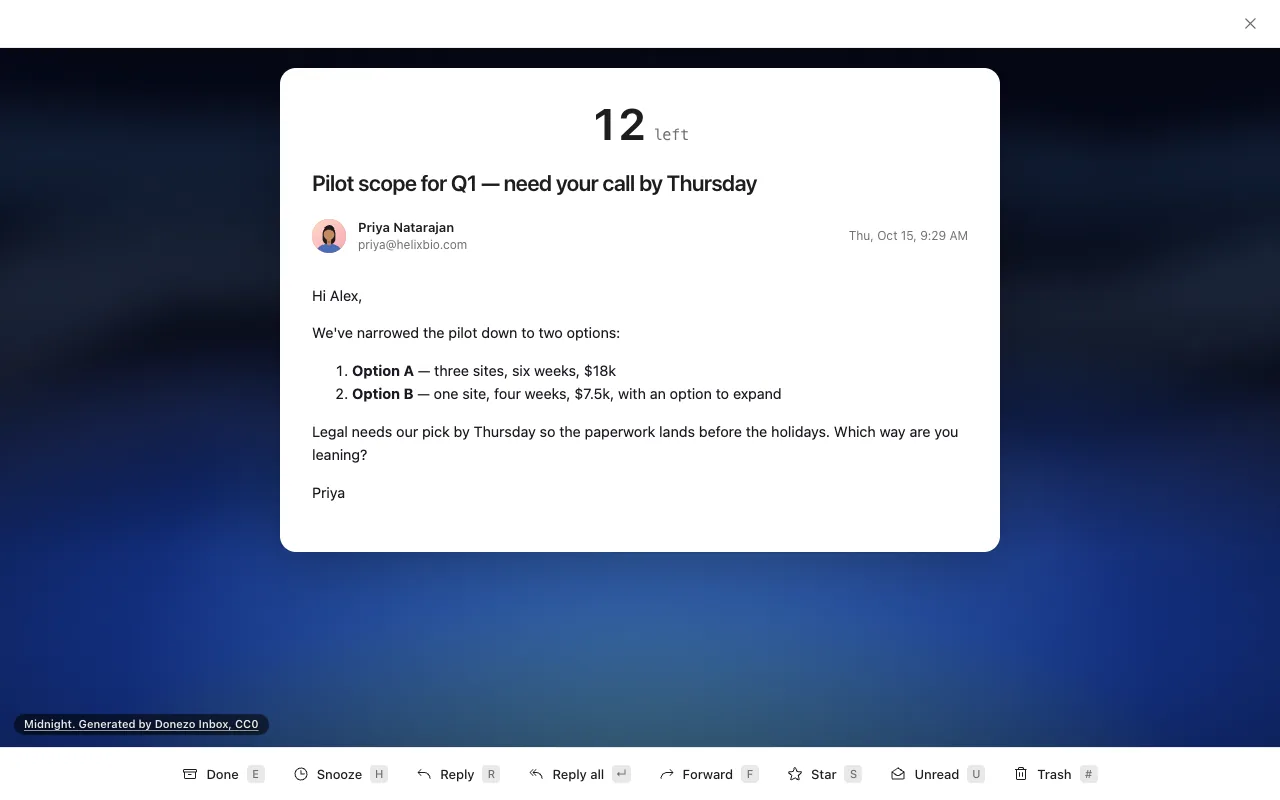
Donezo adds a few things of its own: a Waiting on view for threads nobody answered, a To reply view found by the assistant, and G-key shortcuts to each. Parity is not complete, and a handful of Superhuman keys are deliberately not built.
How do the AI features compare?
Superhuman lists AI on its plans: Superhuman AI on Starter, and on Business its most advanced AI, Auto Drafts, Ask AI and custom Auto Labels with AI. Donezo has three drafting modes, an Ask-your-inbox feature and an opt-in assistant, and it lets you choose which model runs them.
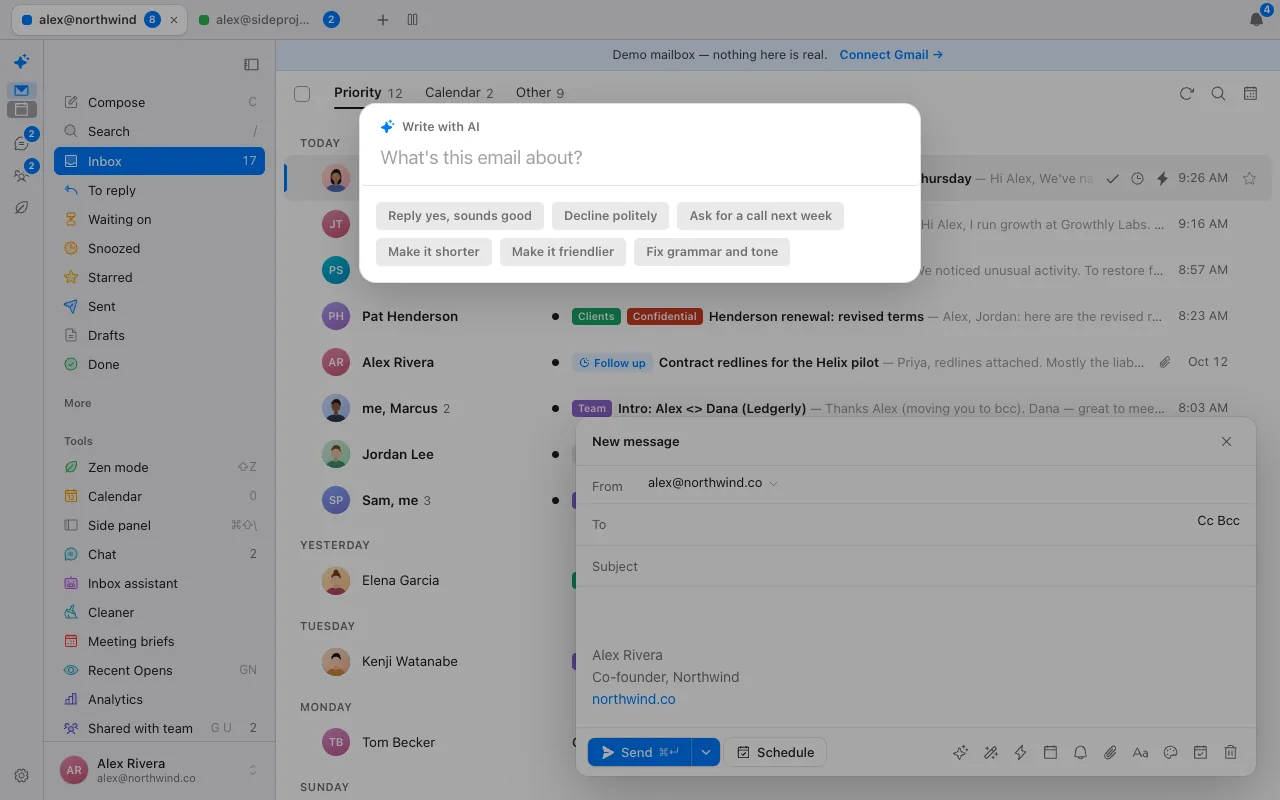
Where the AI runs is Donezo's main difference. With your own key (OpenAI, OpenRouter, Groq or any compatible endpoint), a model on your computer or Chrome's built-in model, the text goes from your browser to the one you chose, and it is free. Hosted AI on Cloudflare Workers AI is part of Pro. The assistant never sends mail and is off until you switch it on.
What does each cost at 1, 5 and 10 seats?
| Plan | 1 seat per year | 5 seats per year | 10 seats per year | Basis |
|---|---|---|---|---|
| Superhuman Mail Starter | $300 | $1,500 | $3,000 | $25 billed annually |
| Superhuman Mail Business | $396 | $1,980 | $3,960 | $33 billed annually |
| Donezo Inbox Pro | $29 | $145 if each person buys their own | $290 if each person buys their own | $29/year, per person |
Donezo Pro is sold per person with no team billing, so the 5 and 10 seat figures are people buying individually. Donezo works with Gmail and Google Workspace only. It has no Outlook or IMAP support, no shared inbox or assignment, no meeting notes and no scheduling links.
What about teams, calendar and providers?
This is where Superhuman is ahead. Its Starter plan lists team collaboration, calendar and scheduling and unified admin and billing, and Enterprise adds SSO and team analytics. Donezo's calendar is a read-only view with meeting briefs (who you are meeting and what you last emailed them about), and it has no scheduling links, no shared inbox and no team billing. On providers, check Superhuman's page; Donezo is Gmail and Google Workspace only.
Which should you choose?
Choose Superhuman if you need team features, calendar and scheduling, use a provider Donezo does not support, or want the vendor's full product and support. Choose Donezo if you use Gmail or Google Workspace, want the same keyboard-first speed, and prefer to pay $29 a year or nothing.
Try it before deciding: the live demo runs with sample mail and needs no sign-in. For a longer take on switching, see Superhuman alternatives.
What does it cost over three years?
| Plan | Price | One year | Three years |
|---|---|---|---|
| Superhuman Mail Starter | $25 per month, billed annually | $300 | $900 |
| Superhuman Mail Business | $33 per month, billed annually | $396 | $1,188 |
| Donezo Inbox Pro | $29/year | $29 | $87 |
Prices change, so treat this as arithmetic on today's list prices, not a forecast. Superhuman's Business plan is where its connector for AI agents and Recent Opens are listed; on Donezo Inbox both are part of the $29 yearly Pro plan or the free tier.
How much time does each need to save?
| Plan | Per year | Hours a year to break even at $25 an hour | at $50 an hour | at $100 an hour | Minutes a working day at $50 an hour |
|---|---|---|---|---|---|
| Superhuman Mail Starter | $300 | 12 | 6.0 | 3.0 | 1.4 |
| Superhuman Mail Business | $396 | 16 | 7.9 | 4.0 | 1.9 |
| Donezo Inbox Pro | $29 | 1.2 | 0.6 | 0.3 | 0.1 |
At $50 an hour, Superhuman Starter needs to save about 1.4 minutes a working day to pay for itself and Business about 1.9. Donezo Inbox Pro needs about 8 seconds. This is arithmetic on list prices, not a claim about either product's speed.
How was this page made?
Every competitor price and plan detail on this page was read from the vendor's own page on October 15, 2026, and links to that page sit beside the figure. Where a page did not show a number, the page says so rather than guessing. Screenshots are of Donezo Inbox's own demo mailbox, which uses sample data. Donezo Inbox publishes this page and competes with the products on it, so read it with that in mind. It has not benchmarked speed or AI accuracy on other products and makes no such claims about them.
Questions
Is Donezo Inbox a Superhuman clone?
It is a keyboard-first Gmail client in the same spirit and supports almost all of Superhuman's shortcuts. It is a different product with a different price and a narrower feature set.
Does Donezo Inbox work with Outlook?
No. Gmail and Google Workspace only.
How much cheaper is Donezo Inbox?
Pro is $29 a year against $300 a year for Superhuman Starter billed annually. The email client itself is free for one inbox.
Does Donezo have team features like Superhuman?
No. Pro is sold per person, and there is no shared inbox, assignment or team billing yet.
Is Donezo as fast as Superhuman?
It uses the same keys, and the browser reads your mail straight from Gmail. This page does not publish a benchmark, so try the demo with your own keys.
What does Superhuman have that Donezo does not?
Team collaboration, calendar and scheduling, an admin console and, on Enterprise, single sign-on, according to its plans page. Donezo has a read-only calendar, no scheduling links and no team features.
What does Donezo have that Superhuman's cheapest plan does not?
A connector for AI agents on every plan (Superhuman lists its MCP on Business), read statuses on Pro (Business on Superhuman) and a choice of AI provider, including free ones.
Which is better for a solo Gmail user?
If you are one person on Gmail who wants keyboard-first speed and does not need team features, Donezo is the cheaper fit. If you need calendar scheduling or work in a team, Superhuman has more.
See it for yourself
The live demo runs with sample mail, no sign-in.
Try the live demoContinue with Google