 Donezo Inbox
Home / Integrations
Run your inbox from Claude or Codex
Donezo Inbox gives you a private link that lets Claude or Codex search, read, triage and draft across every Gmail inbox you have added. You can limit the agent to drafts only and revoke the link at any time. It is an MCP connector, so the same link works in Claude on the web and desktop, Claude Code and Codex.
How do you connect Claude or Codex to Gmail?
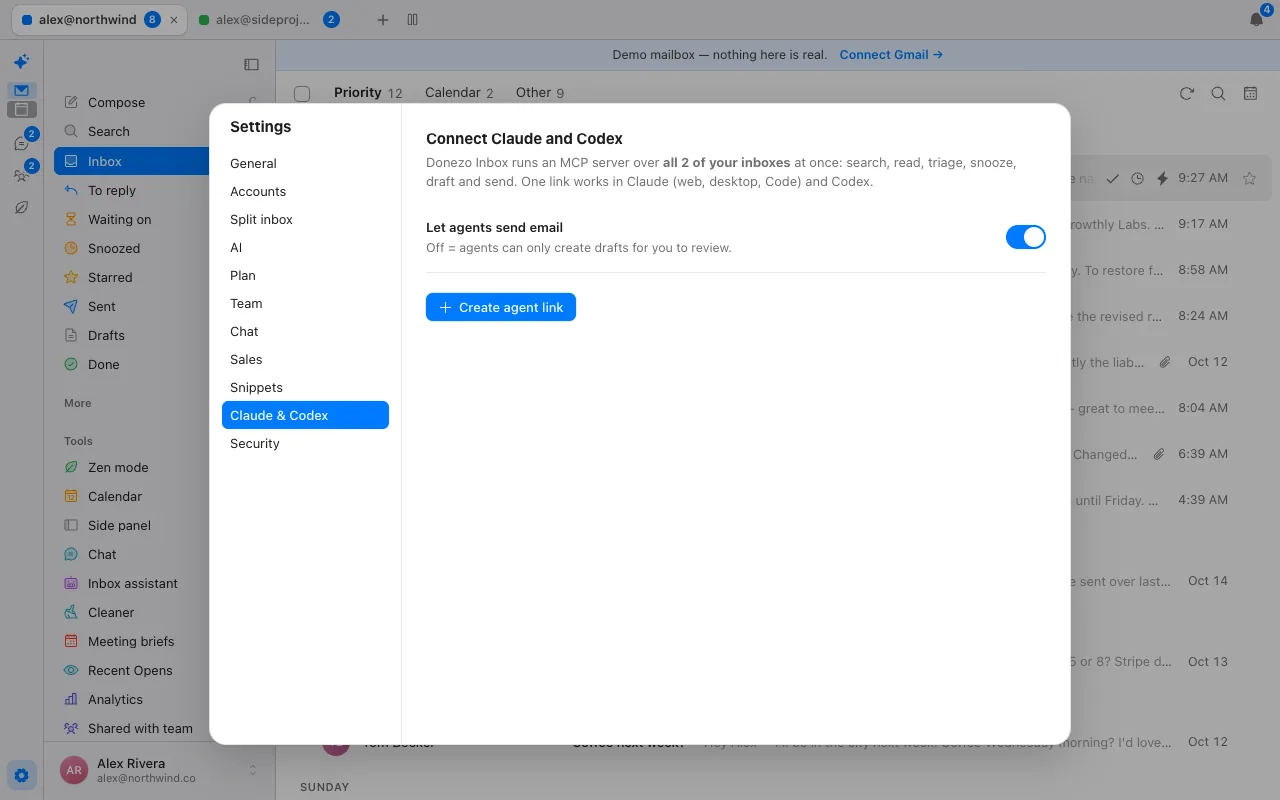
- In Donezo Inbox, open Settings, then Claude & Codex, and choose Create agent link. Copy the link.
- Claude on the web or desktop: Settings, then Connectors, then Add custom connector, and paste the link.
- Claude Code:
claude mcp add --transport http --scope user donezo <link> - Codex:
codex mcp add donezo --url <link> - Ask your agent something about your mail. It can reach every inbox you have added at once.
What can the agent do?
The connector exposes 21 tools. On every plan, the agent can read, search and draft; a free account also gets a trial allowance of the actions that change mail. On Pro the agent can act freely, and one question can fan out across all your inboxes.
| Group | Tools | Changes mail? |
|---|---|---|
| Find and read | list_accounts, inbox_overview, list_threads, get_thread, list_labels, who_is | No |
| Draft | create_draft, list_drafts, list_snippets | No (drafts wait for you) |
| Send | send_draft, send_email (now or scheduled) | Yes: Pro, or a free trial allowance, and only if you allow sending |
| Triage | update_threads (done, star, read, trash, spam, labels), snooze_thread, set_reminder, set_followup | Yes: Pro, or a free trial allowance |
| Reply Zero and rules | reply_zero, list_rules, add_rule, delete_rule, assistant_activity | Rules change what the assistant does |
| Context | meeting_briefs, who_is | No |
Example requests that map onto these tools: “What needs my attention today across all my inboxes?” (inbox_overview), “Find the contract thread with Priya and draft a reply asking for Thursday” (list_threads, get_thread, create_draft), “Who am I meeting tomorrow and what did we last discuss?” (meeting_briefs), “Add a rule that stars emails from investors” (add_rule).
How do you keep it safe?
- Draft-only mode. The Let agents send email switch is off by default, which means the agent can only create drafts for you to review.
- A private, revocable link. Anyone with the link can use it, so treat it like a password, and revoke it in Settings at any time.
- Paid actions are gated. Sending, archiving and snoozing need Pro beyond the free trial allowance.
- Rate limits are respected. If Gmail rate-limits an account, the tool says so and how long to wait; your other accounts are not affected.
- What we record. Product analytics records which tool was called and whether it failed, never the arguments or any mail content. See security and the privacy policy.
What are its limits?
Donezo works with Gmail and Google Workspace only. It has no Outlook or IMAP support, no shared inbox or assignment, no meeting notes and no scheduling links.
How does the agent find mail?
The agent uses Gmail search syntax, so anything you can type in Gmail works: from:, to:, subject:, is:unread, newer_than:2d, has:attachment and label:. Most tools take an optional account; leave it out and the call runs across every linked inbox at once, with each result tagged by account. The default query is the inbox.
To write mail, the agent creates a draft that appears in Donezo Inbox and in Gmail drafts. A reply is threaded onto the conversation, and recipients are filled from the thread. If you allow sending, send_email can send now or schedule: a wall-clock time such as 3 PM San Francisco time is read in that time zone, and set_followup brings a thread back to the top of the inbox if nobody replies in the days you give.
What does a real workflow look like?
- Morning triage. Ask for an overview. The agent calls inbox_overview, which lists mail from real people first and counts everything else, across every inbox.
- Reply with context. Ask for a reply to a thread. The agent reads it with get_thread, checks who the person is with who_is, and leaves a draft with create_draft.
- Chase what is stuck. Ask what is waiting on a reply. reply_zero returns what needs your answer and what you are waiting on, and the agent can set_followup on the stale ones.
- Prepare for meetings. Ask what is coming up. meeting_briefs lists the next 36 hours of meetings with other people and what you last emailed them about.
- Teach the assistant. Ask it to add a rule. add_rule takes a plain-English sentence and an action, and assistant_activity lets you check what the assistant did afterwards.
What if something goes wrong?
- A tool says Gmail is rate-limiting an account. Wait the number of seconds it gives; your other accounts keep working.
- The agent can draft but not send. Draft-only mode is on (the default), or you have used the free trial allowance of actions. Turn on Let agents send email, or upgrade.
- The link stopped working. It was revoked or replaced. Create a new one in Settings and add it to the agent again.
- Some inboxes were skipped. A very large fan-out may run only as many inboxes as fit in one call and names the ones it skipped so the agent can ask again.
What can you ask Claude or Codex to do?
- “What needs my attention today across all my inboxes?”
- “Find the last thread with Priya about the pilot and draft a reply asking for Thursday.”
- “Which threads am I waiting on for more than three days? Set a follow-up on each.”
- “Who am I meeting tomorrow, and what did I last email them about?”
- “Add a rule that stars emails from investors and labels them Investors.”
- “Show me what the inbox assistant did yesterday.”
With sending off (the default) the agent leaves drafts for you in Donezo Inbox and Gmail. Review them there.
Questions
Does it work with Claude and Codex?
Yes. It is a standard MCP connector, and the commands above are for Claude Code and Codex. Claude on the web and desktop uses the Add custom connector setting.
Can the agent send email without asking?
Only if you let it. Draft-only mode limits the agent to drafting, and sending and archiving need Pro beyond the free trial allowance.
Which providers are supported?
Gmail and Google Workspace.
How many inboxes can the agent reach?
All the inboxes you have added. A free account has one; Pro has unlimited.
Does Superhuman have something similar?
Its plans page lists a Superhuman Mail MCP on the Business plan. Donezo Inbox's connector works on every plan, with read, search and draft free.
Is it safe to connect Claude to Gmail?
The link is private and revocable, and the default mode lets the agent only create drafts. Anyone who has the link can use it, so keep it secret and revoke it if it leaks. Donezo Inbox stores your sign-in token encrypted and does not copy your mail; see the security page for the details and the gaps.
Can Claude organise my Gmail inbox?
It can apply labels, archive, star, snooze and set follow-ups through the connector's triage tools, which need Pro beyond a free trial allowance, and it can add rules for the assistant.
Can I link two Gmail accounts to Claude?
Yes. One link covers every inbox you have added, and calls run across all of them unless you name one. A free account has one inbox; Pro is unlimited.
Why is the Claude Gmail connector not working?
Check that the link has not been revoked or replaced, that a tool is not reporting a Gmail rate limit, that you have not used the free trial allowance for actions, and that Let agents send email is on if you expect it to send.
Can I get AI to send emails for me?
Only if you switch on Let agents send email, which needs Pro beyond a free trial allowance. The default is drafts only.
See it for yourself
The live demo runs with sample mail, no sign-in.
Try the live demoContinue with Google