 Donezo Inbox
How to connect Claude to Gmail
In Claude, open Customize, then Connectors, find Gmail and click Connect. That is Anthropic's own connector for searching your mail. To give Claude Code or Codex your Gmail, or to let an agent triage, draft and schedule across several inboxes with approvals, add a Gmail MCP server instead, such as the one built into Donezo Inbox: one link, one command.
How do you connect Claude's built-in Gmail connector?
- In claude.ai, go to Customize, then Connectors.
- Find Gmail in the list and click Connect.
- Sign in to your Google account and grant the permissions it asks for. The button changes to Disconnect when it worked.
- In a conversation, click + at the lower left of the message box, choose Connectors, and turn on Gmail. Then ask about your mail.
- On Team and Enterprise plans, an Owner or Primary Owner has to enable Gmail for the organization before it appears in your list.
- Anthropic's two pages disagree on what it can do. The connector documentation says it is read-only: it searches and reads, and cannot create, send or change email. The Help Center article says it can also draft, and send, reply and forward after asking you. Check the live pages before you rely on either.
- It connects one Google account, and it works in Claude, not in Claude Code or Codex.
These steps follow Anthropic's own documentation, read on October 19, 2026. They were checked against the documentation, not clicked through in a real account. The conflicting description is in Anthropic's Help Center article, support.claude.com/en/articles/10166901, read the same day. Menus change now and then; if a label differs, Anthropic's page is the reference.
How do you connect Claude or Codex to Gmail with Donezo Inbox?
Donezo Inbox runs an MCP server over every Gmail and Google Workspace inbox you have added to it. You make one private link, and it works in Claude on the web and desktop, in Claude Code and in Codex.
- In Donezo Inbox, open Settings, then Claude & Codex.
- Under What this link may do, keep Read and write, with approval (the default), or choose Read only or Drafts only. Then click Create agent link.
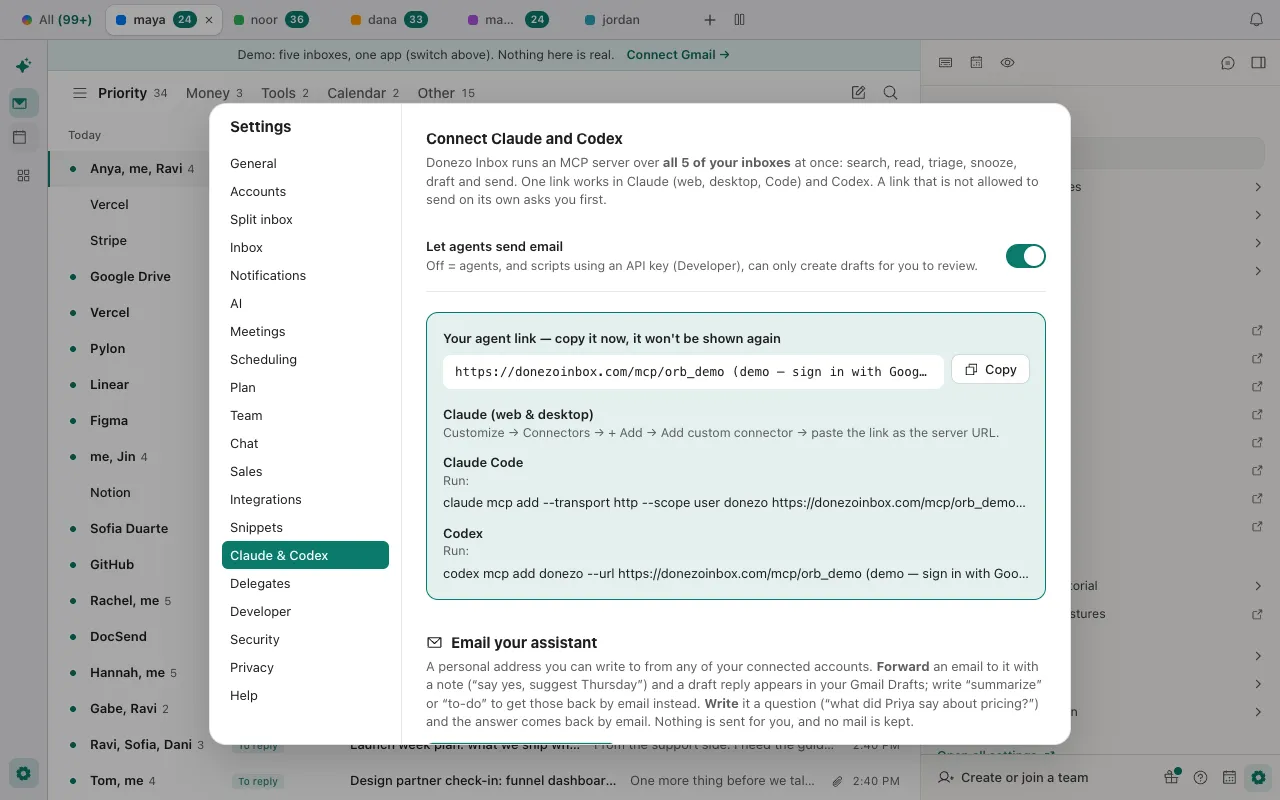
- Copy the link straight away. It is shown once, and anyone who has it can use it, so treat it like a password.
- Claude (web and desktop): Customize, then Connectors, then + Add, then Add custom connector. Give it a name, paste the link as the server URL, and click Add. Then turn it on from +, then Connectors, in a conversation.
- Claude Code: run
claude mcp add --transport http --scope user donezo <your link>.--scope usermakes it available in all your projects. - Codex: run
codex mcp add donezo --url <your link>, thencodex mcp listto check it is there.
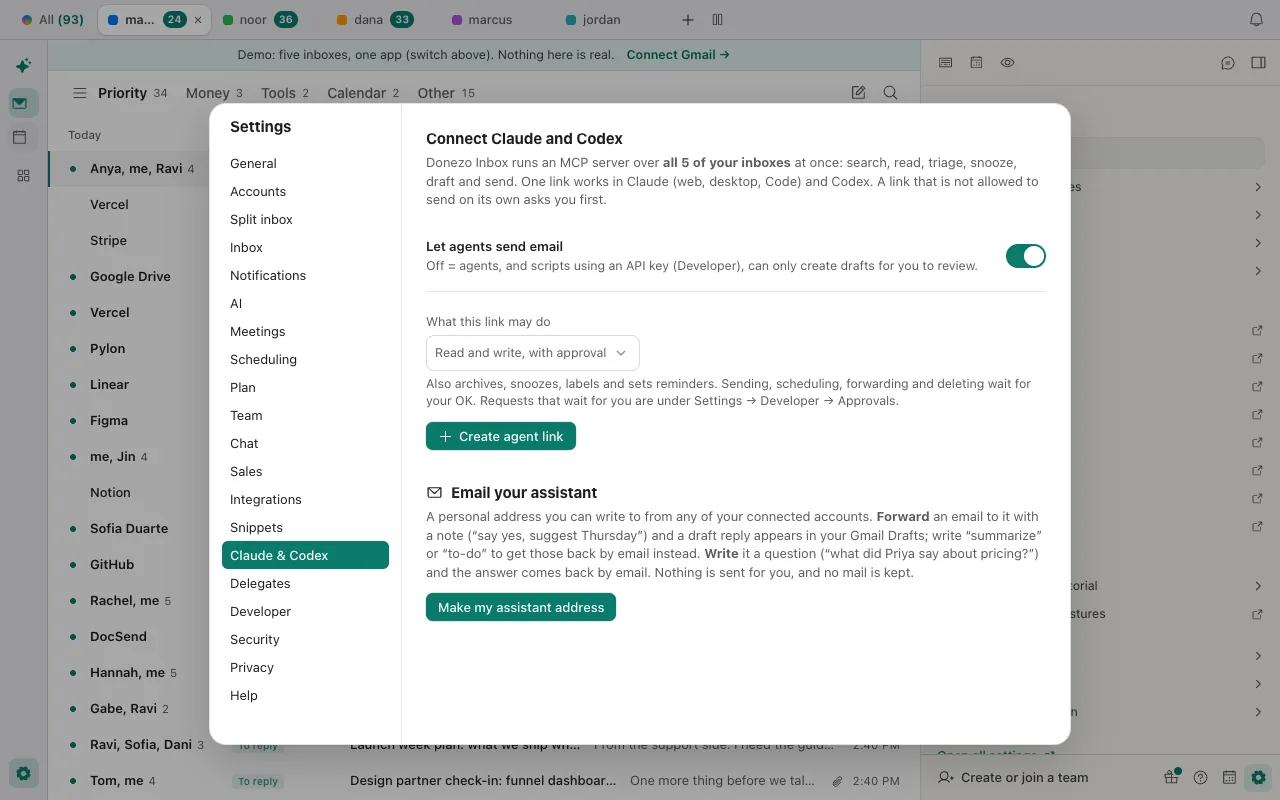
- What the default allows: reading, searching, drafting and organizing (archive, snooze, labels, reminders, follow-ups) run straight away. Sending, scheduling, forwarding and deleting wait for your approval under Settings, then Developer, then Approvals, and expire after 24 hours.
- Let agents send email is on by default. Switch it off and agents, and scripts using an API key, can only create drafts.
- Reading, searching and drafting work on every plan. Actions that change mail need Pro after 30 free actions.
- Anthropic says Claude's custom connectors are available on its Free, Pro, Max, Team and Enterprise plans, with one custom connector on Free. On Team and Enterprise an Owner adds it under Organization settings.
The demo shows the settings and a sample link; connecting a real agent needs a signed-in account. Open the live demo: it runs with sample mail, no sign-in.
What should you ask first?
Start with requests that only read, see what comes back, then move to drafts. Nothing here sends.
Read only: a first look
Using Donezo, what needs my attention today across all my inboxes? Only list them, with sender, subject and account. Do not change anything.A draft, never sent
Find the last thread with Priya about the pilot, read it, and save a draft reply that asks whether Thursday works. Do not send it. Tell me which account the draft is in.Neither prompt needs approval, because neither sends, schedules, forwards or deletes; with the default link those wait for your approval. The connector has 22 tools. Every call is written to an activity log with the tool and a short summary, never the mail. Product analytics records the tool name and whether it failed, never the arguments.
Tools involved: inbox_overview, list_threads, get_thread, create_draft. The full list, permissions and setup commands are in the connector documentation.
Why is the Gmail connector not working?
- The tool says sending is turned off. Let agents send email is off in Settings, then Claude & Codex. The agent can still save a draft for you to send.
- A send or delete never happened. With the default link setting it waited for approval. Open Settings, then Developer, then Approvals. Requests expire after 24 hours.
- It says the free agent actions are used. A free account gets 30 actions that change mail. The agent can still read, search and draft; Pro removes the limit.
- The link stopped working. It was revoked or replaced. Create a new link and add it again; in Claude, a connector is changed by removing it and adding it again.
- Claude will not add a second custom connector. Anthropic limits Free plans to one custom connector.
- A tool reports a Gmail rate limit. Wait the number of seconds it gives. Other inboxes keep working.
Questions
Is it safe to connect Claude to Gmail?
It depends on what you allow. Anthropic's own advice is to connect only servers you trust and to review tool approval requests. With Donezo Inbox's default link, nothing is sent, scheduled, forwarded or deleted without your approval, the link can be revoked at any time, and Read only and Drafts only links are available.
Can Claude read more than one Gmail account?
Claude's built-in connector uses the one Google account you sign in with. A Donezo Inbox link covers every inbox you have added; a free Donezo account has one inbox, and Pro has no limit.
Does it work with ChatGPT?
Donezo Inbox documents setup for Claude, Claude Code and Codex. It is a standard MCP server over HTTP, but other clients are not covered here.
What is a Gmail MCP server?
A server that offers an AI agent tools for Gmail, such as search, read and draft, through the Model Context Protocol. The agent calls the tools; the server talks to Gmail.