 Donezo Inbox
How to delete old emails in Gmail
Search Gmail for the age you want gone, such as older_than:1y or before:2024/01/01, tick the Select box, click the link that selects all conversations, and click Delete. The mail sits in Trash for 30 days; the storage comes back once Trash is emptied.
How do you delete emails older than a date in Gmail?
- Open Gmail on your computer and click the search box at the top.
- Type the age:
older_than:1y(units ared,mandy), or a fixed date withbefore:2024/01/01. Combine it with other words to keep it narrow, for exampleolder_than:2y category:promotionsorbefore:2023/01/01 larger:10M. - Press Enter, then tick the Select box at the top left.
- If a notification offers to select all conversations that match, click its link. Otherwise only the current page is selected.
- Click Delete.
- Check before you delete: read the first page of results. Select-all takes every match, including pages you have not seen.
- Mail in Trash and Spam still counts toward your storage until it is cleared. Empty Trash (open Trash, then Empty Trash now) to get the space back sooner than 30 days.
- Google says the storage figure updates a short time after Trash is emptied, and can take up to 48 to 72 hours after deleting a lot at once.
These steps follow Google's own documentation, read on October 19, 2026 for Gmail on the web (desktop). They were checked against the documentation, not clicked through in a real account. The search operators come from support.google.com/mail/answer/7190 and the storage timing from support.google.com/mail/answer/6374270, both read the same day. Menus change now and then; if a label differs, Google's page is the reference.
How do you clear old email in Donezo Inbox?
Donezo Inbox offers two routes. Deleting works like Gmail's, through search. Clearing marks old mail done (archived), so the inbox empties and nothing is lost.
- To delete: press / and search with the same operators, for example
older_than:1y category:promotions. - Press ⌘A, click Select everything in this view (up to 500), then press #. From 25 conversations up it asks you to confirm the number. It moves the mail to Gmail's Trash and offers Undo. Repeat for each 500.
- To clear without deleting: open the Cleaner (the broom in the Tools dock, or ⌘K, then Cleaner) and choose the Clear out tab.
- Pick a row such as Promotions older than a week, Updates and receipts older than a month, Anything you've read older than a month, or Everything older than three months. Each shows how many inbox conversations it covers; click Mark done.
- Or use Get me to zero: it moves everything older than a week, or a month, to Done in one go, shows the count first, keeps what looks like it needs a reply, and can be undone for 24 hours.
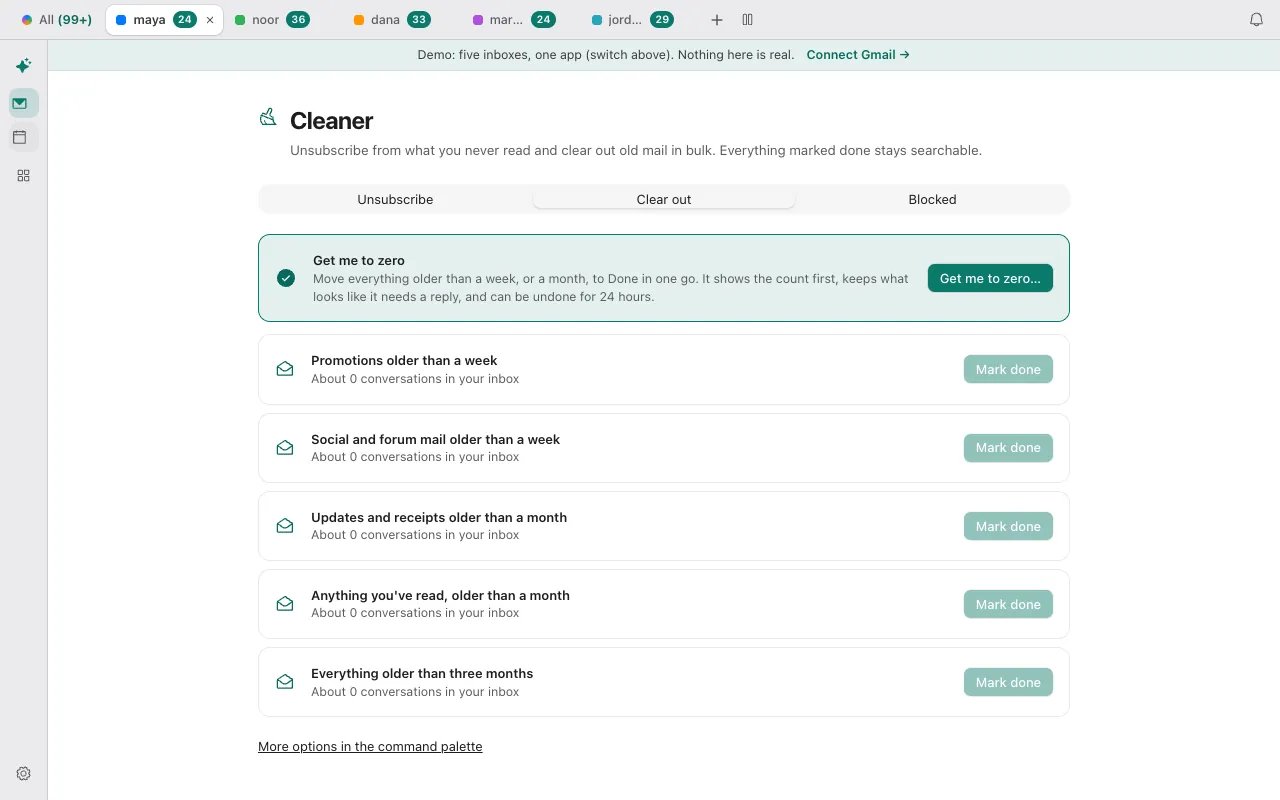
- Clear out only touches the inbox and marks mail done, so it frees no storage. For storage, delete through search and then empty Trash in Gmail; Donezo Inbox does not delete permanently.
Both routes work in the demo with sample mail. Open the live demo: it runs with sample mail, no sign-in.
Can Claude or Codex clear old email for you?
Yes, with a preview first. Ask the agent to search and count; then ask it to mark the results done (archive), which is reversible, or to trash them, which you approve.
Preview only
Using Donezo, count the conversations in my inbox older than one month (search: in:inbox older_than:1m), per account, and list the ten senders with the most of them. Do not change anything.Reversible next step: mark done, not delete
Mark done (archive) the conversations in my inbox older than one month from those ten senders, in batches of at most 100. Only bulk mail (the Other split: newsletters and notifications), never mail from people. Tell me how many you changed per account.Mark done is an organizing action, so with the default link setting it runs straight away and stays reversible: the mail is in Done and search. Trashing counts as a delete and waits in Settings, then Developer, then Approvals for your OK.
Tools involved: list_threads, update_threads. The full list, permissions and setup commands are in the connector documentation.
What if the old emails will not go?
- The search finds too much. Add a second filter:
category:promotions,from:,is:readorlarger:10M. Read a page of results before you delete. - Only one page was deleted. Click the notification link that selects all conversations that match, before Delete.
- Storage is still full. Empty Trash and Spam; both count until cleared. Google says the figure can take up to 48 to 72 hours after a big delete.
- Clear out says About 0 conversations. The Cleaner only counts what is still in the inbox. Older mail that is already done is not counted; use search to delete it.
Questions
Does deleting emails free up storage in Gmail?
Yes, once they leave Trash. Mail in Trash and Spam still counts until it is permanently cleared, by you or after 30 days.
How do I delete all unread old emails?
Search is:unread older_than:1y, select all conversations that match, and delete. In Donezo Inbox, run the same search and select up to 500 at a time.
What is the difference between older_than: and before:?
older_than: counts back from today in days, months or years. before: takes a fixed date such as 2024/04/18.
Is it safer to archive old mail instead?
If you may need it again, yes: archived mail stays searchable. Delete only what you want gone, or what is using space you need.