 Donezo Inbox
How to find archived emails in Gmail
Archiving in Gmail only takes a message out of the inbox; it is not deleted. Find it under More, then All Mail in the left sidebar, or type in:archive in the search box. To put it back, tick the message and click the Move to Inbox icon at the top.
Where do archived emails go in Gmail?
- Open Gmail on your computer.
- In the left sidebar, expand More and click All Mail. Archived messages are there, mixed with everything else.
- To see only archived mail, click the search box and type
in:archive. Add words to narrow it, for examplein:archive payment reminderorin:archive from:amy@example.com. - To move a message back, tick the box beside it and click the Move to Inbox icon at the top.
- To archive: tick the box beside a message and click the Archive icon at the top, or select it and press E (with keyboard shortcuts on).
in:anywheresearches all of Gmail, Spam and Trash included, if the message is not in the archive.
These steps follow Google's own documentation, read on October 19, 2026 for Gmail on the web (desktop). They were checked against the documentation, not clicked through in a real account. The search operators come from Google's page on refining searches (support.google.com/mail/answer/7190), read the same day. Menus change now and then; if a label differs, Google's page is the reference.
How do you find archived email in Donezo Inbox?
In Donezo Inbox, archiving is called Mark done, and it does the same thing in Gmail: the message leaves the inbox and stays in your account.
- Open Done in the sidebar, or press G then E. It lists conversations that are out of the inbox, newest first, without sent mail, drafts, snoozed, muted, spam or trash.
- To find one message, press / and search. The search box takes Gmail's own search syntax and looks across all your mail, archived included, for example
from:priya newer_than:7d. - To bring a conversation back, open or select it and press ⇧E (Move to inbox).
- Pressed E by mistake? The toast offers Undo, and Z undoes the last action.
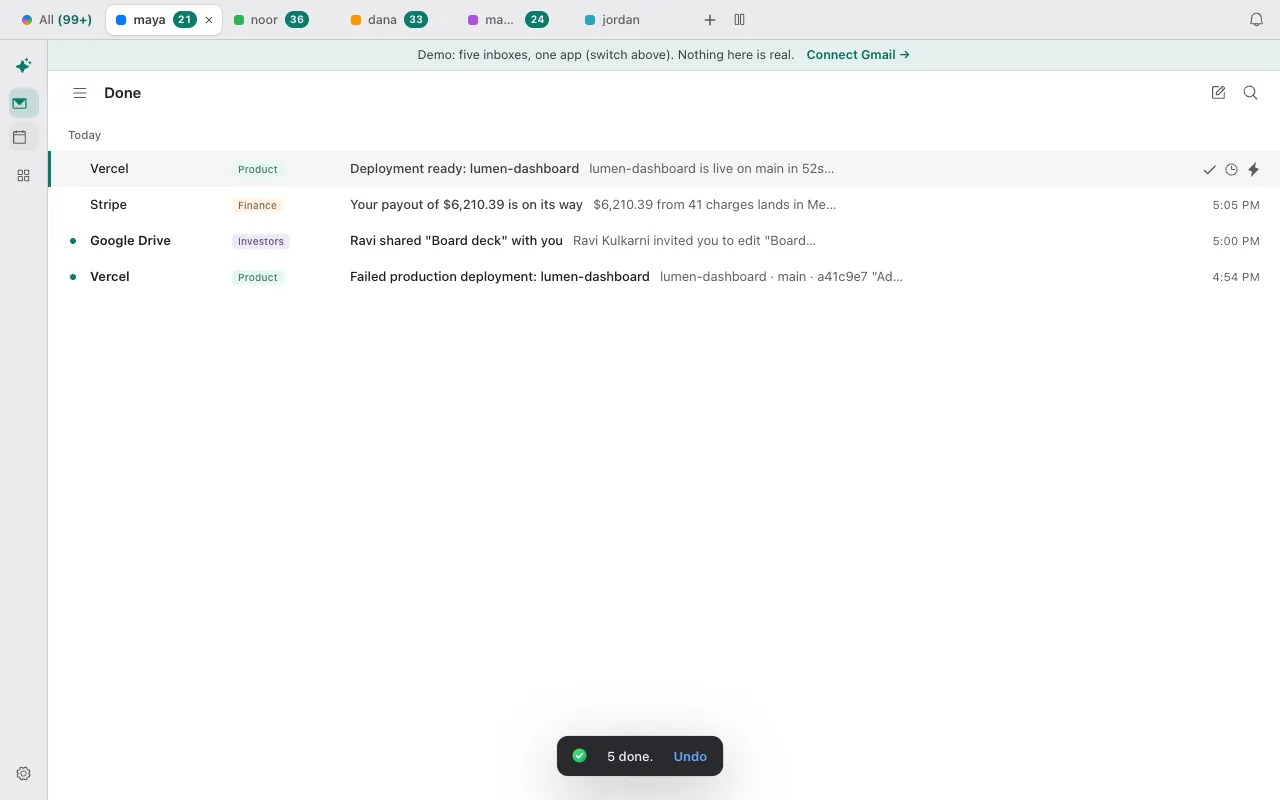
- All mail is also in the sidebar (press G then A) when you want everything, archived or not.
Mark a few messages done in the demo and find them again. Open the live demo: it runs with sample mail, no sign-in.
Can Claude or Codex find archived email for you?
Yes. The connector's list_threads tool takes Gmail search syntax across one or all of your inboxes and only reads. Moving something back to the inbox is a separate, explicit request.
Read only: find it
Using Donezo, list the conversations from Priya that are not in my inbox and are newer than 7 days (search: -in:inbox from:priya newer_than:7d). Do not change anything. Show subject, date and account for each.Then, only if you want it back
Move the conversation with the subject "Pilot pricing" back to my inbox. Only that one.Moving a conversation back to the inbox is an organizing action, so with the default link setting it runs without waiting for approval. Free accounts get 30 such actions in total; after that the agent can still read and search. A read-only link cannot change anything.
Tools involved: list_threads, get_thread, update_threads. The full list, permissions and setup commands are in the connector documentation.
What if the archived email is not there?
- It is not in All Mail. It may have been deleted or marked as spam. Search with
in:anywhereplus a word you remember; Trash keeps deleted mail for 30 days. - The search finds nothing. Remove filters one at a time. A wrong date or a misspelled address in
from:is the usual cause. - It keeps coming back to the inbox. A reply to an archived conversation can bring it back. In Donezo Inbox, muting (⇧M) keeps a conversation out of the inbox when new replies arrive.
- Donezo Inbox's Done view looks short. Done leaves out snoozed and muted conversations and sent mail. Use search or All mail for those.
Questions
What is the point of archiving instead of deleting?
Archived mail stays searchable for as long as it is in your account, while deleted mail is permanently removed 30 days after it lands in Trash. Archiving clears the inbox without losing anything.
How do I move emails from the archive back to the inbox?
In Gmail, tick them and click Move to Inbox. In Donezo Inbox, select them and press ⇧E.
Do archived emails count toward my storage?
Yes. They are still in your account, so they use storage like any other message.
Is there an Archive folder in Gmail?
No. Archived mail is in All Mail, and in:archive shows only the archived part.