 Donezo Inbox
How to know if someone read your email in Gmail
In Gmail on the web, open Compose, write the message, click More options at the bottom right, choose Request read receipt and send. Google says read receipts are only available to work or school accounts, not personal @gmail.com accounts, and that you should not rely on them. Donezo Inbox works differently: with Read statuses on, a message you send shows Opened once an invisible image in it loads. That shows an image was fetched, not that a person read it.
How do you request a read receipt in Gmail?
- Open Gmail on your computer and click Compose.
- Write your email as usual.
- At the bottom right of the compose window, click More options, then Request read receipt.
- Click Send.
- Who can use it: Google says read receipts are only available to work or school accounts and do not work with personal @gmail.com accounts. In a work or school account, an administrator decides whether they are available. Google's admin page lists the choices: off for everyone, on for addresses in your organization plus an allowlist of up to 100 outside addresses, or on for any address (in which case recipients must approve each receipt).
- What the recipient sees: if their organization requires approval, a message says you asked for a read receipt. Send receipts sends it now; Not now asks again the next time they open the message. If no message appears, the receipt was sent automatically.
- When no receipt comes back: Google lists a message sent to a group mailing list or alias, an administrator who restricts receipts to certain people, and a recipient whose email program does not sync in real time (such as a POP client that syncs on demand, or a Google Workspace Sync client). It also says an IMAP client may not send receipts automatically.
- What a receipt proves: Google's heading is “Don't rely on receipts to certify delivery”, and it says getting one does not always mean the recipient read the message. An IMAP client can mark a message as read without opening it, and Google says some non-IMAP mobile email systems may not return receipts at all.
These steps follow Google's own documentation, read on October 20, 2026 for Gmail on the web (desktop). They were checked against the documentation, not clicked through in a real account. Google's page gives steps for a computer only and does not say which Google Workspace editions include read receipts. The administrator options come from Google's admin page, knowledge.workspace.google.com/admin/gmail/let-users-request-read-receipts, read the same day. Menus change now and then; if a label differs, Google's page is the reference.
How do you see when someone opens your email in Donezo Inbox?
Donezo Inbox is an email client for Gmail and Google Workspace. Read statuses are not read receipts: the recipient is not asked and their mail program sends nothing back. Instead Donezo adds an invisible one-pixel image, loaded from Donezo's server, to the emails you send, and records when it loads. The setting is not limited to work or school accounts.
- Open Settings (⌘,), then General, and switch on Read statuses. It is off until you turn it on. Searching Settings for “read statuses” finds it too, and so does Privacy, where it is called “Show when my emails are opened”.
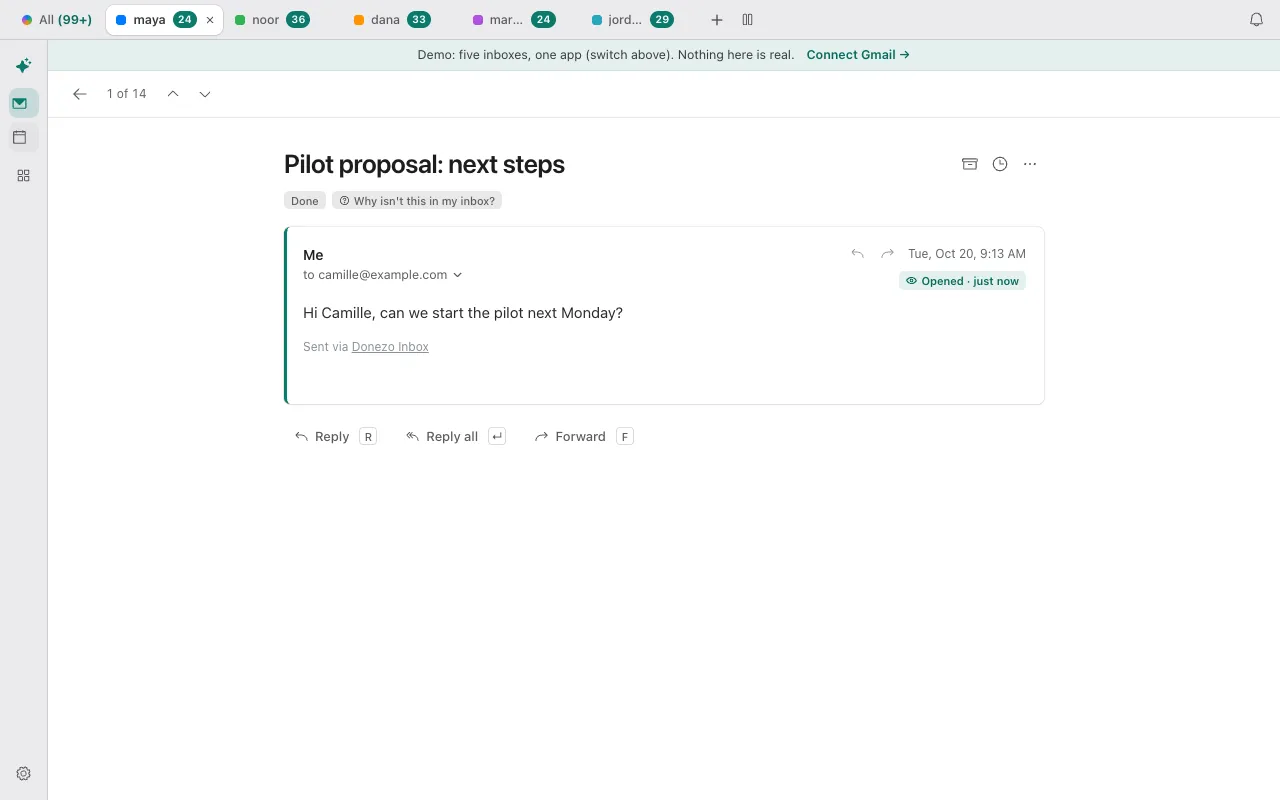
- Send an email as usual. One message carries one image.
- To see the result, open the message from Sent (press G, then T). A chip beside its date reads Not opened yet, or Opened with a count when it has loaded more than once and how long ago the last load was.
- Writing to 2 to 10 people and want to know which of them opened it? Choose Send each person their own copy in the Send menu, or switch it on under Settings, then Sales. Each person then gets a separate email with an image of its own. Replies come back separately and nobody sees who else got it. With more than 10 recipients, or with this off, it is one email and one image, so you cannot tell who opened it.
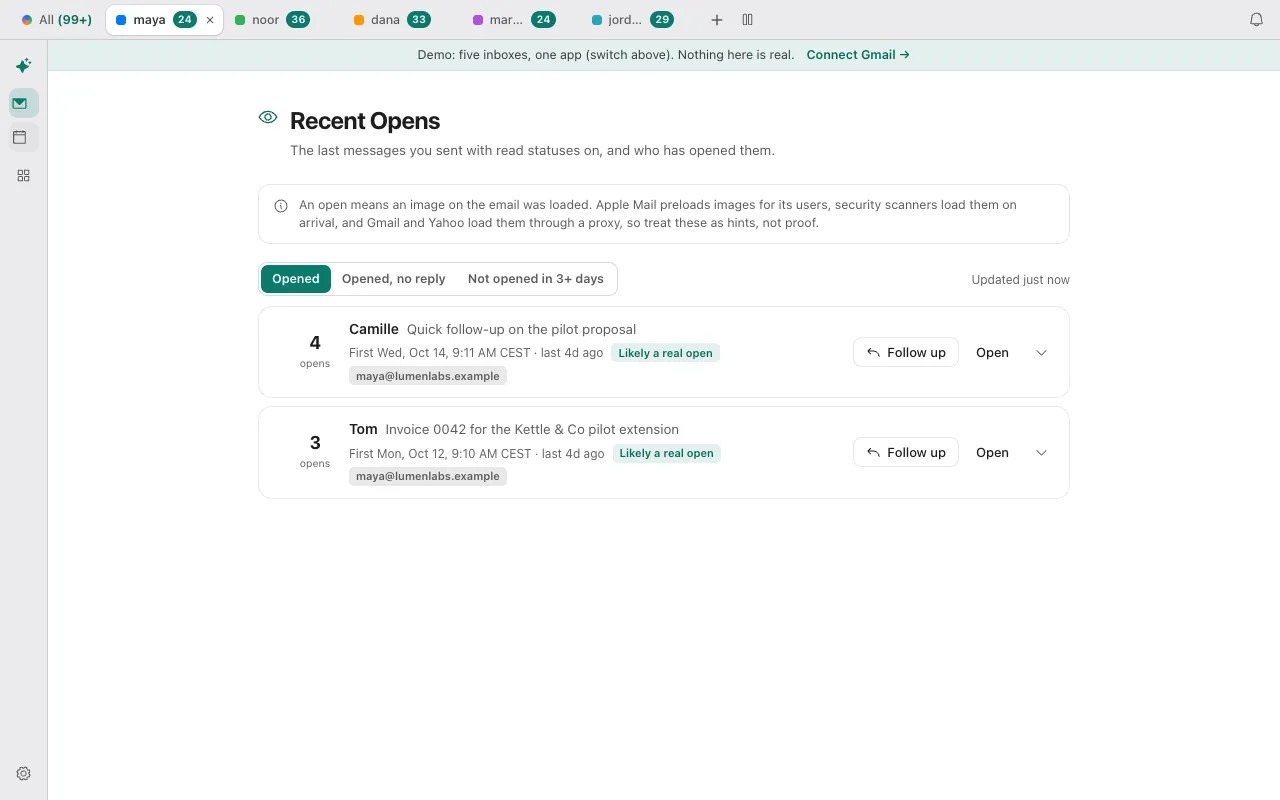
- Press G, then N for Recent Opens, a list of the last messages you sent with Read statuses on. It has three views (Opened, Opened, no reply and Not opened for a number of days you pick) and labels each message with how much the opens look like a person. Recent Opens is a Pro feature; the Opened chip under a sent message stays free.
| Label | When it is used | What it tells you |
|---|---|---|
| Likely a real open | An image load some time after sending, from a mail app | Probably a person reading it. |
| Maybe a real open | A load through Gmail's or Yahoo's image proxy | That usually happens when the message is opened, but the proxy hides repeat opens and where the reader is. |
| Probably automatic | A load within 30 seconds of sending, from Apple Mail, or from what looks like a security scanner or bot | Apple Mail preloads images for its users and scanners load them on arrival, so this is probably not a real open. |
| Not opened | No image has loaded | Nothing was fetched. A reader who blocks remote images is not counted, so it does not prove the message was unread. |
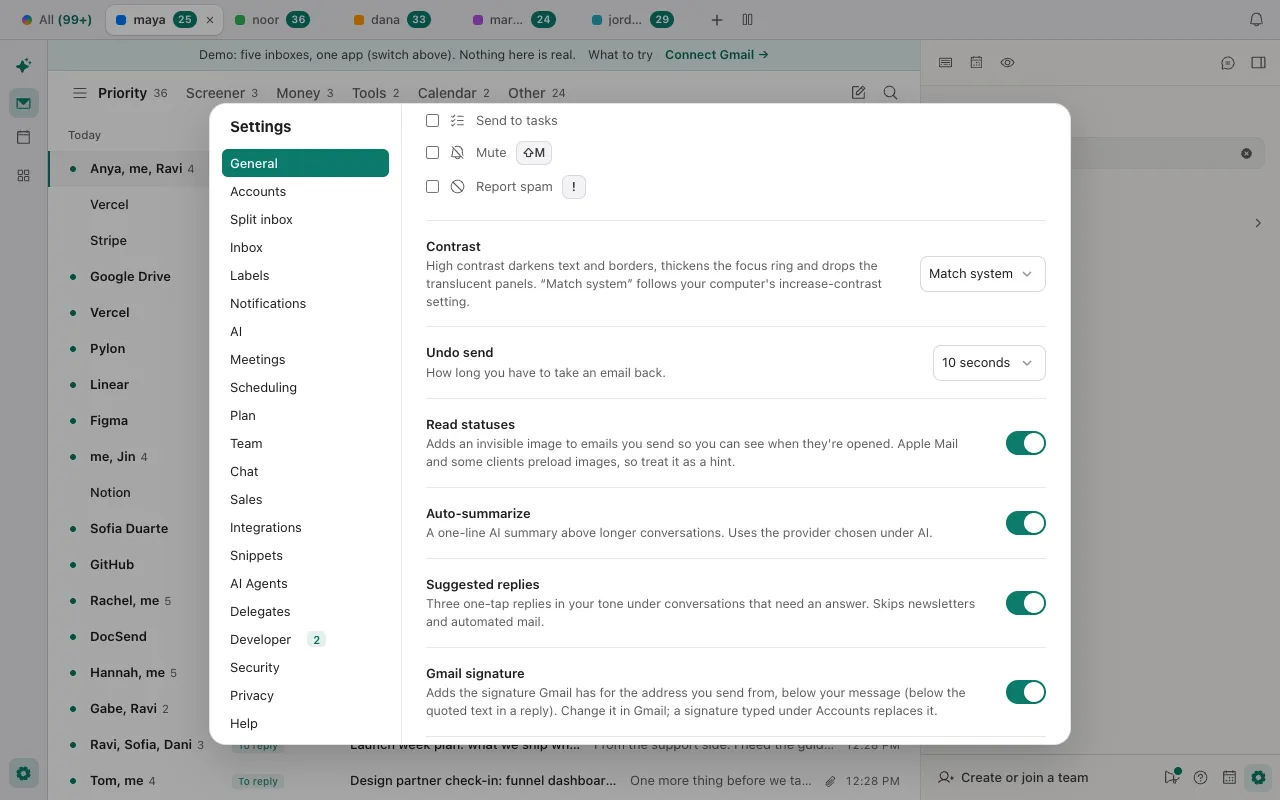
- Turn it off for one account: under Settings, then Sales, Track emails I send is the master switch, and with two or more accounts each has its own switch. Off means nothing is tracked, whatever the other settings say.
- Who is told: Donezo's own setting text says the people you write to are not told. Its terms say that if you turn read statuses on you are responsible for having a lawful basis and for telling the people you write to, where the law requires it (for example under the GDPR and ePrivacy rules in Europe).
- What Donezo keeps: for each tracked email, who it went to, its subject, which Gmail message it is and when it left; for each image load, when it happened, a coarse kind (Apple Mail, Gmail or Yahoo image proxy, security scanner or other) and how soon after sending. Its privacy page says no message text, IP address or raw browser identifier is stored, and that loads are deleted after six months.
- Not in every mailbox: read statuses are not available in an inbox somebody else has shared with you.
In the demo, an email you send shows Opened about 20 seconds later (simulated), and Recent Opens has sample rows. Open the live demo: it runs with sample mail, no sign-in.
Why is an open or a read receipt missing, or wrong?
- It says Opened seconds after you sent it. Apple Mail preloads images for its users, and security scanners load them as mail arrives. The Opened chip counts every image load; Recent Opens sorts them and labels a load within 30 seconds of sending, or from Apple Mail, as Probably automatic.
- It says Not opened yet, but they replied. The image only loads when the reader's mail app shows remote pictures. Donezo's privacy page says recipients who block remote images are not counted.
- You cannot tell who opened a message sent to several people. One email carries one image. Send each person their own copy (2 to 10 recipients) so each has an image of their own.
- Opens from Gmail readers look vague. Gmail and Yahoo load images through a proxy. The proxy hides repeat opens and where the reader is, which is why Recent Opens calls these Maybe a real open.
- There is no chip under a message you sent. Read statuses were off for that account when you sent it, or you sent it from an inbox somebody else shared with you. A message sent before you switched the setting on has no image and never gets a status.
- Gmail never returned a read receipt. Check Google's list: a group mailing list or alias, an administrator restriction, a recipient who tapped Not now, or an email program that does not sync in real time. A personal @gmail.com account cannot request one at all.
Questions
Can I tell if someone has read my email on Gmail without a read receipt?
Not reliably. The other method is an invisible image in the message, which is what Donezo Inbox's Read statuses use. An image load shows that something fetched the image: a person, Apple Mail preloading it, a scanner, or Gmail's proxy. It does not show that anyone read the message.
Can you put read receipts on emails sent from a personal Gmail account?
Google says no: read receipts are only available to work or school accounts. Donezo Inbox's Read statuses are a different mechanism and the setting is not limited to a kind of account, but the same caution applies to what an open means.
How do I get a read receipt in Gmail without the recipient knowing?
With Google's read receipts the recipient may be asked first, and can answer Not now. Donezo's setting text says the people you write to are not told, which is why its terms put the duty of telling them, where the law requires it, on you. Recipients can also block the image.
Does Opened mean the person read my message?
No. It means an image in the message was loaded. Apple Mail and security scanners load images whether or not anyone reads, and Gmail and Yahoo load them through a proxy. Donezo's own wording is to treat an open as a hint, not proof.
Is Recent Opens free?
No. Recent Opens, Smart Send and the CRM integrations are Pro features. Read statuses on the messages you send, and the Opened chip under them, stay free.