 Donezo Inbox
How to add another Gmail account
On a computer, sign in to Google, select your profile picture at the top right, choose Add account and sign in to the other account; pick an account from the same menu to switch. Google warns that with several accounts signed in it sometimes can't tell which one you mean. Donezo Inbox keeps every Gmail and Google Workspace account in one window instead: one tab each, an All inboxes list, and Ctrl+1 to 9 to switch. The free plan covers one inbox; Pro has no limit.
How do you add another account and switch between accounts in Google?
- On your computer, sign in to Google.
- At the top right, select your profile image or initial.
- On the menu, choose Add account.
- Follow the instructions to sign in to the account you want to use.
- Switch: select your profile image or initial at the top right again, and on the menu select the account you want to use.
- Same browser: Google says that when you are signed in to several accounts at once it sometimes can't tell which one you are using. Account settings usually are not shared between accounts, though some can carry over from your default account, which in many cases is the one you signed in with first.
- Sign out or remove one: go to myaccount.google.com, select your profile picture, choose Sign out or Sign out of all accounts, then Remove an account and select Remove next to it. Optionally, repeat in other browsers you used.
- A different job: reading another address's mail inside one Gmail inbox is set up under Settings, then See all settings, then the Accounts and Import (or Accounts) tab, then Add a mail account. Google says you can add up to 5 email addresses this way, and that you cannot add an Outlook account on a computer. Sending from another address uses Send mail as on the same tab; Google's Send mail as page says Gmail will stop supporting it for third-party (non-Gmail) addresses from January 2027, and that Google Workspace aliases and other Gmail addresses you own are not affected.
These steps follow Google's own documentation, read on October 20, 2026 for Gmail on the web (desktop). They were checked against the documentation, not clicked through in a real account. This is Google Account help, not a Gmail-only page: it does not name Gmail or give a limit on signed-in accounts. The other mail account and send-as notes come from support.google.com/mail/answer/21289 and support.google.com/mail/answer/22370, read the same day. Menus change now and then; if a label differs, Google's page is the reference.
How do you add and switch Gmail accounts in Donezo Inbox?
Donezo Inbox is an email client for Gmail and Google Workspace. Each account is connected with Google sign-in and shown in the same window, so there are no browser profiles to switch. It connects Gmail and Google Workspace accounts today; Outlook is on the roadmap, and iCloud and other IMAP accounts cannot be added.
- Open Settings (⌘,), then Accounts, and click Add account. The + at the end of the tab bar does the same.
- In Add an account, choose Google, click Continue and sign in with the Gmail or Google Workspace address.
- With two or more accounts, a tab bar appears above the app, one tab per account with its unread count. Click a tab, or press Ctrl + 1 to 9 for the first nine. The order is the order shown under Settings, then Accounts; change it with Reorder… or by dragging a tab. In the desktop and iPhone apps ⌘ + 1 to 9 works too; a browser keeps ⌘1 to 9 for its own tabs.
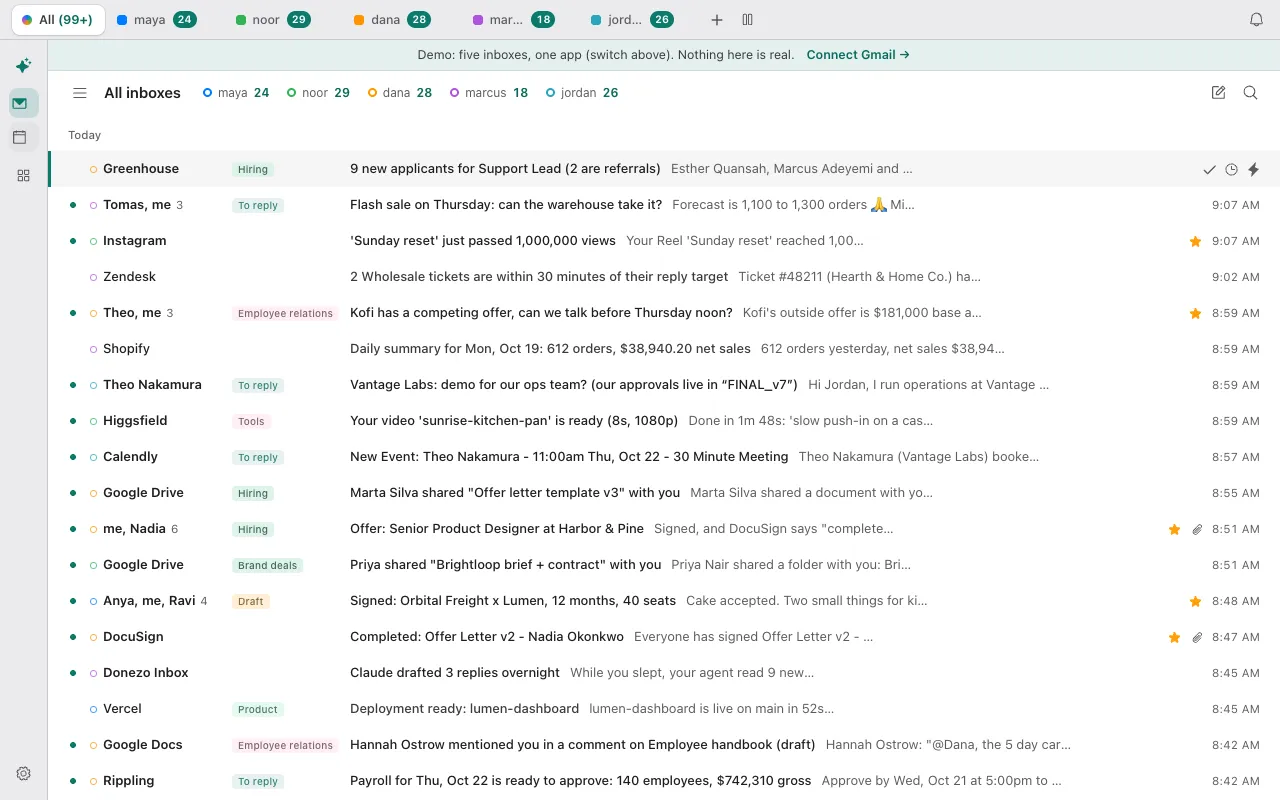
- Click the first tab, All inboxes, or press G then B, for the Priority split of every account in one list, newest first. Each conversation is marked with its account's color (the address shows on hover), and search works across accounts. Archive, snooze, star and reply act on the conversation's own account.
- To write from a particular address: a new message has a From picker that lists the addresses of every account, and ⌘⇧F cycles through them. A reply or forward stays with the account its conversation is in. It goes out from the address the conversation was sent to (or that you sent it from) when that is one of the account's Gmail send-as addresses, and from the default address otherwise.
| Plan | Inboxes | What the app says |
|---|---|---|
| Free | One | “Free includes 1 inbox.” Trying to add a second opens a panel titled More inboxes are Pro. |
| Pro, or the free Pro trial a new account gets | No limit | “Pro connects as many Gmail and Workspace inboxes as you like, searched and triaged together.” |
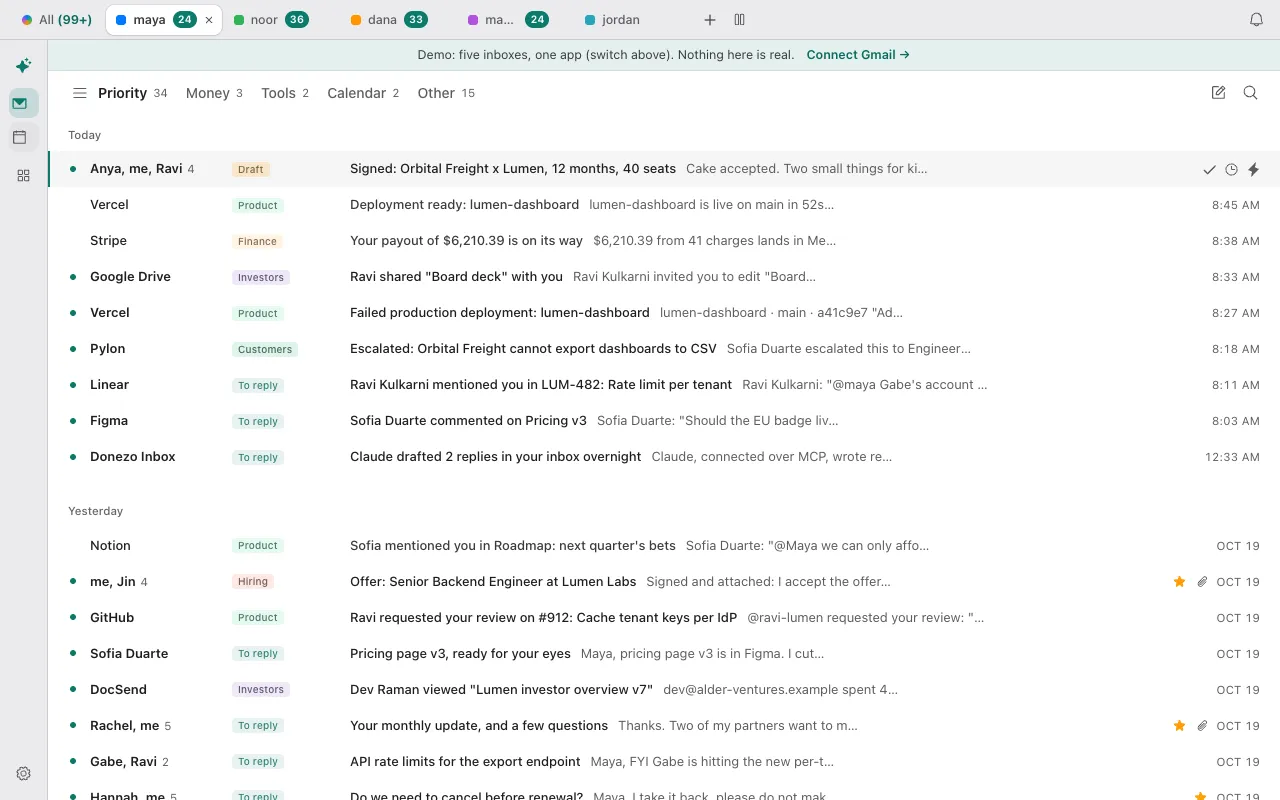
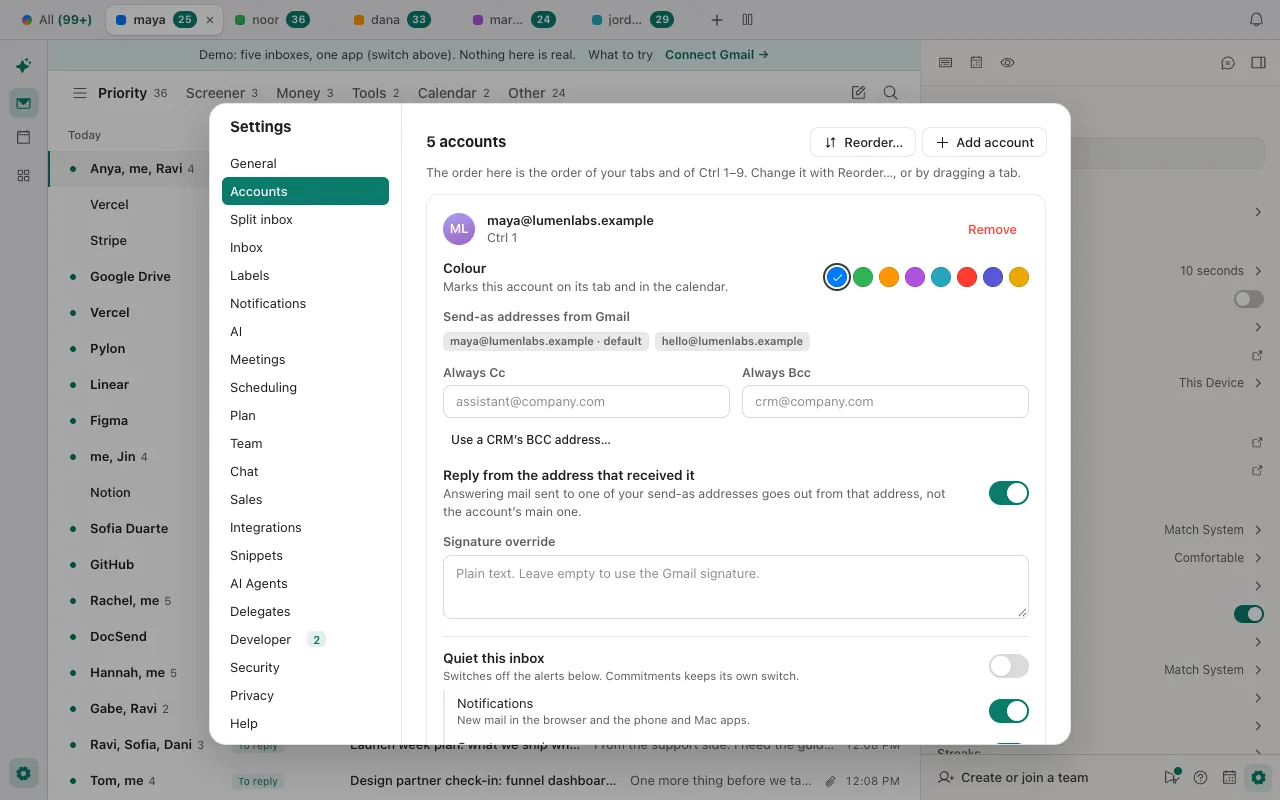
- Account colors and order: each account has a color (used on its tab, in All inboxes and in the calendar) and a position. The position decides which account Ctrl+1 to 9 opens.
- Reply from the received address is a switch under Settings, then Accounts, for each account: “Answering mail sent to one of your send-as addresses goes out from that address, not the account's main one.” Send-as addresses are the ones already set up in Gmail.
- All inboxes needs at least two inboxes and is on by default. Turn it off under Settings, then General, Show “All inboxes”. Accounts hidden from the tab bar or paused by your plan are left out of it.
The demo has five sample inboxes to switch between. Adding a real account needs a signed-in account. Open the live demo: it runs with sample mail, no sign-in.
Can Claude or Codex work across all your Gmail accounts?
Yes, through the Donezo Inbox connector. Its list_accounts tool returns every linked inbox with its inbox and unread counts. Most other tools take an optional account (an address, or a unique part of it): leave it out and the tool works across every inbox at once, with results tagged by account. Tools that act on one conversation, such as get_thread and create_draft, need the account named.
Read only: which inboxes are linked
Using Donezo, list every inbox I have linked, with its inbox and unread counts. Only read. Do not change anything.Read only: across all of them
What needs my attention across all my inboxes? List each item with the sender, the subject and the account it is in. Do not change anything.One account, a draft that is never sent
In my second inbox only, find the latest thread from Priya and save a draft reply that asks whether Thursday works. Do not send it. Tell me which account the draft is in and which address it is from.None of these prompts needs approval, because none sends, schedules, forwards or deletes. With the default setting, Read and write, with approval, those actions wait in your approval queue (Settings, then Developer, then Approvals) and expire after 24 hours; organizing actions run straight away. Reading, searching and drafting work on every plan, and actions that change mail need Pro after 30 free actions. A free account has one inbox, so there is only one to list.
Tools involved: list_accounts, inbox_overview, list_threads, get_thread, create_draft. The full list, permissions and setup commands are in the connector documentation.
What if an account will not add, or a tab or shortcut is missing?
- Google keeps opening the wrong account. That is the caveat in Google's help page: with several accounts signed in at once it sometimes can't tell which one you mean. Open the profile menu and select the account you want, or sign out of the others.
- Donezo Inbox says More inboxes are Pro. The free plan connects one inbox. The panel offers an upgrade, or you can keep the one you have. A new account's free Pro trial lets you connect more than one while it lasts.
- An inbox is paused. When a plan covers fewer inboxes than you have connected, the first inbox you connected stays active and the later ones are paused, not deleted. The app says “This inbox is paused because your plan covers fewer inboxes than you have connected” and it comes back as soon as you upgrade to Pro.
- Outlook, iCloud and other non-Google addresses are coming. Donezo Inbox connects Gmail and Google Workspace accounts today, and Outlook and other providers are on the roadmap. Google's own page says you cannot add an Outlook account on a computer through Gmail either.
- There is no tab bar, or no All inboxes tab. The tab bar shows with two or more accounts in a window at least 900 pixels wide. All inboxes also needs the setting under Settings, then General, to be on, and it leaves out hidden and paused accounts.
- ⌘1 to 9 does nothing. In a browser, ⌘1 to 9 stays with the browser's own tabs; use Ctrl + 1 to 9. ⌘1 to 9 works only in the desktop and iPhone apps.
- An account asks you to reconnect. Donezo Inbox needs you to sign in with Google again for that account. Under Settings, then Accounts, click Reconnect on it.
Questions
Can I have more than one email address on a Gmail account?
Yes, as send-as addresses. In Gmail, Settings, then See all settings, then the Accounts and Import tab has Send mail as (Google says third-party, non-Gmail addresses stop being supported there from January 2027). Donezo Inbox lists an account's send-as addresses in its From picker and can answer from the address a message was sent to.
How do I add another email inbox to Gmail?
Gmail's own way is Add a mail account under Check mail from other accounts, which Google says takes up to 5 addresses and cannot add an Outlook account on a computer. Donezo Inbox adds Gmail and Google Workspace accounts as separate tabs instead of merging them into one Gmail inbox.
Do I have to sign out of one account to use another?
In Donezo Inbox, no: click another tab or press Ctrl+1 to 9. Each account stays connected, and the tab bar shows its unread count.
Does Claude see all my accounts or just one?
One Donezo Inbox connection covers every inbox you have added. Claude's own built-in Gmail connector connects one Google account. See how to connect Claude to Gmail for both.
Does a free account include more than one inbox?
No. Free includes one inbox; Pro connects as many as you like. The Pro trial a new account gets applies to inboxes while it lasts.