 Donezo Inbox
What does snooze mean in Gmail?
Snooze takes an email out of your inbox for now and brings it back to the top of the inbox at the day and time you choose. Google describes it as removing the email from your inbox temporarily; it is not deleted, and you find it under Mail, then Snoozed. In Gmail on the web, point to the email, click the Snooze icon on the right and pick a time. In Donezo Inbox, press H, pick a time or type one such as “fri 9am”, and the conversation comes back unread at the top.
How do you snooze an email in Gmail?
- On your computer, go to Gmail.
- Point to the email.
- On the right, click the Snooze icon.
- Choose a later day and time to get the email.
- What happens: the email is removed from your inbox temporarily and comes back to the top of your inbox at the time you chose.
- Several at once: select the messages and click the Snooze icon at the top. If you cannot find Snooze there, click More, then Snooze.
- Find snoozed email: on the left side of the page click Mail, then Snoozed. You can also type
in:snoozedin the search bar. - Not on Google's page: it does not say how to bring a snoozed email back before its time, whether there is a limit on how many you can snooze, or what happens if someone replies while it is snoozed.
These steps follow Google's own documentation, read on October 20, 2026 for Gmail on the web (desktop). They were checked against the documentation, not clicked through in a real account. Google's page also has Android and iPhone tabs; only the computer steps were read. It lists no limits and does not describe unsnoozing early. Menus change now and then; if a label differs, Google's page is the reference.
How does snooze work in Donezo Inbox?
Donezo Inbox has its own snooze; it does not use Gmail's. Snoozing takes the conversation out of your Gmail inbox and tags it with a Gmail label named Donezo/Snoozed, which Donezo creates hidden from Gmail's label list and message list. The time is stored on Donezo's server, which checks every minute for snoozes that are due. At the time you chose it puts the conversation back in your inbox, unread, and removes the tag. Until then it sits in All Mail, and it does not appear in Gmail's own Snoozed list.
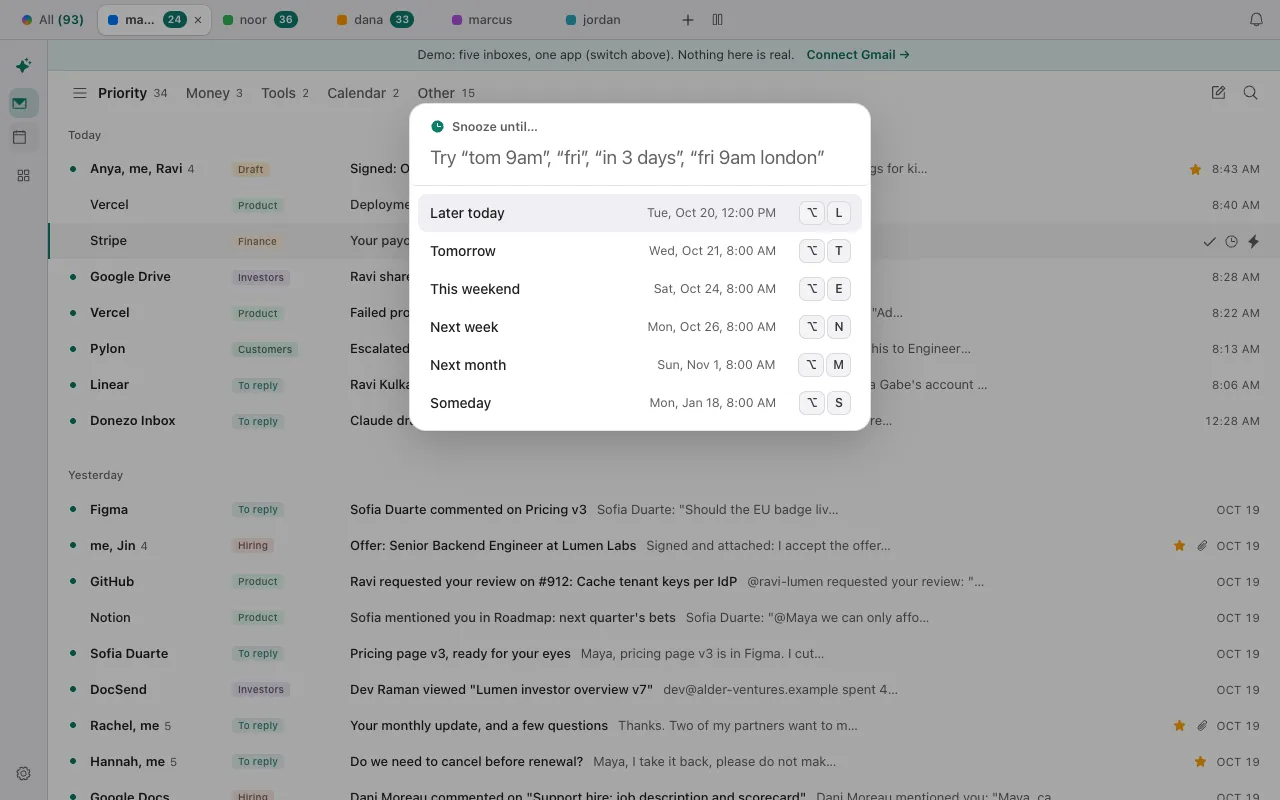
- Select a conversation, or open one, and press H. You can also click the clock icon that appears on the row. The picker is titled Snooze until….
- Choose a time. By default the presets are Later today, Tomorrow, This weekend, Next week, Next month and Someday, and only the ones that make sense right now are shown; each has an ⌥ shortcut printed beside it. The list can be changed under Reminder Suggestions in the phone settings, and the change reaches the desktop picker. Or type a time in words, such as “tom 9am”, “fri”, “in 3 days” or “fri 9am london”, and press Enter.
- The conversation leaves the inbox, and a message at the bottom says Snoozed until and the time, with an Undo button.
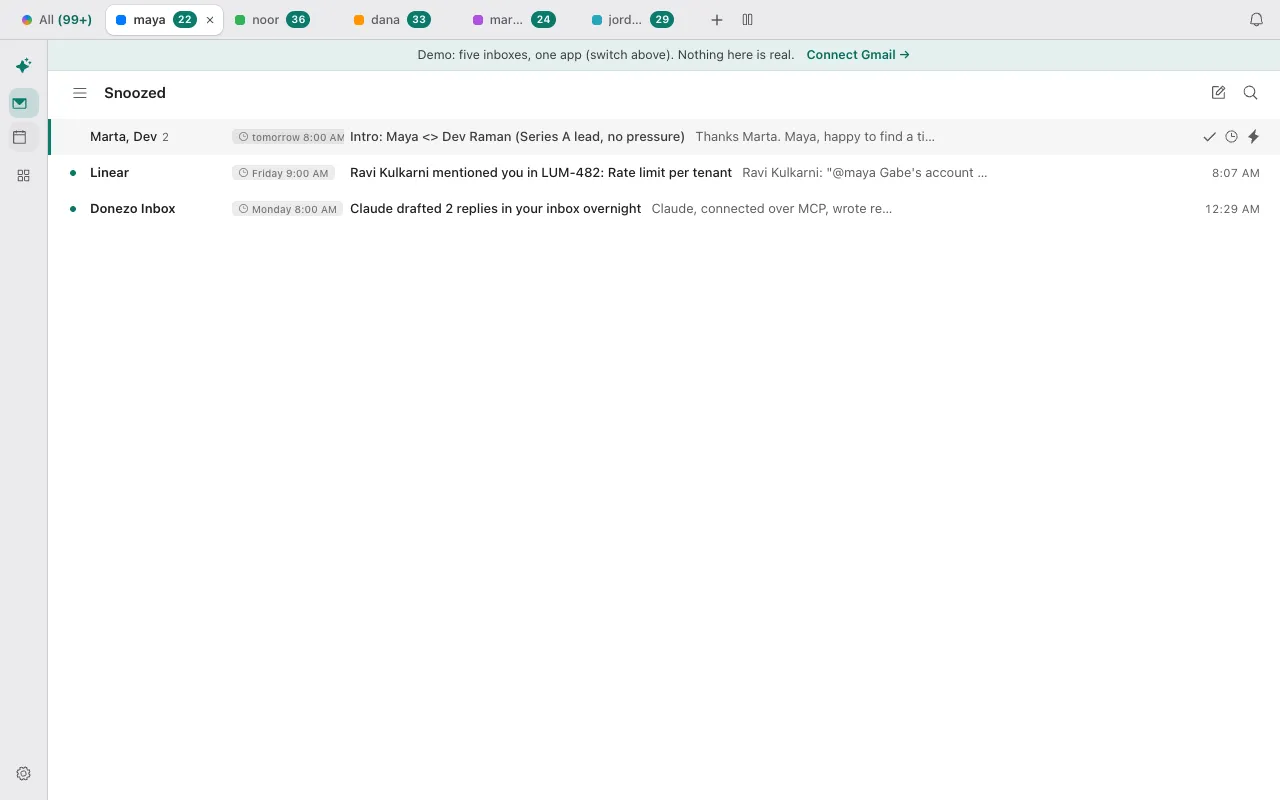
- To see what is snoozed, press G, then H. The Snoozed view lists the conversations soonest first, each with a clock chip showing when it returns.
- To change the time, press H on the conversation again. To bring it back now, open the Snoozed view, press ⌘K and choose Unsnooze.
- When the time comes, the conversation is back at the top of the inbox, unread, and its date reads Back with the time it returned. In Gmail's own web inbox it sits where its latest message date puts it, because Gmail does not know it was snoozed.
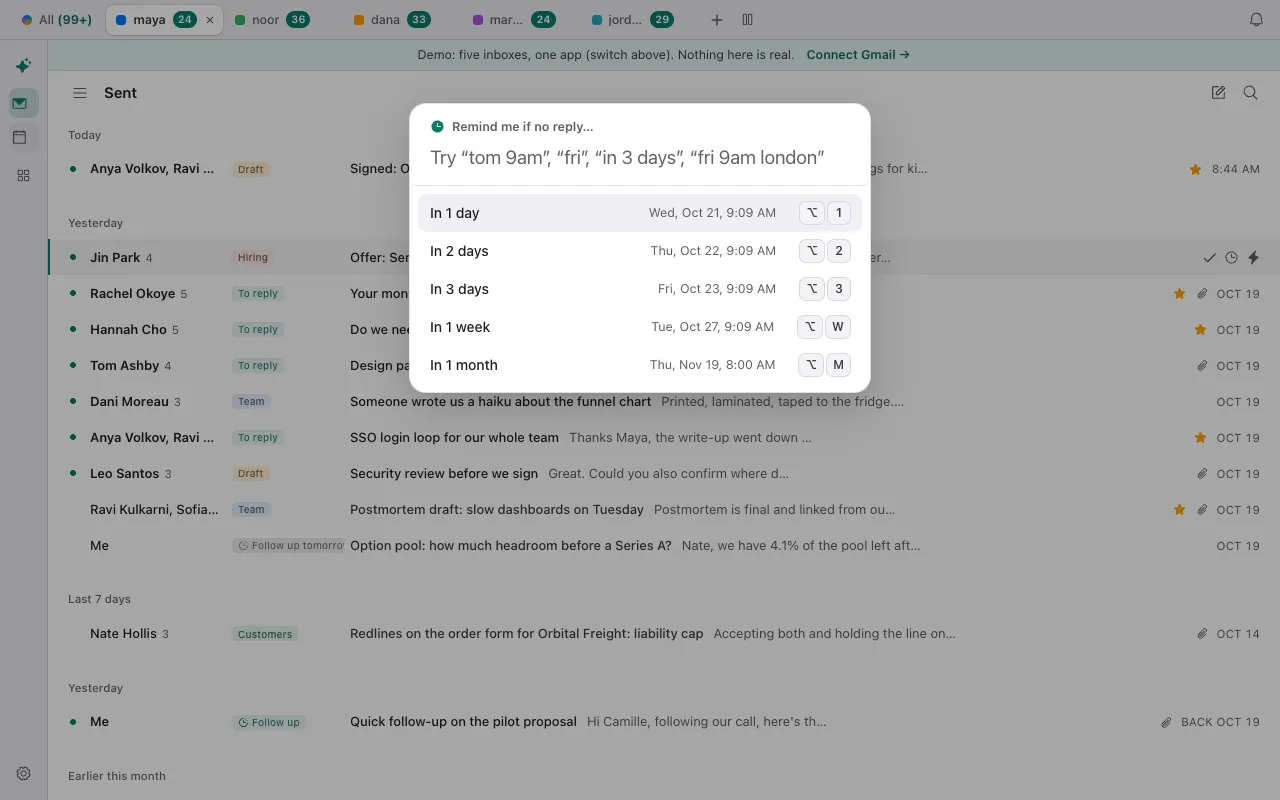
- If nobody replies: for a message you are waiting on, open the command bar and choose Remind me if no reply… (in a draft, ⌘⇧H). Pick In 1 day, In 2 days, In 3 days, In 1 week or In 1 month, or type a time. The conversation stays where it is, and comes back to the top, unread, only if nobody but you has written in it by then. They are listed in Follow-ups (press G, then R).
- Several at once: select more than one conversation (X selects the one you are on) and press H; one time applies to all of them.
- Tomorrow, Next week and bare days start at your “Morning starts at” time in Settings, then General (6 to 10 AM, 8 by default). Times typed without a place are read in this device's time zone; naming a place, as in “fri 9am london”, shows the time in both zones before you confirm.
- Follow-up after N days: in a draft, ⌘⇧U asks Donezo Inbox to bring the conversation back if nobody replies within 1 to 30 days. Settings, then General, has Follow up automatically for every message you send.
- On a touch screen: a row swiped to the right opens a Remind Me sheet by default, with times, a date and time picker, and a choice between “regardless” (a snooze) and “if no reply”. The sheet remembers the last choice on that device, so check it says “regardless” for a snooze. A longer swipe snoozes the conversation until tomorrow morning at once, with Undo. The swipe actions can be changed in the phone settings.
- The Done view leaves snoozed conversations out, so snoozing does not look like archiving. Snooze is part of the free plan.
- Compared with Gmail: the idea is the same, out of the inbox and back at a time you pick, but the two are separate. A snooze made in Donezo Inbox is not in Gmail's Snoozed list, and the Snoozed view in Donezo Inbox lists snoozes made in Donezo Inbox.
You can snooze sample mail without signing in; the snooze is not stored anywhere. Open the live demo: it runs with sample mail, no sign-in.
Can Claude or Codex snooze an email for you?
Yes, through the Donezo Inbox connector. snooze_thread takes a thread out of the inbox until a time you give it, set_reminder brings a thread back at a time if nobody has replied, and set_followup does the same after 1 to 30 days. Start by asking what it would snooze, so you see the list before anything moves.
Safe first step: a list, nothing changed
Using Donezo, list the conversations in my inbox from the last 3 days that are newsletters or notifications and that I have not opened, with sender, subject and account. Do not change anything.Then one snooze, with the time written out
Snooze the Linear notification about rate limits until Friday at 9:00 AM San Francisco time. Before you do, tell me the exact date, time and UTC offset you will use, and which account it is in.A reminder if nobody replies
In my last thread with Camille about the pilot, set a follow-up for 3 days from now, so it comes back only if she has not replied. Tell me when it is due.Snoozing, reminders and follow-ups are organizing actions, so with the default setting, Read and write, with approval, they run straight away without a prompt. They are also easy to undo: unsnooze the conversation in Donezo Inbox. Sending, scheduling, forwarding and deleting still wait in Settings, then Developer, then Approvals, and expire after 24 hours. snooze_thread takes an ISO 8601 time, so ask for the UTC offset to be included; a time without one may be read in the server's zone. set_followup needs a message you have sent in the thread. A free account has a limited number of agent actions that change mail; reading, searching and drafting are not counted.
Tools involved: list_threads, snooze_thread, set_reminder, set_followup. The full list, permissions and setup commands are in the connector documentation.
What if the email did not come back, or you cannot find it?
- You cannot find a snoozed email in Gmail. Click Mail, then Snoozed on the left, or search
in:snoozed. - You snoozed it in Gmail but it is not in Donezo Inbox's Snoozed view. That view lists snoozes made in Donezo Inbox. A snooze made in Gmail is in Gmail's own Snoozed list.
- You snoozed it in Donezo Inbox but Gmail's Snoozed list is empty. Expected: Donezo Inbox keeps its own snooze. Look in Donezo Inbox's Snoozed view (G, then H), or search Gmail for
label:donezo-snoozed; the label is hidden from the sidebar, so there is nothing to click. - It came back at the wrong hour. Tomorrow, Next week and bare days use your “Morning starts at” setting. Words typed with no place are read in this device's time zone; add one (“fri 9am london”) when you mean another.
- The snooze never took effect. A snooze made while the app is offline waits in a queue and is made when the connection is back; until then nothing will bring the conversation back. If an agent asked for a snooze, the time must be in the future.
- A reminder did not bring the conversation back. Remind me if no reply only returns it when nobody but you has written since. A reply means it stays where it is.
- An agent says its free actions are used. A free account gets a limited number of agent actions that change mail. The agent can still read, search and draft; Pro lifts the limit.
Questions
How is snoozing different from muting in Gmail?
Snooze brings the email back at a time you pick. Muting sends later replies straight to your archive, labeled Muted, with no time to return, and Google lists cases where a muted message still reaches your inbox: when it is sent only to you, to a Google Group you are in, or when you are added to To or Cc.
What does snoozing an email do to the message?
In Gmail it is removed from the inbox temporarily, and it returns to the top at your chosen time. In Donezo Inbox the message itself is untouched: Donezo takes the Inbox label off the conversation and puts its own Donezo/Snoozed label on, then reverses both at the chosen time and marks it unread. Nothing is sent, so the sender is not told.
Does a reply bring a snoozed email back early?
Google's page does not say. In Donezo Inbox the snooze itself does not check for replies; it returns the conversation at the time you chose, and a new message is delivered by Gmail as usual. Remind me if no reply is the option that depends on replies.
Can I snooze emails on my phone?
Google's page has Android and iPhone tabs that were not read for this guide. In Donezo Inbox, a swipe to the right on a row opens the Remind Me sheet on a touch screen; with “regardless” chosen, it is a snooze.
Is there a limit on how many emails I can snooze?
Google's page lists none. Donezo Inbox does not state one for snoozes; an agent on a free account has a limited number of actions that change mail.