 Donezo Inbox
Home / Features
Automate Gmail with plain-English rules, and what that does not mean
Donezo Inbox's assistant labels new mail, applies rules you write in plain English and drafts replies in your tone. A rule can mark mail done, mark it read, star it, apply a label or write a draft. It never sends mail by itself, it is off until you switch it on for an account, and it is not a workflow builder: no multi-step flows, no forwarding, no webhooks. It is part of Pro ($29/year) or works with your own AI key.
What can a rule do?
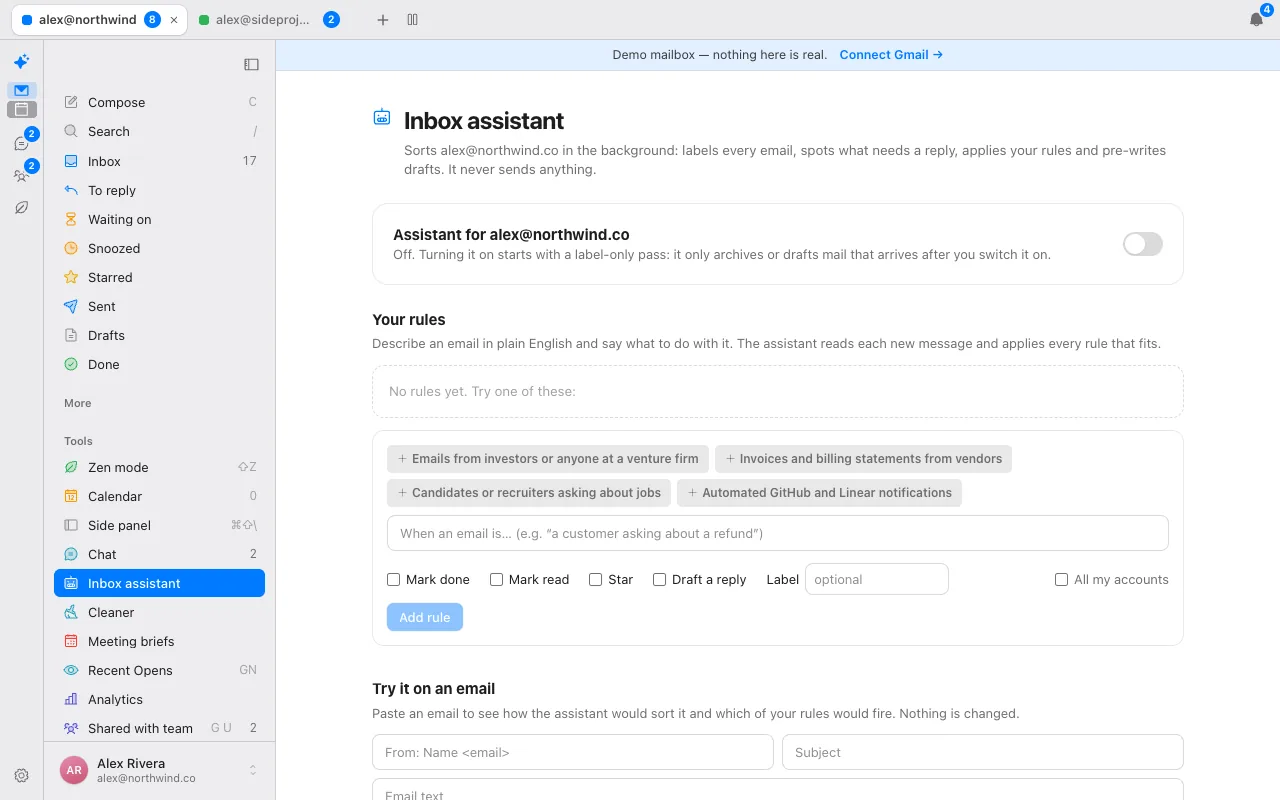
You describe the mail in a sentence – for example, emails from investors – and tick what should happen. A rule applies to one account or all of them, and the assistant judges each new email against it alongside its own labelling.
| Action | What happens | Changes your mail? |
|---|---|---|
| Mark done | Archives the conversation | Yes |
| Mark read | Marks it read | Yes |
| Star | Stars it | Yes |
| Apply a label | Adds a Gmail label, created if missing | Yes |
| Draft a reply | Writes a draft in your tone and leaves it for you | No: a draft only |
Every new conversation also gets one of seven labels, stored as real Gmail labels under Donezo: To reply, FYI, Notification, Marketing, Meeting, Receipt and Cold email. Because they are Gmail labels, they show in Gmail too.
What does it never do, and how do you stay in control?
- It never sends. The assistant, follow-up drafts and draft refresh create drafts or change labels. Nothing in them sends an email.
- It is off by default, per account, until you switch it on. Switching it on is a Pro feature, or needs your own AI key.
- Archiving and drafting apply only to mail that arrives after you switch it on, with an hour of grace. The labelling pass does look at the last 14 days of mail already in your inbox, so old mail can receive a label.
- You can test a rule first. The test box shows what the assistant would do to a sample email without touching mail.
- People on your never-send-to-AI list are skipped and left alone.
The assistant runs when Gmail tells Donezo Inbox about new mail, with a sweep every 10 minutes as a backup. It looks at inbox mail from the last 14 days, up to 40 conversations per scan.
What else can run on its own?
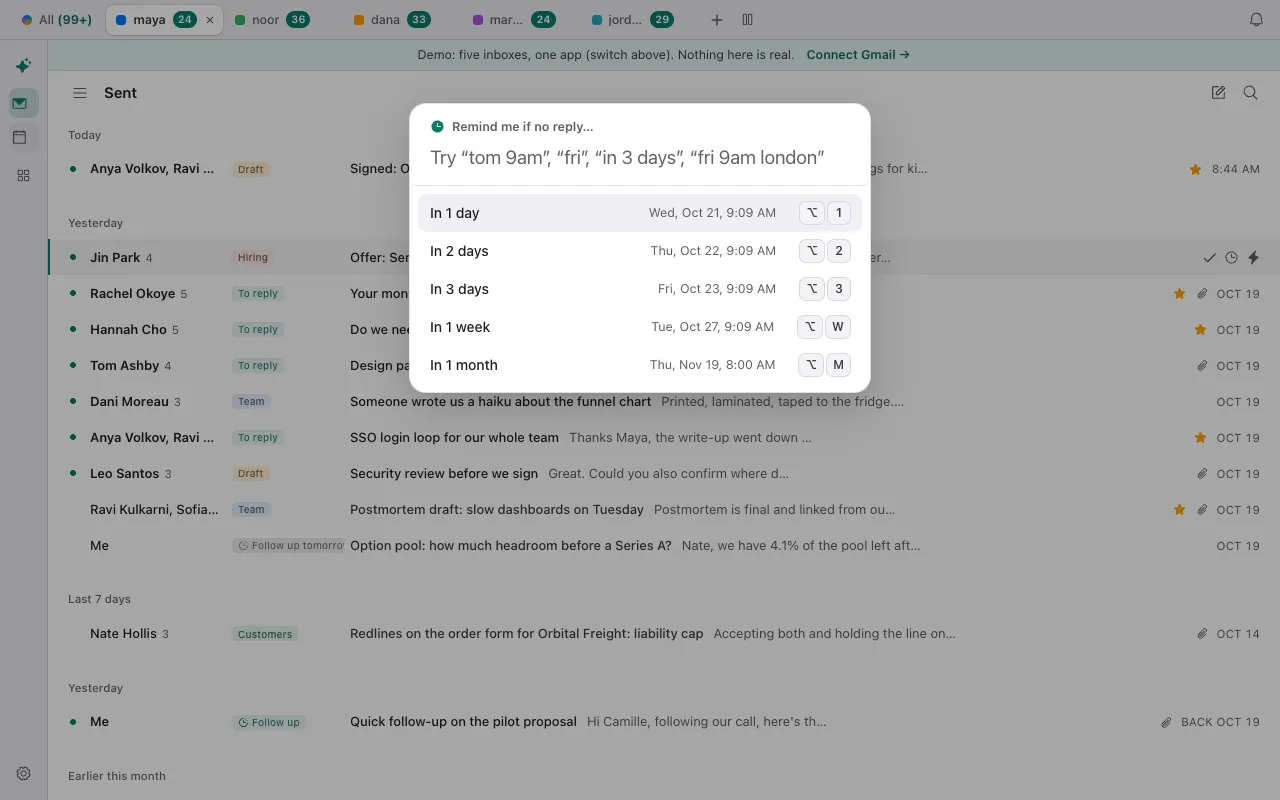
- Follow-up reminders. Choose 1 to 30 days; if nobody has replied since your last message, the thread comes back to the top of your inbox, unread. If someone replied, nothing happens.
- Send later, snooze and undo send. These run on the server, so they fire with the app closed.
- Auto-archive, a separate opt-in. It starts as a preview of what it would archive, covers only the categories and senders you pick, never touches starred mail or conversations you replied to, and archives at most 25 a run, with an undo.
- Get me to zero and the Cleaner for one-off clear-outs.
How is this different from Gmail filters and workflow tools?
| Gmail filters | Donezo Inbox's assistant | |
|---|---|---|
| How you describe the mail | Search criteria in the search options | A sentence in plain English |
| Actions | Label, archive, delete, star or forward | Mark done, mark read, star, label or draft a reply |
| Forwarding | Yes | No |
| Deleting | Yes | No |
| Writes a draft reply | No | Yes, in your tone |
| Cost | Free with Gmail | Pro, $29/year, or your own AI key |
Filters are exact, free and cover forwarding and deletion. The assistant reads the email, so it can act on what mail means rather than only on who sent it, at the cost of sometimes being wrong, which is why it drafts and archives but does not delete or send. For multi-step workflows across apps, a platform such as Zapier is the right kind of tool and the assistant is not. The AI email assistant page has the full list of what it does.
What are the limits?
- No multi-step workflows, no webhooks or integrations, no forwarding, no automatic replies and no calendar actions in a rule.
- A rule fires when the model judges the email matches, so it can miss or over-match. Use the test box and review the activity list.
- The hosted assistant runs on a small open model through Cloudflare Workers AI; to run it without Pro, add your own key under Settings, then AI, and switch on "Use my own key for the background assistant"; the assistant then uses that key and does not fall back to the hosted model.
- Donezo works with Gmail and Google Workspace today. Outlook and other mail providers are on the roadmap. On the roadmap: Android and Windows apps, single sign-on for teams, and a bot that joins calls. The Mac app is in closed beta (download it here), and the iPhone app is launching soon.
Questions
Can Gmail automate replies with AI?
Gmail has a vacation responder and filters, and Google's Gemini features are described on our Gmail AI assistant page. Donezo Inbox's assistant drafts replies in your tone but never sends them by itself.
Will the assistant send email without asking?
No. It creates drafts and applies labels, stars, read marks and archiving. Nothing in it sends mail.
Does the assistant change my old email?
It labels mail already in your inbox from the last 14 days. It archives and drafts only for mail that arrives after you switch it on.
Can a rule forward or delete an email?
No. A rule can mark mail done, mark it read, star it, label it or write a draft.
Is it free?
Switching on the assistant needs Pro at $29/year or your own AI key. Follow-up reminders, send later, snooze and the Cleaner work on the free plan.
Try a rule on sample mail
The demo opens a full inbox with sample mail and no sign-in. The assistant page has a test box that shows what a rule would do.