 Donezo Inbox
Home / Integrations
Gmail MCP server: the options, and what each one asks of you
A Gmail MCP server is the piece that lets an AI client such as Claude, Codex, ChatGPT or Cursor search, read and draft in your Gmail. There are four common routes: Google's own server, which is in Developer Preview and needs a Google Cloud project; open-source servers you run yourself, which also need your own Google credentials; automation platforms such as Zapier; and a hosted Gmail client with an MCP server built in, which is what Donezo Inbox is. Donezo Inbox is also the publisher of this page, so its row is the one to read with the most care. The table below lists what each route needs and what its own page does not say.
What are the ways to connect an AI client to Gmail?
| Route | Who runs the server | What you set up | Gmail actions its page names | Cost |
|---|---|---|---|---|
| Google's Gmail MCP server | Google (endpoint gmailmcp.googleapis.com/mcp/v1) | Developer Preview membership, a Google Cloud project and an OAuth web client for an AI agent (steps below) | Tool reference: search_threads, get_thread, create_draft, list_drafts, list_labels and label and unlabel tools. Scopes: gmail.readonly and gmail.compose | Not stated on the setup page |
| Open-source servers (for example on GitHub and Docker Hub) | You, on your machine or your own host | Usually your own Google Cloud project and OAuth credentials; one Docker Hub listing uses IMAP and an app password instead. Read each README | Varies by project: searching, reading, drafting, sending and labels are typical | Free software; you carry the hosting and upkeep |
| Zapier's Gmail MCP | Zapier (mcp.zapier.com) | Not stated on the Gmail page; it links to a quickstart | Find Email, Get Conversation, Create Draft, Create Draft Reply, Reply to Email, Send Email, Archive Email, Delete Email, Forward Email, Add and Remove Label, Create Label | Not stated on the Gmail page |
| Donezo Inbox's connector (the publisher of this page) | Donezo Inbox, hosted at donezoinbox.com/mcp | Add the address to your AI client and sign in with your browser. No Google Cloud project and no key to copy | 32 tools across every Gmail inbox you have added: find and read, draft, send, triage, snooze, reminders, follow-ups, rules, calendar | Free: unlimited read, search and draft, plus 30 actions once. Pro, $29/year: no action limit |
The routes are not equals. Google's server is the one to watch if you want an official path, and it is a Developer Preview. Open source gives you the most control and the most to maintain. Zapier is worth looking at if Gmail is one step in a longer automation. A Gmail client with MCP built in suits someone who wants to open Claude and ask about their mail today, across several inboxes, without creating cloud credentials.
What does Google's own Gmail MCP server need?
Google's setup page, last updated on October 29, 2026, calls the server part of the Google Workspace Developer Preview Program, which grants early access to some features. You need a Google Cloud project with both gmail.googleapis.com and gmailmcp.googleapis.com enabled, and an OAuth 2.0 web client created with the option for an AI-powered agent selected. The server speaks Streamable HTTP with OAuth. The page warns that mail can carry instructions meant to steer an agent (indirect prompt injection) and advises screening content and reviewing actions. Read it at developers.google.com.
Two practical notes from that page. Requests can be refused if the OAuth client was created without the AI-agent option, so an older client may need replacing. And if no refresh token is issued, you may be asked to sign in about every hour.
How does Donezo Inbox's Gmail MCP server work?
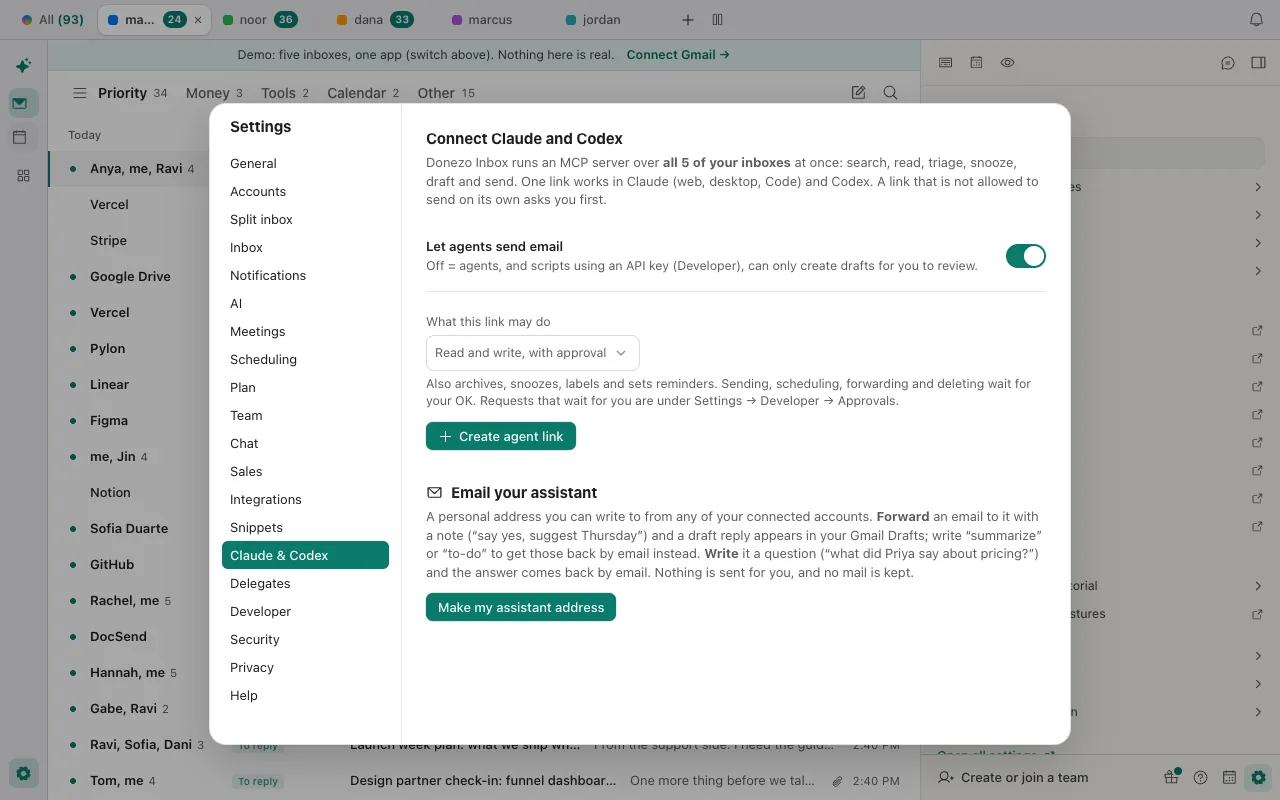
- In Donezo Inbox, open Settings, then AI Agents, and copy the server address,
https://donezoinbox.com/mcp. - Add it to your client: a custom connector in Claude, or one command in Claude Code or Codex (below).
- Your browser opens a Donezo Inbox page where you choose what the agent may do. The default is read and write with approval, and a first sign-in is capped at that level.
- Ask your agent about your mail. Without a named inbox, a question runs across every Gmail inbox you have added, up to 40 at a time.
Claude Code
claude mcp add --transport http --scope user donezo https://donezoinbox.com/mcpCodex
codex mcp add donezo --url https://donezoinbox.com/mcpThe commands change between versions of those tools, so check claude mcp add --help and codex mcp --help. Full setup and every tool are in the connector docs. If a sign-in fails, start with the troubleshooting section: it covers the one address that works, approvals that are waiting and sign-in expiry. The guide how to connect Claude to Gmail compares Anthropic's own Gmail connector with this one.
What can the agent change, and what stops it?
The connection has four levels: read only, drafts only, read and write with approval, and read and write. Reading, searching and drafting never change your mail. By default, sending, scheduling, deleting and creating rules wait in an approval queue under Settings, then Developer, then Approvals, and a request expires after 24 hours. Archiving, starring, snoozing, reminders and follow-ups run straight away.
- Drafts only is not a hard block on sending. A send from a drafts-only connection waits for your approval. Read only refuses it, and the setting that lets agents send email, when switched off, makes every send fail.
- Inbox limits. A key or app can be limited to chosen inboxes, and a rule or an event must then name its inbox.
- People on your never-send-to-AI list are left out of every result and their threads cannot be read by an agent.
- Mail is treated as untrusted. Text returned to an agent is marked as written by others, and outgoing text is checked for data leaving. That lowers the risk of a hostile email steering an agent. It does not remove it, so read what an agent proposes before you approve it.
- Revoking a key or app stops it at once and rejects its pending requests. An unused sign-in lapses after 30 days.
Donezo Inbox does not store your mail for the connector. It keeps an activity log for 90 days with the tool, the time and a short summary, never the mail itself. What we store lists the rest.
What are the limits?
- Donezo works with Gmail and Google Workspace today. Outlook and other mail providers are on the roadmap. On the roadmap: Android and Windows apps, single sign-on for teams, and a bot that joins calls. The Mac app is in closed beta (download it here), and the iPhone app is launching soon.
- The free plan: read, search and draft are unlimited. Everything that changes mail shares one allowance of 30 actions, used once and never reset. An action counts when it is queued, so a request you reject, or one that expires, still uses one. Pro ($29/year) has no action meter, and every new account gets 21 days of Pro with no card.
- Rate limit: 120 connector calls a minute per person.
- Sign-up is limited. Google's restricted-scope verification and security assessment are not finished, which caps the service at 100 users until they are. See security.
- Clients tested: we have signed in and listed accounts from Claude Code and ChatGPT. Claude on the web and desktop and Codex are not yet tested, and no tool that changes mail has yet been run from a real client. The connector docs list which clients have been tested.
Questions
Is there an official Gmail MCP server?
Yes. Google publishes one at gmailmcp.googleapis.com, in Developer Preview as of October 31, 2026. It needs Developer Preview Program membership and a Google Cloud project with an OAuth client created for an AI agent.
Do I need a Google Cloud project to connect Claude to Gmail?
For Google's server and for most open-source servers, yes. Donezo Inbox's connector does not need one: you add its address to your AI client and sign in with your browser.
Can an AI agent send email through a Gmail MCP server?
It depends on the server and its permissions. Google's tool reference lists draft, label and read tools and no send tool. Zapier's page names Send Email. In Donezo Inbox an agent can send only if you allow sending, and by default a send waits for your approval.
Does a Gmail MCP server work with more than one Gmail account?
Google's setup page does not say how several Gmail accounts are handled. Donezo Inbox's connector reaches every inbox you have added in one conversation, and you can limit a connection to chosen inboxes.
Is it safe to let an AI read my email?
Mail is written by other people, and an email can contain text meant to steer an agent. Google's setup page warns of this. The sensible habits are the ones in the control section above: start read only or drafts only, keep sends behind approval, and keep sensitive correspondents on a never-send-to-AI list.
What if Claude says authorization failed or it could not reach the server?
Check the address first: it must be exactly https://donezoinbox.com/mcp, because the www and http addresses redirect and Anthropic says Claude drops its sign-in on a redirect. The troubleshooting section of the connector docs lists the other causes and a check that needs no key or password.
Is Donezo Inbox's connector free?
Reading, searching and drafting are free. Actions that change mail include 30 free actions in total, then Pro at $29/year.
See the connector's settings in the demo
The demo opens a full inbox with sample mail and no sign-in. The AI Agents settings show the server address and each client's steps.