 Donezo Inbox
Home / Features
Clean up a Gmail inbox: the Cleaner in Donezo Inbox
The Cleaner in Donezo Inbox lists the senders filling your inbox, least-read first, and lets you unsubscribe, archive, block or keep each one. A second tab archives old mail in bulk by category and age, and Get me to zero moves everything older than a date you choose into Done and keeps what is starred or waiting on your reply, with a 24-hour undo. It archives and never deletes, it works on one inbox at a time except for Get me to zero, and the standing rules for future mail need the assistant. The Cleaner itself is free.
How does the unsubscribe list work?
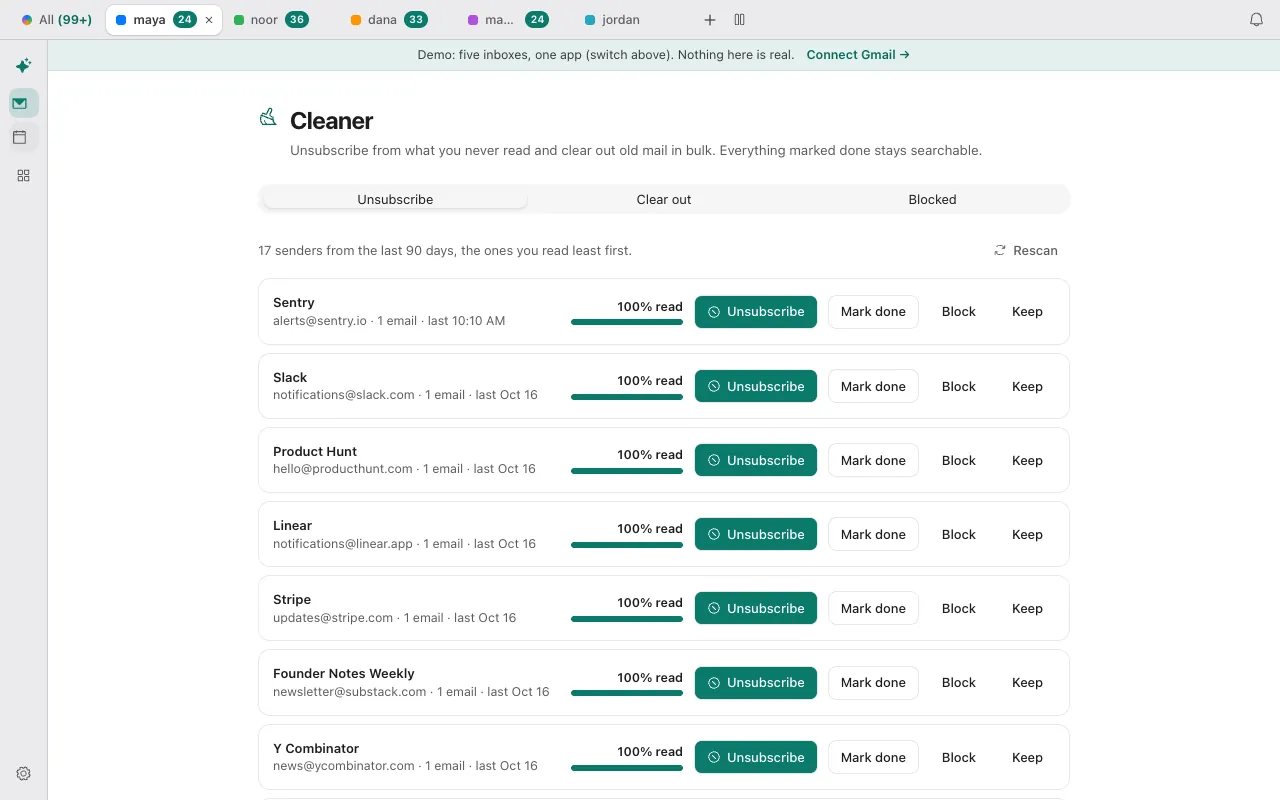
The Cleaner reads up to 300 bulk-looking conversations from the last 90 days in the inbox you are viewing and groups them by sender, with the least-read senders first. Nothing happens by itself: each row waits for your click.
| Button | What it does |
|---|---|
| Unsubscribe | Sends the unsubscribe request, archives that sender's mail in your inbox and saves a rule to archive its future mail |
| Mark done | Archives that sender's mail and saves the same rule, without unsubscribing |
| Block | Saves a rule that sends the sender's future mail to spam. Mail already in the inbox stays |
| Keep | Takes the sender off the list |
Unsubscribing depends on what the sender offers. If the email carries a one-click https link, Donezo Inbox sends the request for you. If it offers only a mailto address, the app sends an email from your account. If it offers only a web page, the page opens in a new tab and you finish it there. With no unsubscribe information at all, nothing is sent. The confirmation message reads the same in each case, so for web-page senders check that you completed the page.
The rules for future mail (archive or spam) are applied by the assistant, which is part of Pro or needs your own AI key. On the free plan the first archive happens, and the standing rule does not run afterwards. How to unsubscribe from emails in Gmail in bulk covers Gmail's own list.
How do you clear out old mail?
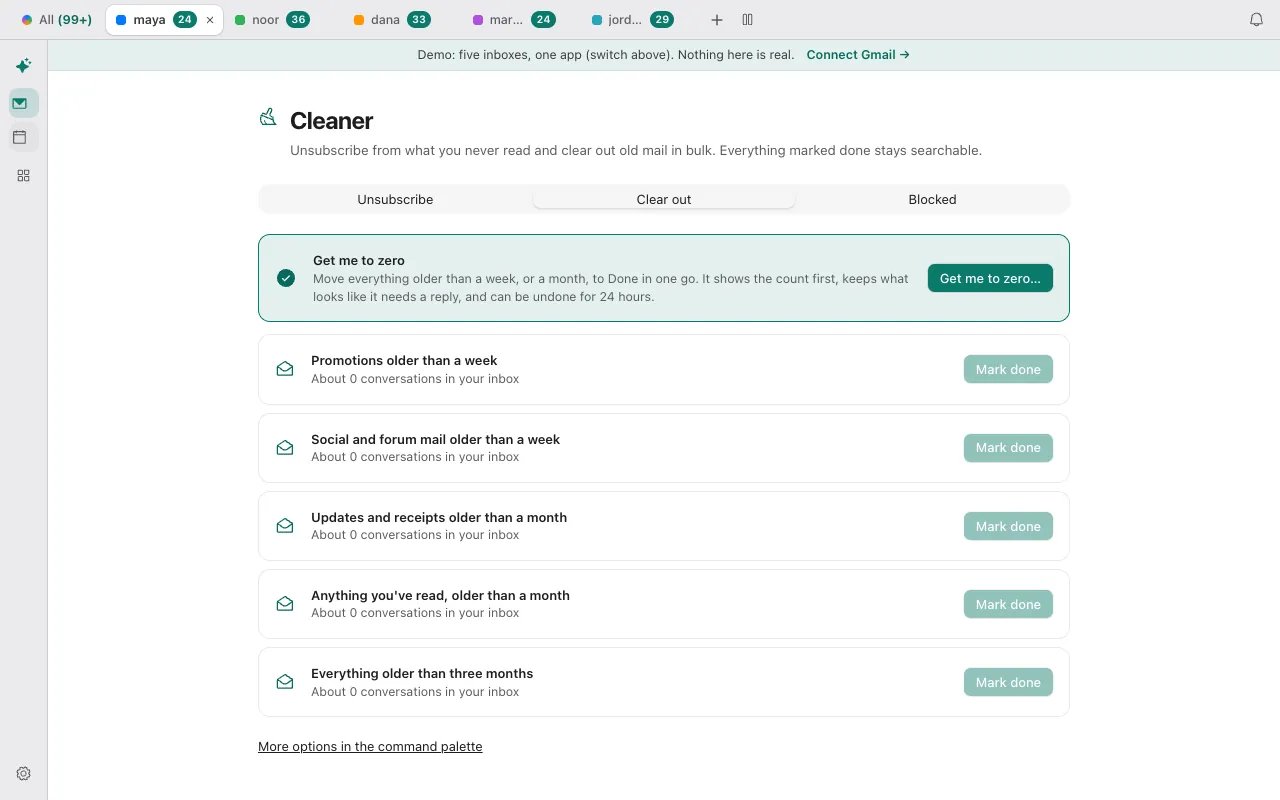
The Clear out tab has five presets, each showing a count before you act: Promotions older than a week, Social and forums older than a week, Updates older than a month, Read mail older than a month, and everything older than three months. Mark done asks you to confirm, then removes the mail from the inbox in batches of 500, up to 20,000 in one run. It archives. Nothing in the Cleaner deletes, and the presets have no Undo button, though each conversation can be brought back from the Done view.
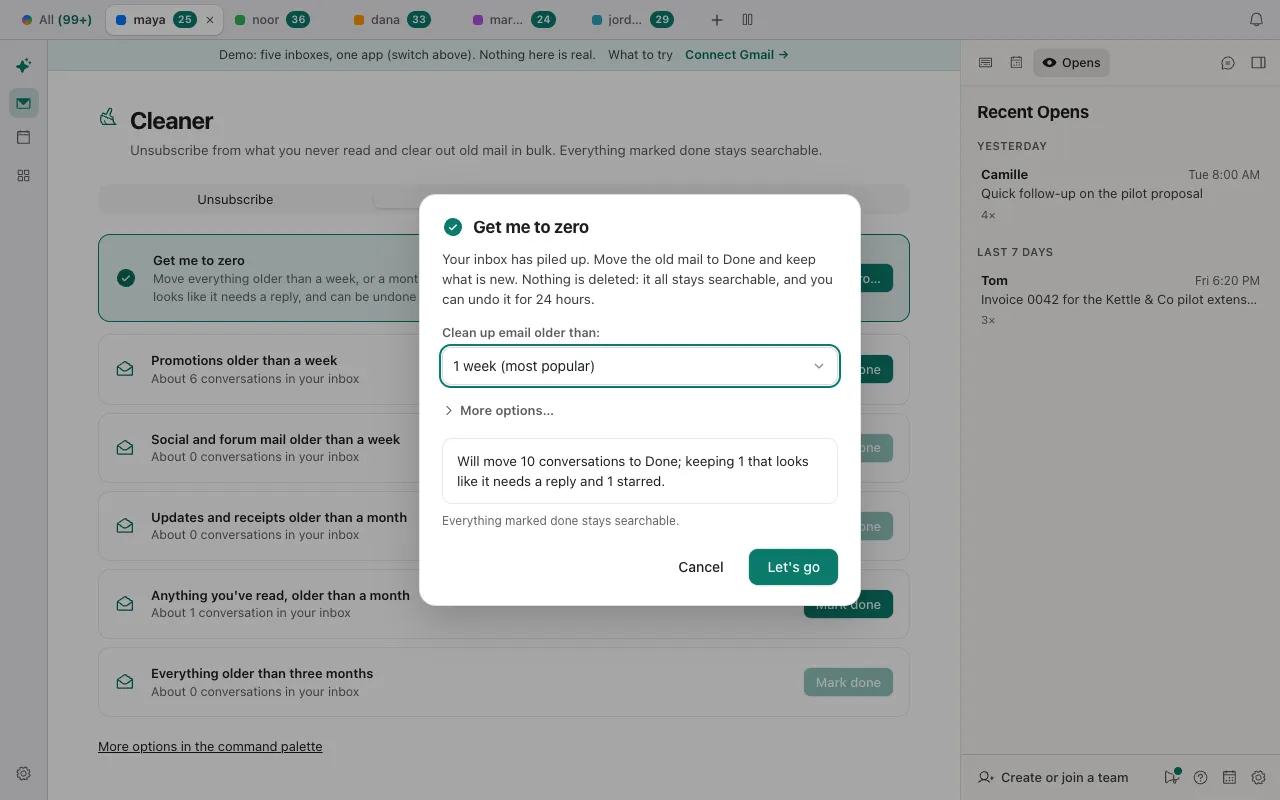
Get me to zero is the careful version. You pick an age – one week, two weeks, one month, three months or six months – and it shows how many conversations it will move and what it keeps: starred conversations, ones waiting on your reply and ones with a draft. It handles up to 1,500 old conversations at a time and keeps an Undo for 24 hours. It is the one part of the Cleaner that can run on all your inboxes.
How is this different from Gmail's own tools and from SaneBox?
| Gmail's own tools | SaneBox | Donezo Inbox Cleaner | |
|---|---|---|---|
| What it is | Built into Gmail: a subscriptions list, filters and search | A filter service that sorts mail inside the client you already use | A cleaner inside an email client |
| Works with | Gmail | Any email client (its pricing page says all plans work with any email client) | Gmail and Google Workspace today; Outlook is on the roadmap |
| Removes mail | Filters can label, archive, delete, star or forward | Sorts mail into folders, for example SaneLater | Archives; never deletes |
| Cost | Free with Gmail | From $4.54 a month billed every 2 years (Snack plan, 1 account) | Free for one inbox; Pro is $29/year |
If you want a service that cleans in the background inside Apple Mail or Outlook, SaneBox is built for that. If you want to see and decide sender by sender, and then keep the inbox tidy from a fast client, that is what the Cleaner is for. Prices change, so check the linked page before you buy.
What does the Cleaner not do?
- It does not delete. To delete in bulk, see how to mass delete emails in Gmail.
- Unsubscribe and Clear out work on the inbox you are viewing. Get me to zero can run on all inboxes.
- It scans the last 90 days and up to 300 conversations for the sender list.
- Blocking affects future mail only.
- Donezo works with Gmail and Google Workspace today. Outlook and other mail providers are on the roadmap. On the roadmap: Android and Windows apps, single sign-on for teams, and a bot that joins calls. The Mac app is in closed beta (download it here), and the iPhone app is launching soon.
Questions
Does the Cleaner delete my emails?
No. It archives, which removes mail from the inbox and keeps it in All Mail. Nothing in the Cleaner deletes.
Can I undo a clean-up?
Get me to zero keeps an Undo for 24 hours. The Clear out presets have no Undo button, but you can find the mail in Done and move a conversation back.
Does it unsubscribe me from everything?
Only from the senders you click. When a sender offers one-click unsubscribe the request is sent for you. When it offers only a web page, you finish that page yourself.
Is the Cleaner free?
Yes. The Cleaner is part of the free email client for one inbox. The assistant, which applies your saved rules to future mail, is part of Pro at $29/year or needs your own AI key.
Does it work with Outlook or Yahoo mail?
Not yet. Donezo Inbox works with Gmail and Google Workspace today.
Try the Cleaner on sample mail
The demo opens a full inbox with sample mail and no sign-in. Open the Cleaner from the sidebar and try a sender.