 Donezo Inbox
How to find unread emails in Gmail
Type is:unread in Gmail's search box and press Enter. Google lists it as a search by status, next to is:read. To keep unread mail on top of your inbox instead, click Settings and, under Inbox type, choose Unread first. In Donezo Inbox, press ⇧U to show only unread conversations in the list you are on, or press / and search is:unread to search all mail.
How do you find unread emails in Gmail?
- Open Gmail on your computer and click the search box at the top.
- Type
is:unreadand press Enter. Google listsis:unreadandis:readunder searches by status, withis:importantandis:starred. - To narrow the results, add more operators to the same search:
is:unread from:amy,is:unread category:primary,is:unread label:friendsoris:unread newer_than:2d. Google says you can combine operators to filter your results further. - To see unread mail at the top of your inbox all the time, click the Settings icon (a gear), and under Inbox type choose Unread first. Google says your inbox is then separated into two sections: “Unread” at the top and “Everything else” at the bottom.
- To go back, open the same Inbox type list and choose Default.
- Where it looks: a standard search leaves out Spam and Trash. Add
in:anywhereto include them, orin:archiveto list only archived mail, as inis:unread in:archive. - The other way round:
is:readlists mail you have opened. - Other inbox types: the same list offers Default, Important first, Starred first, Priority Inbox and Multiple Inboxes. Default is the one with the Primary, Social and Promotions tabs.
- Marking mail as read: Google's page on marking messages read or unread could not be read when this guide was checked, so no Gmail steps for it are given here. The Donezo Inbox steps below are for Donezo Inbox only.
- Not on Google's pages: neither page says whether
is:unreadis limited to the inbox, so check where a result sits, and neither says what the unread count in the sidebar includes.
These steps follow Google's own documentation, read on November 1, 2026 for Gmail on the web (desktop). They were checked against the documentation, not clicked through in a real account. The operators come from Google's page on search operators (support.google.com/mail/answer/7190). The inbox types come from its page on changing your inbox layout (support.google.com/mail/answer/186531), read the same day. Neither describes marking messages as read. Menus change now and then; if a label differs, Google's page is the reference.
How do you find and clear unread mail in Donezo Inbox?
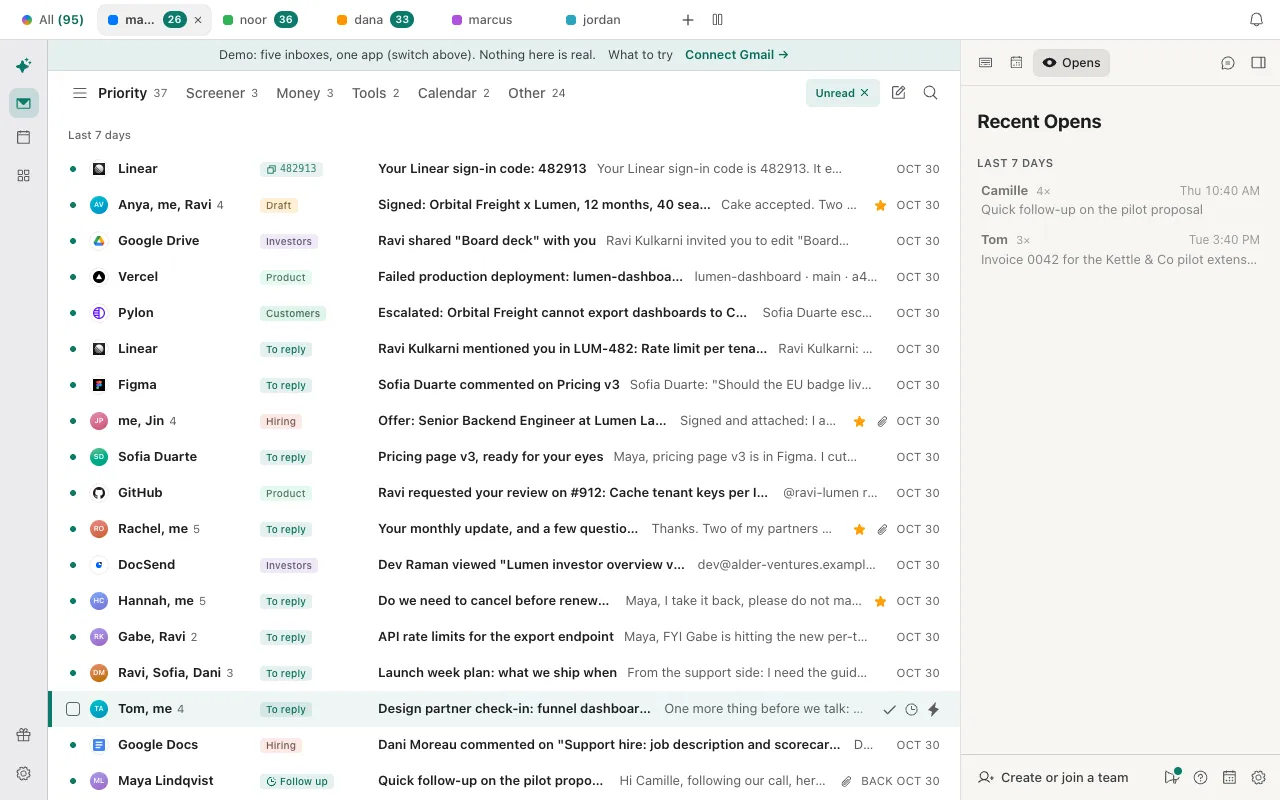
Donezo Inbox shows an unread conversation in bold with a dot at its left, and takes the bold off when you open it. Two things find unread mail: a filter that narrows the list you are looking at, and search, which uses Gmail's own operators and covers all mail.
- Filter the list. Press ⇧U, or press ⌘K and choose Filter: unread. An Unread chip appears at the top right of the list and only unread conversations stay. The filter works on the tab you are on, such as Priority, so mail in another tab such as Other is not shown. Press ⇧U again, or Esc, to clear it. If nothing is unread, the list says No unread conversations here. Esc clears the filter.
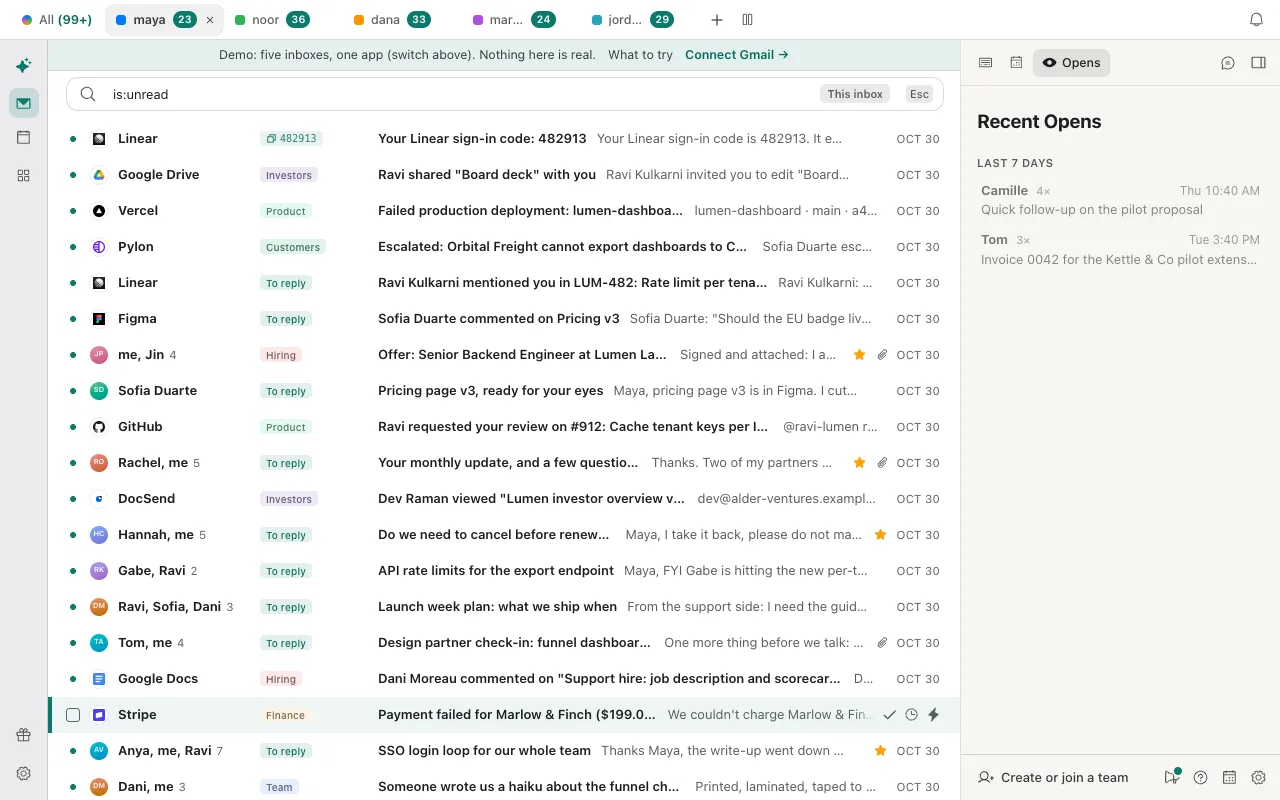
- Or search all mail. Press /, type
is:unreadand press Enter. Donezo Inbox hands Gmail's operators to Gmail as you typed them, sois:unread from:priyaoris:unread newer_than:2dwork as in the steps above. With two or more inboxes, the chip at the right of the box reads This inbox or All accounts; click it to switch. Esc closes the search. - Read one. Open it with Enter or a click: once the conversation has loaded, it is marked read. To keep it as a reminder, press U in the open conversation: it is marked unread and the conversation closes.
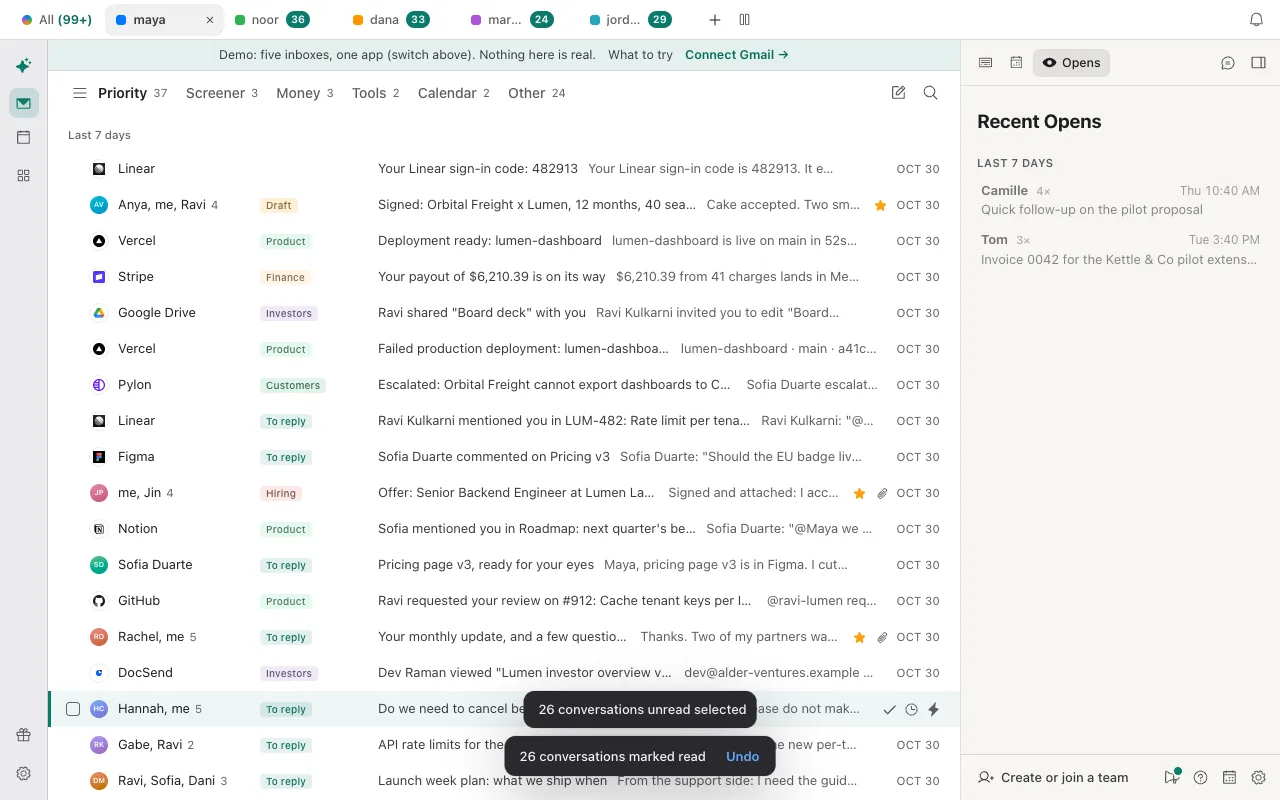
- Mark many as read. With the filter or the search on, press ⌘A to select the list, then U. Or press ⌘K, choose Select all unread, then U. A message such as 26 conversations marked read appears with Undo; Z undoes it too. U marks everything selected as read when any of it is unread, and marks it unread only when all of it is already read.
- Check the count. With more than one inbox, each account's tab shows its unread count, and the All tab shows the total.
- The filter and search differ. The filter works on the conversations already loaded into the tab you are on; search asks Gmail across all your mail. Use search when the filter looks short.
- Other filters: ⇧S shows starred, ⇧I shows important (mail from people) and ⇧R shows conversations where you sent the last message.
- Reading marks it read. Opening a conversation clears it, so an unread list shrinks as you read. If you only want to look, U marks it unread again.
- Select all and the 500 limit: ⌘A selects what is loaded. A bar offers Select everything in this view (up to 500) when there is more; use it for a long list, then U.
- Marking read changes the mail itself. It takes the unread label off the conversations in Gmail, so Gmail's own inbox shows them as read too.
You can filter and search the sample mail without signing in; reading changes are not stored. Open the live demo: it runs with sample mail, no sign-in.
Can Claude or Codex list your unread email?
Yes, through the Donezo Inbox connector. list_threads takes the same Gmail search as the box above, across one or all of your inboxes, newest first, and only reads. Its split option keeps mail from real people (important) or only bulk mail (other). One search returns at most 50 conversations per inbox, and the split is applied after those come back, so a split search can return fewer. list_accounts gives each inbox's unread count.
Read only: unread from real people today
Using Donezo, list the unread conversations in my inbox from real people (not newsletters or notifications) that arrived in the last day, in every account. Search in:inbox is:unread newer_than:1d with the important split. Do not change anything. Show sender, subject and account, and say if a search returned 50 for an inbox, because that is the most one search returns.Read only: how many are waiting
Using Donezo, tell me how many unread conversations each of my inboxes has. Only list; do not change anything.Then, only the ones you name
Mark as read only the conversations from GitHub and Linear in that list. Tell me how many you changed in each account, and do not touch anything else.Reading, searching and counting never change mail. Marking read is an organizing action, so with the default link setting, Read and write, with approval, it runs straight away without a prompt; it is easy to reverse by asking for the same conversations to be marked unread. Sending, scheduling, forwarding and deleting still wait in Settings, then Developer, then Approvals, and expire after 24 hours. A read-only link cannot change anything. Each update_threads call takes up to 100 conversations from one account. A free account has a limited number of agent actions that change mail; reading, searching and drafting are not counted.
Tools involved: list_accounts, list_threads, update_threads. The full list, permissions and setup commands are in the connector documentation.
What if the unread count and the list do not match?
- The Unread filter shows nothing, but Gmail says there is unread mail. The filter works on the tab you are on, such as Priority. Mail in other tabs, or older mail that has not been loaded, is not in it. Press / and search
is:unreadto ask Gmail for all of it. - is:unread finds mail you cannot see in the inbox. Google's pages do not say
is:unreadis limited to the inbox. It can match archived mail: addin:archiveto list only that, or look under All Mail. - Spam or Trash holds unread mail that does not show. A standard Gmail search leaves out Spam and Trash. Add
in:anywhereto include them. - Reading a conversation made it disappear from the filter. That is expected: opening it marks it read, and the filter shows only unread. Press U in the open conversation to mark it unread again.
- Select all unread selected fewer conversations than the count. It selects the unread conversations in the list on screen, and a list loads in pages. Use Select everything in this view (up to 500), or search
is:unreadand select that. - An agent could not mark the conversations read. A free account has a limited number of agent actions that change mail; the agent can still read and search. Pro lifts the limit. A read-only or drafts-only link refuses it.
Questions
How do I see only unread emails in Gmail?
Search is:unread, or choose Unread first as the inbox type. Search finds them wherever they are; the inbox type only rearranges the inbox.
Can I see which sent emails the other person has not read?
Gmail's own read receipts work only on work or school accounts, and the recipient's side must cooperate. Donezo Inbox has an optional read status for mail you send, which is a hint and not a receipt. Both are in how to know if someone read your email in Gmail.
Does searching for unread email mark anything as read?
No. Search only lists. In Donezo Inbox a conversation is marked read when you open it, not when it appears in a list.
How do I stop a pile of unread mail building up?
Unsubscribe from what you never open, then move old mail out of the inbox. The order is in how to clean up your Gmail inbox.
Does Claude need my approval to read my unread mail?
No. Reading and searching run without a prompt on any link setting. Only the actions that send, schedule, forward or delete wait for approval under the default setting.