 Donezo Inbox
How to write a follow-up email
Wait about a week, or a day or two past the date they gave you, then send one short follow-up that says what you still need. If nothing comes back, send one last note a few days to a week later and stop. In Gmail, turn on follow-up nudges under Settings, See all settings, General, then Nudges. In Donezo Inbox, press ⌘⇧U in the draft and choose a number of days: if nobody replies by then, the conversation comes back to the top of your inbox, unread, with a Follow up label.
How do you follow up on an email in Gmail?
- On your computer, go to Gmail and open the message you are waiting on a reply to.
- Below the message, click Reply to write to the sender only, or Reply all to write to the sender and everyone on the To and Cc lines. Enter your follow-up and click Send.
- To have Gmail remind you of mail you have not answered, or sent mail nobody has answered, first make sure conversation view is on. Then click Settings, then See all settings, and open the General tab.
- Next to Nudges, choose Suggest emails to reply to, Suggest emails to follow up on, or both, and click Save Changes at the bottom.
- Gmail may then show suggestions, which Google calls nudges, at the top of your inbox for emails you should reply to or follow up on.
- To keep your own list instead, open the message you sent, click More, then Add Star, and open Starred in the left sidebar when you check in. You can also search, for example
from:me older_than:7d, to list what you wrote more than a week ago.
- How long to wait: career-advice sites such as Hiration and JournalismJobs.com give the same numbers for an interview. Send a thank-you within 24 hours. If the interviewer gave a decision date, wait until it has passed and then a day or two more. If they gave none, wait 5 to 7 business days. These are conventions, not rules, and a date you were told beats any of them.
- How often: one follow-up, then one last note a few days to a week later. After two unanswered notes, both sites say to stop and treat the silence as a no.
- For a sales or proposal email: there is no figure here worth quoting. Use the date you promised in the email, then the same pattern: one short follow-up that adds something new, one last note, then stop.
- Interview, about a week after: “Hi Dana, I enjoyed our conversation on Tuesday about the product designer role. I wanted to check where things stand and whether there is anything else I can send you. Thank you, Sam.”
- Proposal, after the date you promised: “Hi Priya, I sent the proposal on 14 October and said I would check in this week. Is there a question I can answer before your review on Thursday? If the timing has changed, tell me and I will pick this up then.”
- A last note: “Hi Dana, I know hiring plans change, so this is my last note on the role. If it is still open I would like to hear where it stands; if not, thank you for your time and I would be glad to stay in touch.”
- What to put in it: reply to your own earlier message so the history is in front of them, keep it to a few lines, say what you need (an answer, a date, a file) and by when, and add something new rather than “just checking in”.
- Not on Google's page: how long after you send a message a nudge appears, and whether nudges work on a phone; the steps are written for a computer. A nudge is a suggestion at the top of the inbox, not a reminder at a time you choose. Google lists no search operator for sent mail that got no reply, so
from:me older_than:7dalso lists mail that was answered, and Google's page does not say whether a reply stays in the same conversation.
These steps follow Google's own documentation, read on November 1, 2026 for Gmail on the web (desktop). They were checked against the documentation, not clicked through in a real account. Google's Reply to messages page (steps 1 to 5), read together on the same day with Star emails in Gmail (support.google.com/mail/answer/5904) and Gmail search operators (7190). The interview timings come from career-advice sites, not from Google. Google's page has no mobile steps and does not say when a nudge appears. Menus change now and then; if a label differs, Google's page is the reference.
How do you follow up on an email in Donezo Inbox?
Donezo Inbox has its own follow-ups; it does not use Gmail's nudges. You choose a number of days when you write the message. Donezo's server then watches the conversation and, if nobody has replied by then, takes it back to the top of your inbox as unread, with a chip that says Follow up and a Gmail label named Donezo/Follow up. It runs on the server, so it works with the app closed.
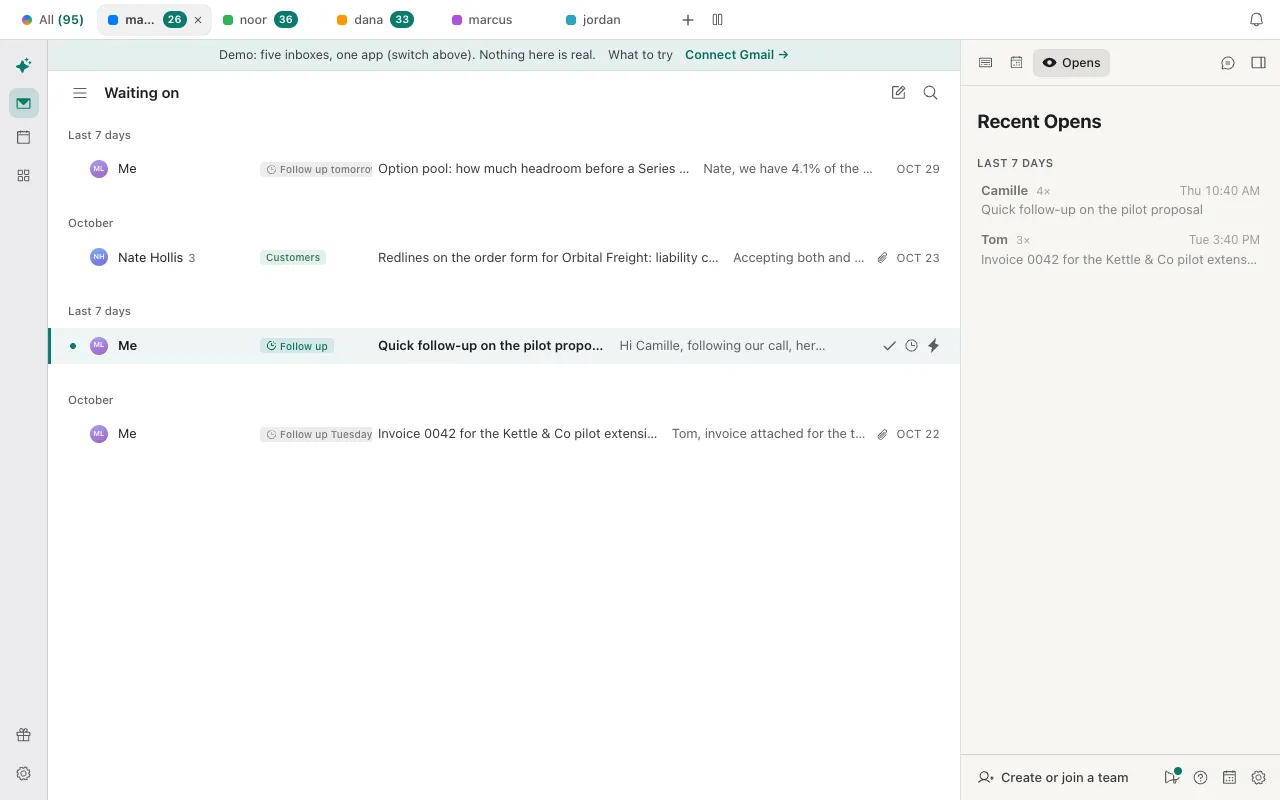
- To find what is waiting, press G, then W for Waiting on. It lists conversations from the last 30 days where you sent the last message and nobody has answered for two days. Open one and press R to reply.
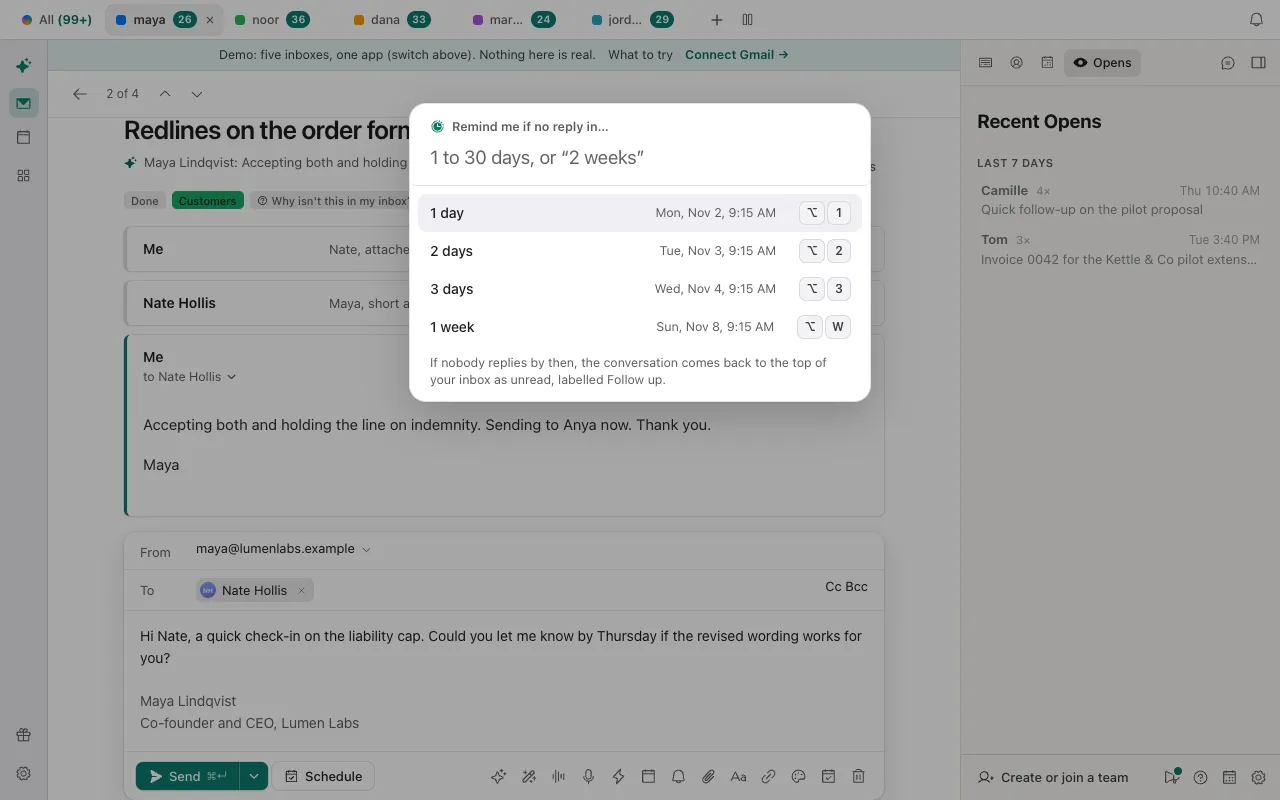
- Write the follow-up, then press ⌘⇧U (Ctrl + Shift + U on Windows and Linux). The box is titled Remind me if no reply in…. Pick 1 day, 2 days, 3 days or 1 week, or type a number from 1 to 30, such as “4”, “4 days” or “2 weeks”. The same choices are under Remind me if no reply in in the menu beside Send, which also has a Custom box.
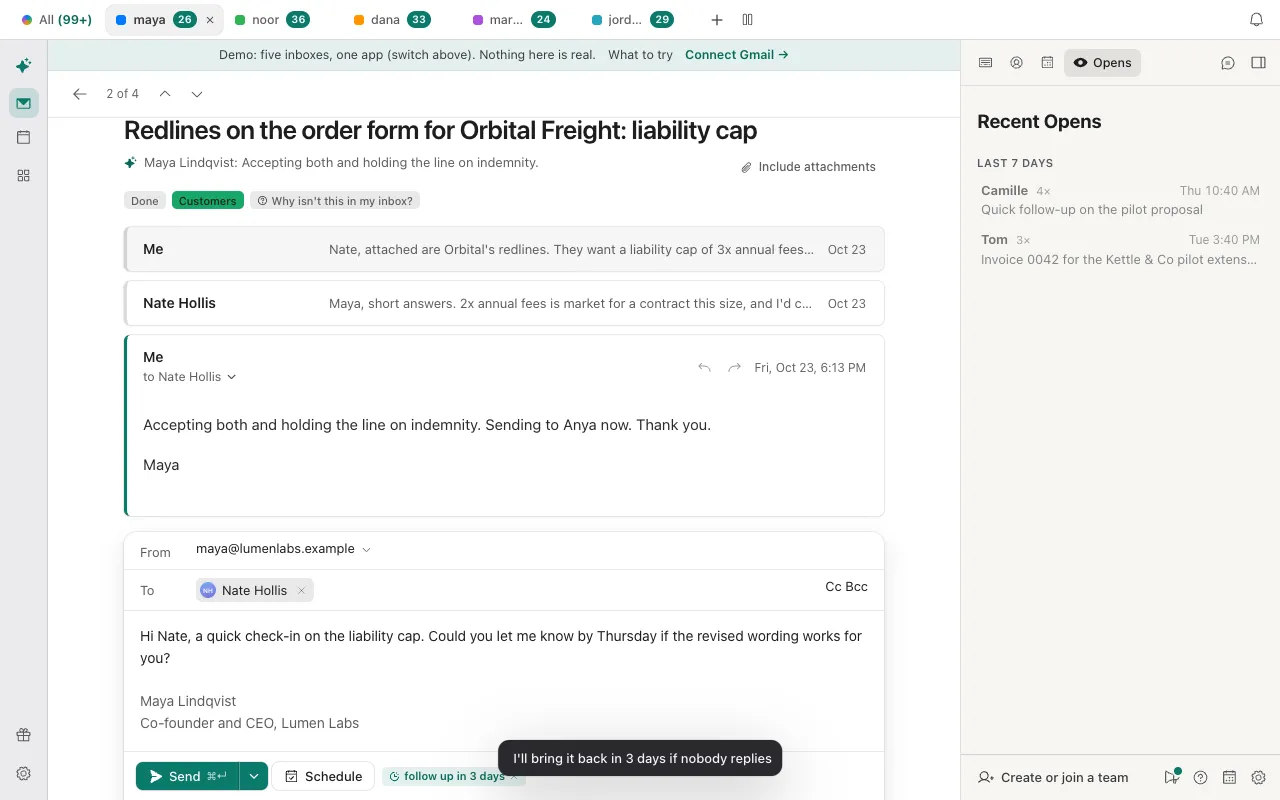
- A chip in the draft says follow up in 3 days (or the number you chose). Click it to remove the follow-up.
- Send. A message at the bottom says I'll bring it back in 3 days if nobody replies, with a Cancel follow-up button for about eight seconds. The countdown starts when the email actually goes out, so for a scheduled send it starts at the send time.
- While it waits, the conversation shows a clock chip such as Follow up tomorrow, and every pending follow-up is listed in Follow-ups (G, then R), soonest first. To cancel one later, press ⌘K and choose Cancel follow-up.
- If someone replies, the follow-up is dropped quietly. If nobody does, at the time you chose the conversation returns to the top of your inbox, unread, with the Follow up chip, and it is listed in Waiting on whatever its age.
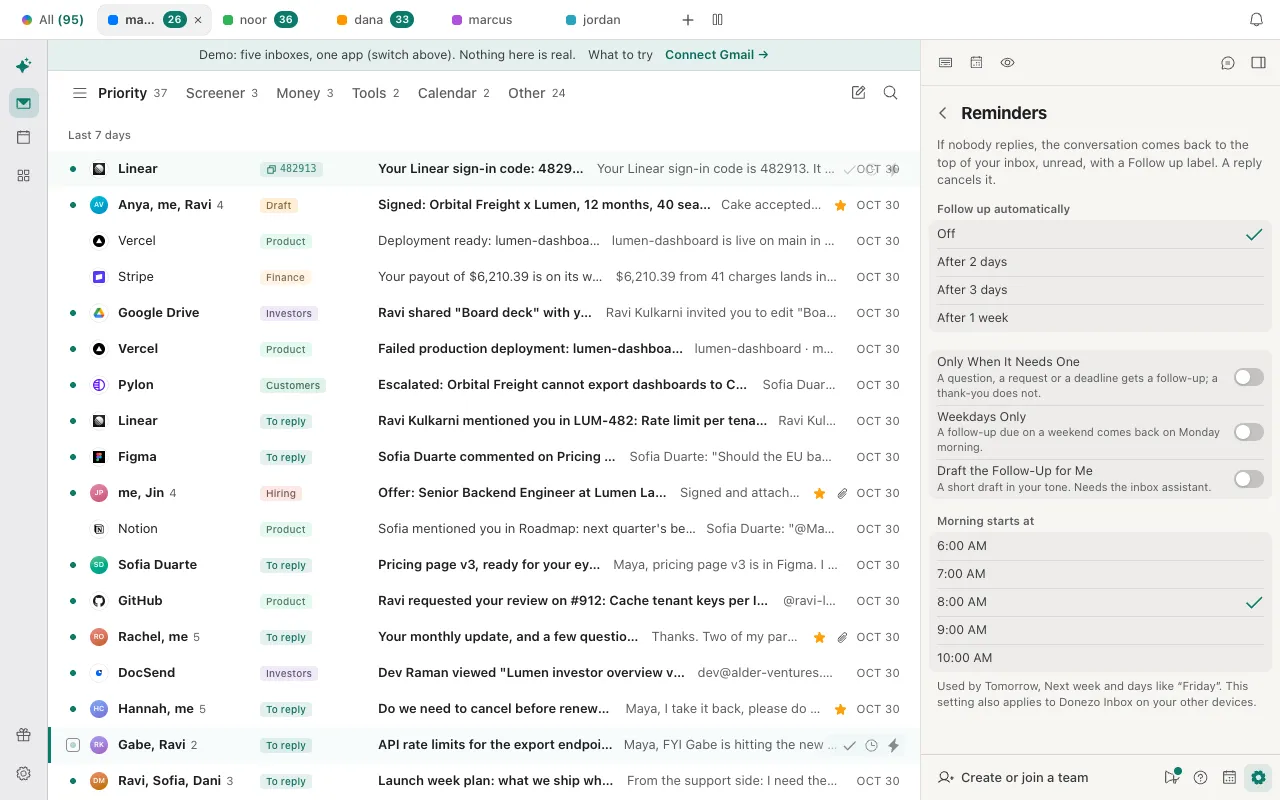
- To do this for every message you send, open Settings, then Reminders (in the full Settings window the same options are under General), and set Follow up automatically to After 2 days, After 3 days or After 1 week. It is off by default. You can still change it per message from the draft.
- A reminder at a clock time instead: for mail you did not send from Donezo Inbox, or when you would rather pick a day and time, press ⌘K on the conversation and choose Remind me if no reply…, then pick a time or type one such as “fri 9am”. In a draft, ⌘⇧H does the same when you send. The conversation comes back only if nobody but you has written since. See what snooze means in Gmail for the difference from a plain snooze.
- What counts as an answer: any message from an address that is not yours or one of your send-as addresses. Drafts, out-of-office replies and bounces do not count, and a reply from someone else on the thread does.
- Only When It Needs One (in the same Settings page) reads what you wrote instead of adding a follow-up to every message: a question, a request or a deadline gets one, and a thank-you or an FYI does not. If it cannot tell, it asks the AI you chose; that is a Pro feature on Donezo's AI and free with your own key. With no AI available it keeps the follow-up. One you set on a message yourself is always kept.
- Weekdays Only: a follow-up due on a Saturday or Sunday comes back on Monday morning, at your “Morning starts at” time.
- Draft the Follow-Up for Me: when a follow-up comes back, Donezo also writes a short draft in your tone. It is a draft only and is never sent. It needs the inbox assistant switched on for that account, which runs on Donezo's servers and needs Pro or a server-side AI key of your own.
- Not in a shared mailbox: in a mailbox somebody else has shared with you, there are no follow-ups. Reminders are part of the free plan.
You can set a follow-up on sample mail without signing in; the demo sends nothing. Open the live demo: it runs with sample mail, no sign-in.
Can Claude or Codex follow up for you?
Mostly. Through the Donezo Inbox connector, an agent can list what is waiting, write the follow-up as a draft and set the reminder; sending still waits for you. reply_zero lists mail you sent that nobody has answered in two days, create_draft saves a draft for you to read, set_followup brings a thread back after 1 to 30 days if nobody replies, and set_reminder does the same at a time you give. Start with the list, so you see it before anything changes.
Safe first step: a list, nothing changed
Using Donezo, list the emails I sent in the last 30 days that nobody has answered for more than 3 days, with the recipient, subject, number of days waiting and account. Do not change anything. If a list stops at the per-inbox limit, say so.Then a draft to read, not sent
Write a follow-up to my thread with Camille about the pilot proposal, as a draft only. Two to four sentences, one clear question, and ask for an answer by Friday. Save it as a draft and show me the text. Do not send it.A follow-up if nobody replies
On my thread with Camille about the pilot proposal, set a follow-up for 3 days from now. If she has already replied, tell me instead of setting one, and tell me the date it is due.Reading and drafting run straight away. Setting a follow-up or a reminder is an organizing action, so with the default setting, Read and write, with approval, it also runs without a prompt, and it is easy to undo: Cancel follow-up in the command bar. Sending the follow-up (send_draft or send_email) waits in Settings, then Developer, then Approvals, for your OK, and expires after 24 hours. set_followup counts its days from the moment it is called, and it refuses when you have sent nothing in that thread or when someone has already replied. reply_zero shows up to 15 per list for each inbox unless you ask for more, up to 30. A free account has a limited number of agent actions that change mail; reading, searching and drafting are not counted.
Tools involved: reply_zero, create_draft, set_followup, set_reminder. The full list, permissions and setup commands are in the connector documentation.
What if the follow-up did not come back?
- The conversation never came back. Someone other than you wrote in it, so the follow-up was dropped quietly. That includes a colleague on Cc. Out-of-office replies, bounces and drafts do not count as an answer.
- There is no follow-up chip on the draft. Follow up automatically is off until you choose a number of days, so press ⌘⇧U in the draft. With Only When It Needs One on, a thank-you or an FYI gets none, and the message after sending says so and offers Follow up anyway.
- It is not in Waiting on. Waiting on lists conversations from the last 30 days where you sent last and nobody has answered for two days, never ones in Trash or Spam. A conversation a follow-up has just brought back is listed at once.
- It came back on Monday, not Saturday. Weekdays Only moves a follow-up that would land on a weekend to Monday morning.
- You sent the message from Gmail or another app. The days are counted from sending in Donezo Inbox. For mail sent elsewhere, press ⌘K on the conversation and choose Remind me if no reply….
- Gmail shows no nudges. Conversation view has to be on, and Google's page does not say how long after sending a nudge appears. Nudges are suggestions at the top of the inbox, not reminders.
- An agent says someone has already replied.
set_followuprefuses when anyone other than you has written since your latest message. Nothing is left to follow up on.
Questions
How long should I wait before following up after an interview?
Career-advice sites such as Hiration and JournalismJobs.com agree on the numbers: send a thank-you within 24 hours, wait a day or two past any decision date you were given, and with no date wait 5 to 7 business days. Those are conventions. If you were told a date, use that.
How many times should I follow up?
Once, and then one last note a few days to a week later. Both sites say to stop after that and treat no answer as a no.
Is a follow-up the same as a thank-you note?
No. The thank-you goes out within 24 hours of the interview; Mississippi State's career centre says up to 48 hours is still fine. The follow-up is the later message that asks where things stand.
What is the difference between a follow-up and a snooze?
A snooze brings a conversation back at a time whatever happens. A follow-up brings it back only if nobody has replied.
Does Donezo Inbox write the follow-up for me?
Only if you switch on Draft the Follow-Up for Me, and then it writes a short draft when the conversation comes back. It never sends it.
Can Claude send the follow-up for me?
It can write the draft and set the reminder. Sending waits for your approval under the default setting. The prompts are in the section above.